Mohamed Khaled
New Member
April 1, 2025
Solved

Show/Hide Annotation & Meturement

  • April 1, 2025
  • 7 replies
  • 1370 views

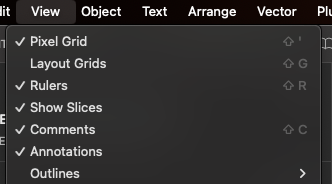
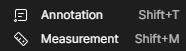
Just like  i can Show/Hide Comments .. I wanna be able to do the same thing with the new features Annotation & Measurement
 

Best answer by corpus_chase_M

view>annotations

measurement counts as an annotation, so it will hide both the new annotations feature, as well as the measurements


7 replies

corpus_chase_M
New Participant
April 1, 2025

view>annotations

measurement counts as an annotation, so it will hide both the new annotations feature, as well as the measurements


Cheryl_Bacigalupi1
New Member
April 1, 2025

I would like to be able to show/hide annotations in prototype mode. My goal is to share with my product team and other designers without using Dev mode. The new annotations that show in design mode with colored categories -- Can we show them on prototype view like comments? 

Mohamed Khaled
New Member
April 1, 2025

view>annotations

measurement counts as an annotation, so it will hide both the new annotations feature, as well as the measurements


Doesn't it have a shortcut ?

Vosidiy_M
New Participant
April 4, 2025

We have show/hide comment with right click. Why it is not applied for annotations?


finalui.com
Stace
New Member
April 16, 2025

Now that annotations are always visible in design mode, they’re constantly in my way. Wish it went back to “off” in design mode, and “on” in dev mode :(
Right now the show/hide option in the view menu is an all or nothing across modes.

Franco_Andrade
Active Member
April 24, 2025

It is SUPER annoying having the annotations all the time visible in the design mode. Leave it as it was before, makes way more sense.

Capo
New Member
May 6, 2025

These dang annotations keep showing up. I turn them off and then come back to the file and they’re visible again! They cover the designs and are not necessary for me to see all the time. Are they not a personal view setting??? Please fix this.