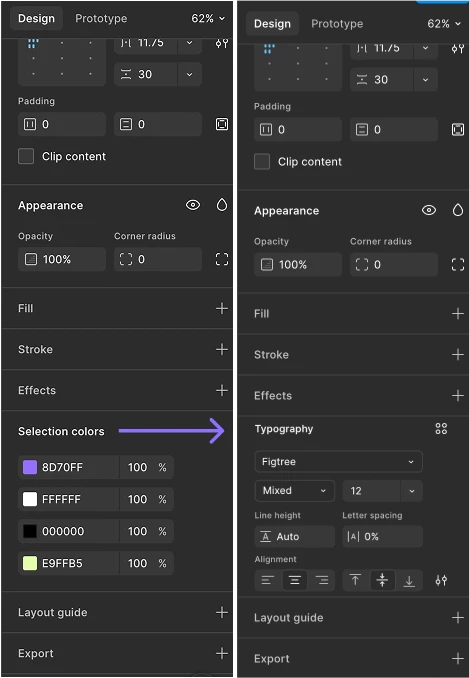
Selection Typography
Problem
When selecting a frame or Auto Layout containing multiple text layers, there is no way to edit their shared typography from the right sidebar. Users have to select each text layer individually or use workarounds, even when they simply want to change a common property like font size, font family, or weight.
The suggestion
Introduce a Selection Typography section that appears when a selected frame or Auto Layout contains text layers, similar to how Selection colors works today. It should display the typography used within the selection and allow users to edit shared text properties across all included text layers without selecting them individually. This would make global typography changes much faster when refining layouts, creating design systems, or iterating on UI screens.
Example
Select an Auto Layout with multiple text layers. A Selection Typography panel appears in the Design sidebar, allowing changes to properties such as font family, size, weight, line height, and letter spacing (or design styles) for all matching text layers in the selection.