

Dmitrii_Denezhkin
September 16, 2021

Search bar in selection list of Variants

  • September 16, 2021
  • 15 replies
  • 3735 views

I am actively using Variants, but there is not enough search in the Variants selection list in component. In my Design System I decided to design one basic component: 1 button, 1 input field, 1 icon … etc. I implement the rest of the variations and states in Variants. I’ve in my base 16px Icon component 34 Variants of icons, in base 24px Icon as many.

Search bar would be of great help:
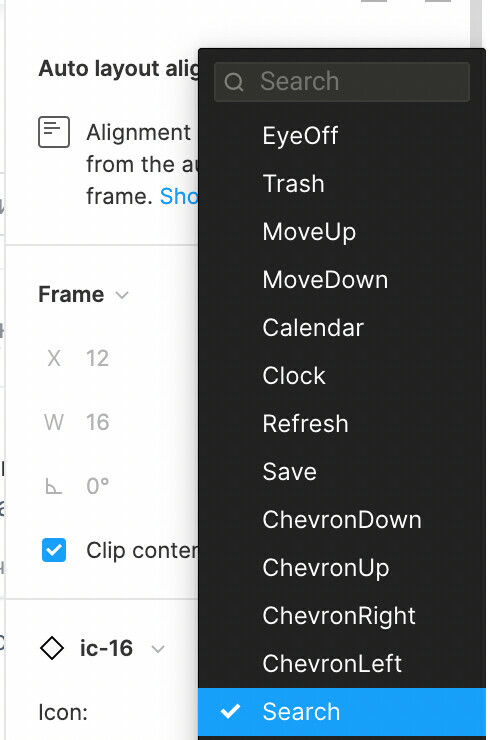
Does anyone use Variants like me? How did you solve this navigation (Search) problem? 😊

15 replies

Smartkrio
September 16, 2021

Yeap! That’s usefull thing! Guys from Figma team must be thought about that. I’m really need it too👌

AshA
September 20, 2021

I have many variance with fairly long names and hence, the variants menu is extremely long. Just like the fonts menu. I would like to be able to search/filter this list, possibly through a search field at the top of the menu. Furthermore, since the variants names are very long, I would like to see the variants menu, as well as the fonts menu widened to accommodate all the text, without using ellipses.

Have a look at the screenshot here, you’ll see multiple variance that seemingly have the same name. However, the end portion of the name differs from the front portion but the end portion is hidden away as the menu is so narrow:

Can the developers of Figma help to increase the width of this menu and optionally add a search field at the top?

October 16, 2021

This topic was automatically closed 30 days after the last reply. New replies are no longer allowed.

Sabri_Hakuli
New Participant
November 20, 2021

Hello, I created a Variant for the icon family that I use to design. Using variants makes it much easier to create prototypes for icons, but when I am using them in design it is too hard to find the specific icon because I can not search icons by name or at least preview them if they are created as Variants.

The family of icons that I use (it takes too much time to find the icon I want to use ☹ ):

P.S
I don’t want to use icons as components, because component icons can not be prototyped in my design pages.

Please share any tips or tricks if you have the same issue 😃

Gleb
Power Member
November 21, 2021

Please don’t use variants for icons. Never never ever!!!

twitter.com
Danial
February 17, 2022

I also made this mistake. Is there a way to transform these variants into symbols without losing the name of each symbol?

tank666
February 21, 2022

A post was merged into an existing topic: Component variant value dropdown option lists too narrow

UX/UI designer. Figma expert. Creator and developer of plugins and widgets for Figma and FigJam. Check out my resources in Figma Community: figma.com/@tank
_UI1
November 7, 2023


In the variant function I need a search

y_toku
Figmate
Community Support
November 9, 2023

Thanks for your feedback! I’ll pass it around to the internal team.

February 27, 2024

Hi @Gleb,

Using variants is the only way —at the moment— to access icons and photos programmatically. I use variables that reference strings that correspond with image and Icon variants in a product catalogue.

How would you suggest approaching this?