

Seferidis
May 12, 2022

Right Panel Resize [Design, Prototype, Inspect]

  • May 12, 2022
  • 14 replies
  • 2399 views

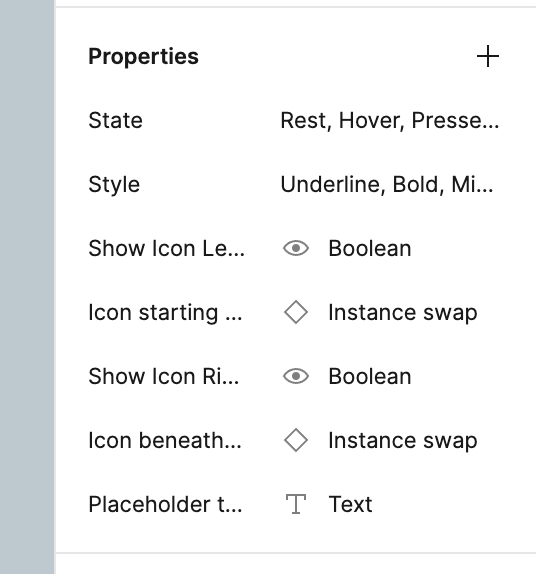
The new properties feature is great.
However giving it a name past some character length feels crowded and the ellipses do not help.

I can scale the UI as documented in here but that does not help us laptop users.
So I wish I could resize the panel to better see the name of the property, similar to how I resize the left (layers) panel.
14 replies

y_toku
Figmate
Community Support
February 27, 2024

Hi there,

One potential solution could be to hover over the style. I can’t come up with other ideas unfortunately at this moment.

Thanks,
Toku

KieranN
New Participant
February 27, 2024

Thanks for the reply Toku. Hovering doesn’t appear to do what I need it to do unfortunately. Here’s hoping Figma adds a way to resize the right panel, or some other way to view full style names.

KieranN
New Participant
February 27, 2024

One workaround that I found is to go into Dev Mode and view the full name in the Style section at the right.

Buck
April 3, 2024

I run into this a lot. There’s no tooltip to show the full name, and clicking on the style to see it in a grid of styles doesn’t always pinpoint it, if the style isn’t necessarily accessible in the current file (but an asset already has it applied). I’m left guessing.

The goal: to be able to select the correct color, through seeing the full name of a style color (all the way to the end of the folder structure & color name, where the actual distinguishing characteristics often appear).

Possible Solutions:

  • Full, fast tooltips that show full names and pop up immediately so I don’t have to wait or slow down while scanning through a list of them quickly.
  • Resizeable right panel - Note, this may not solve the whole problem, depending on length of style names.
  • Wrap style names, with optional expand/collapse.
  • Helpful: Ellipsis in the middle, like the macOS file system naming convention, e.g.:
    Full name: “The beginning of the text, the middle of the text, and the text at the end that actually matters, e.g. the color name, light blue.
    Visible chunk: “The beginnin…light blue.”