ooolzhas
New Participant
March 10, 2026
Question

Regression: text style picker search + keyboard controls

  • March 10, 2026
  • 19 replies
  • 193 views

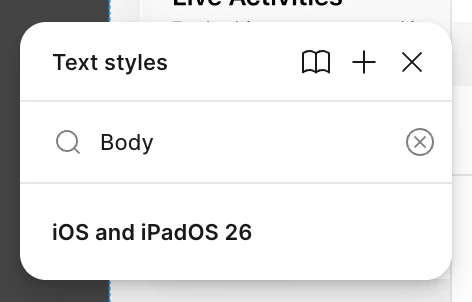
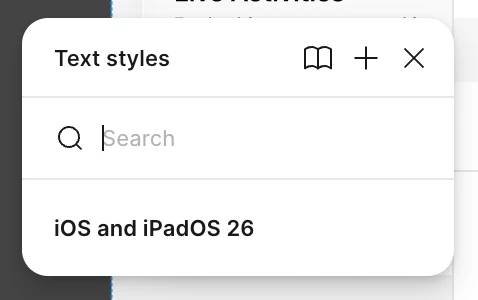
Feedback 1: since Figma Desktop App version 126.1.2 text styles picker always shows libraries of styles in collapsed state. It’s super annoying, since search doesn’t work until you un-collapse it.

Feedback 2: please fix up/down arrow behavior on styles. Example: the text span has style “Body/Emphasized” → I press arrow up expecting it to switch to “Body/Emphasized” → instead Figma selects “Headline/Regular” (the style that just happened to be below the search box). I papercut myself on this multiple times every day for the past couple of months now, at least.

Figma’s a great product, I love it, but bugs like these are a big let down for me. I believe basic features like text styles should be dogfooded more to remain best in class.


    19 replies

    ooolzhas
    ooolzhasAuthor
    New Participant
    May 9, 2026

    @adamsmasher ​@djv it seems like it got fixed today

    Thank you for addressing this, it was the single biggest frustration in 9 years of using Figma

    This topic can be closed or archived now

    Fabio_Pizzano
    New Participant
    June 30, 2026

    When are you fixing this?

    Fabio_Pizzano
    New Participant
    June 30, 2026

    @adamsmasher ​@djv it seems like it got fixed today

    Thank you for addressing this, it was the single biggest frustration in 9 years of using Figma

    This topic can be closed or archived now

    I still have this issue on the latest update. 

    djv
    Figmate
    Community Support
    July 1, 2026

    Hey @Fabio_Pizzano, thanks for chiming in here! 

    Since ​@ooolzhas reported it resolved back in May, this might be associated with the latest update. To make sure we pass the right details along, could you share:

    • Which version of the Figma desktop app you're on? (You can find this under Figma menu → Help → Open log files or in About Figma)
    • Whether this is happening across all UI Kit libraries or specific ones?
    • A quick screen recording if you're able, like the one shared earlier in this thread. This would be incredibly useful for the team to confirm the repro.

    In the meantime, a workaround that may help: try typing your search query first, then expand the collapsed library. The results should already be filtered when you open it. Not ideal, but it can save a few clicks while the team looks into this.

    Thanks again for taking the time to report this recent regression!

    Fabio_Pizzano
    New Participant
    July 2, 2026

    Hey ​@djv sure, here are the info: 

    Figma Desktop App version: 126.6.12

    It happens with the pre-made UI Kits, such as iOS26, Material 3, Simple Design System, etc.

    • What I noticed is that when I use an empty file with only the pre-made UI Kits, the issue doesn’t happen. It starts happening when I import my libraries.
    • My expected behavior, as it worked in previous Figma versions, is that the menu opens on the selected color or text style, exactly as it does when a color or text style from my library is selected.

    Thanks

    djv
    Figmate
    Community Support
    September 23, 2026

    Hi ​@Fabio_Pizzano, thanks for the additional context and apologies for the delay! 

    From what you’ve described, this seems related specifically to the use of pre-made UI Kits + personal libraries. I’ve flagged this over to our team to investigate and take a closer look. I’ll follow up here as soon as I hear back. 

    Tung Bui
    New Member
    September 23, 2026

    After update i want to change the font size but have to click to chevron to expand the menu select

    djv
    Figmate
    Community Support
    September 23, 2026

    Hi ​@Tung Bui, thanks for flagging this issue! 

    This seems related to a similar, existing topic in our Community, so I’ve merged your topic here. I’ve passed this issue along to our team to investigate. I’ll follow up as soon as I can. 

    Tung Bui
    New Member
    September 24, 2026

    thought it’s fixed this morning. Thanks ​@djv !