

Question

Prototype • Show all comments of page in one listing

  • January 19, 2026
  • 3 replies
  • 75 views

Gregory-Clever-Starfish

Hi all, 

Challenge
I regularly need to check all comments on a Prototype and it’s not always convenient to switch to Editor view to see all comments. Currently comments in Prototypes are presented per frame which requires me to scroll through the frames until I find comments.

Solution
Add the Only current page filter from the Editor view to the Prototype view comments list 
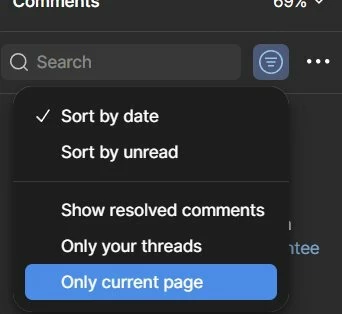
 

Or add Show all comments filter
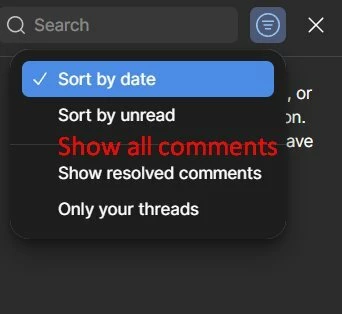


What do you all think?

Btw, I do use desktop notifications too.

3 replies

sehagevez23
  • New Member
  • January 19, 2026

Hey, I totally get what you mean. I also find it annoying having to scroll through each frame in Prototype just to see comments. A “Show all comments” filter or an “Only current page” option in Prototype view would save a lot of time and make reviewing feedback way easier. I hope Figma considers adding something like that soon.


avyn.talan
  • New Member
  • January 20, 2026

This is a really practical suggestion. Being able to view all comments on a Prototype in one list would save a lot of time and make feedback management much smoother. I’d definitely support a “Show all comments” filter in Prototype view.

Tubidy


sehagevez23
  • New Member
  • January 20, 2026

Hey, I totally get what you mean. I also find it annoying having to scroll through each frame in Prototype just to see comments. A “Show all comments” filter or an “Only current page” option in Prototype view would save a lot of time and make reviewing https://tropical-casino.com/ feedback way easier. I hope Figma considers adding something like that soon.

I hear you—that scrolling through every frame in Prototype just to see comments is really frustrating. A “Show all comments” filter or an “Only current page” option would make reviewing feedback so much faster and more manageable. Hopefully Figma adds something like that soon, because it would really improve the workflow.