

Plugin API: Support for COMPOSE_COLOR (Variable Alias + Opacity)
In the Figma UI, you can create a color variable that references another color variable (alias) and override its opacity — producing a "composed color" value. This is extremely useful for building semantic color systems where, for example, surface/overlay = palette/neutral/900 at 54% opacity.
However, the Plugin API currently does not support writing these composed color values via setValueForMode(). Attempting to do so throws:
Uncaught Error: in setValueForMode: Composed color variable values are not supported
Minimal reproduction script
Run this in the Plugin API console or inside a plugin:
// Step 1: Create a variable collection
const collection = figma.variables.createVariableCollection("Semantic Colors");
const modeId = collection.modes[0].modeId;

// Step 2: Create palette/neutral/900 — a base color
const paletteNeutral900 = figma.variables.createVariable("palette/neutral/900", collection, "COLOR");
paletteNeutral900.setValueForMode(modeId, { r: 0.07, g: 0.07, b: 0.07 }); // Works fine ✅

// Step 3: Create surface/overlay — should alias palette/neutral/900 with 54% opacity
const surfaceOverlay = figma.variables.createVariable("surface/overlay", collection, "COLOR");

// First, verify that a simple alias works:
const alias = figma.variables.createVariableAlias(paletteNeutral900);
surfaceOverlay.setValueForMode(modeId, alias); // Works fine ✅
console.log("Simple alias set:", JSON.stringify(surfaceOverlay.valuesByMode[modeId]));

// Now try to set the composed color (alias + opacity):
surfaceOverlay.setValueForMode(modeId, {
  type: "VARIABLE_EXPRESSION",
  expressionFunction: "COMPOSE_COLOR",
  expressionArguments: [
    { type: "VARIABLE_ALIAS", id: paletteNeutral900.id },
    54  // opacity percentage (0–100)
  ]
});
// ❌ Throws: "Composed color variable values are not supported"
Current behavior
- ✅ Reading composed colors works — valuesByMode correctly returns the VARIABLE_EXPRESSION with COMPOSE_COLOR for variables created via the UI
- ✅ Simple aliases work — setValueForMode(modeId, variableAlias) succeeds
- ❌ Writing composed colors fails — setValueForMode rejects the COMPOSE_COLOR expression
The underlying engine already supports this
This is not a missing feature in Figma's core — the engine fully supports composed color variables. Variables created this way via the UI work perfectly, and their values can be read back through the Plugin API. The only barrier is an explicit validation check in the public Plugin API that rejects COMPOSE_COLOR before the value reaches the engine. Removing or updating this validation would be sufficient to enable the feature for plugins.
Expected behavior
setValueForMode() should accept composed color values, allowing the full script above to run without errors. The resulting surface/overlay variable should behave identically to one created via the UI — maintaining a live link to palette/neutral/900 with a separate opacity override at 54%.
After a successful setValueForMode call, inspecting the variable should show the following structure:
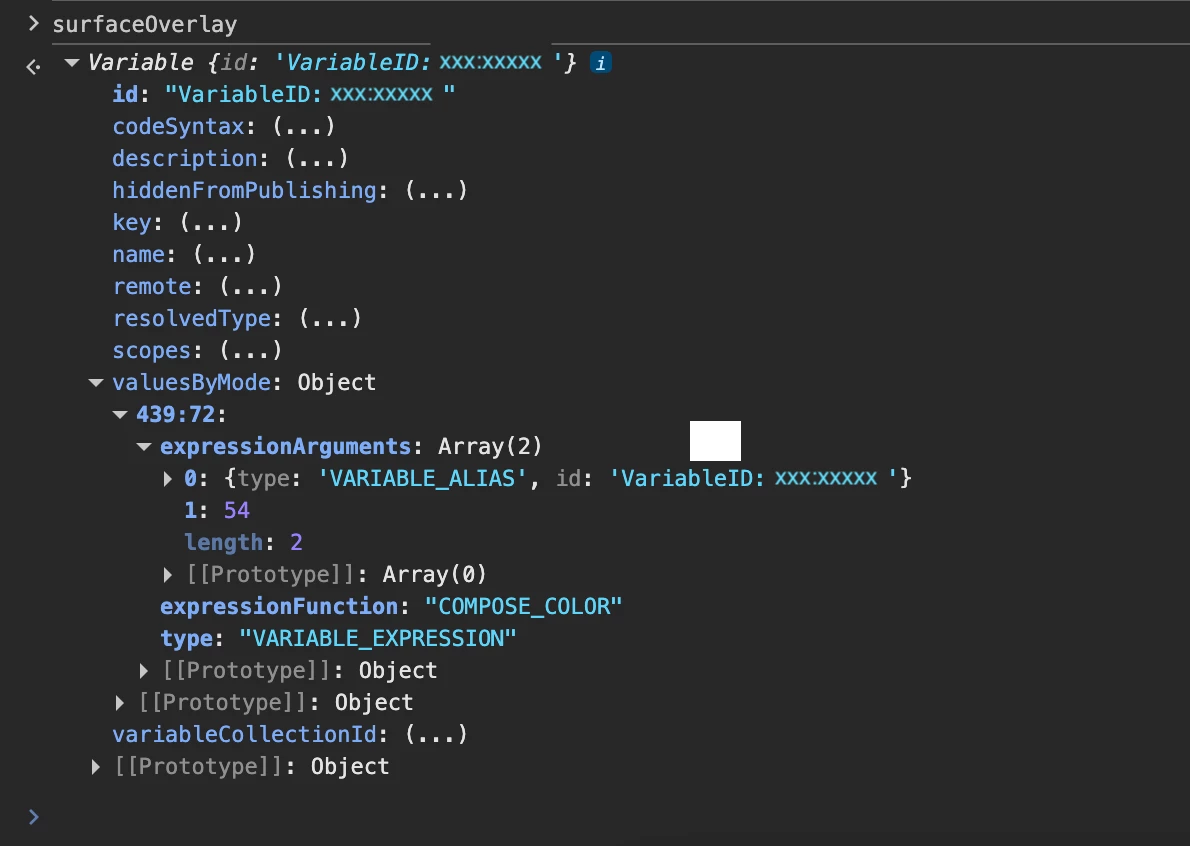
This is exactly what valuesByMode already returns when a composed color variable is created through the Figma UI — the Plugin API should allow writing the same structure back.
Use cases
The core need is automation. Design systems often have hundreds of semantic color tokens derived from a base palette — many of which use the "alias + opacity" format. Creating and maintaining these manually through the UI is tedious and error-prone.
Plugin developers need to be able to programmatically create and update these variables so they can build tools that:
- Generate semantic color tokens in bulk from a base palette (e.g. creating hover, pressed, disabled, overlay states — each referencing a palette color at a specific opacity)
- Sync design tokens between Figma and code, with full round-trip support — currently composed colors can be read but not written back
- Migrate, restructure, or refactor variable collections without losing composed color values
Without Plugin API support for this, any automation that touches composed color variables hits a dead end — you can read them, but you can't create or modify them.
Workarounds and why they fall short
The only current workaround is resolving the alias and baking the final RGBA value. This breaks the live link to the source variable — if the source color changes, the derived variable won't update. This defeats the purpose of using aliases in the first place.
Request
Provide a way in the Plugin API to programmatically set a color variable's value as an alias to another color variable with a custom opacity — the same "variable alias + opacity" format that is already available in the Figma UI.
The specific implementation is up to the Figma team — whether it's exposing COMPOSE_COLOR as a public expression function, adding a dedicated method like setAliasWithOpacity(variable, opacity), extending createVariableAlias() with an opacity parameter, or any other approach. What matters is the capability: plugins need a way to create and update composed color values without losing the live link to the source variable.