

ElyssaOM
New Member
October 7, 2026
Question

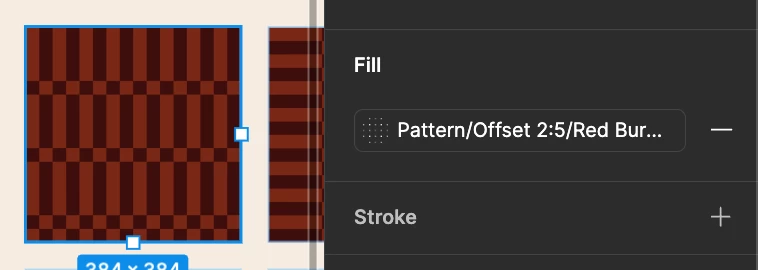
Pattern Fill visible in Style panel preview

  • October 7, 2026
  • 1 reply
  • 7 views

I would love to be able to see all my brand’s patterns in the preview of the style panel. Right now they all sport the same generic dotted pattern.

I am able to add a “background” colour behind the pattern, but many of my patterns use the same colours in different combinations, so it isn’t a reliable way to distinguish between patterns.


1 reply

kmeza
New Member
October 7, 2026

Hi @ElyssaOM! It looks like you've already saved these as styles, so unfortunately the generic dotted swatch is just how pattern fill styles display right now. There isn't a setting to show the actual pattern as the thumbnail.

A few things that help in the meantime: put the most distinguishing part of the name first so it doesn't get cut off, add a description to each style (it shows when you hover in the picker), and keep a labeled swatch sheet in your library file for quick reference.

It's worth posting this in the Ideas section too, since real previews for pattern styles would be a great improvement!

Come learn Figma with me! https://maven.com/katie-meza/figma-for-brand