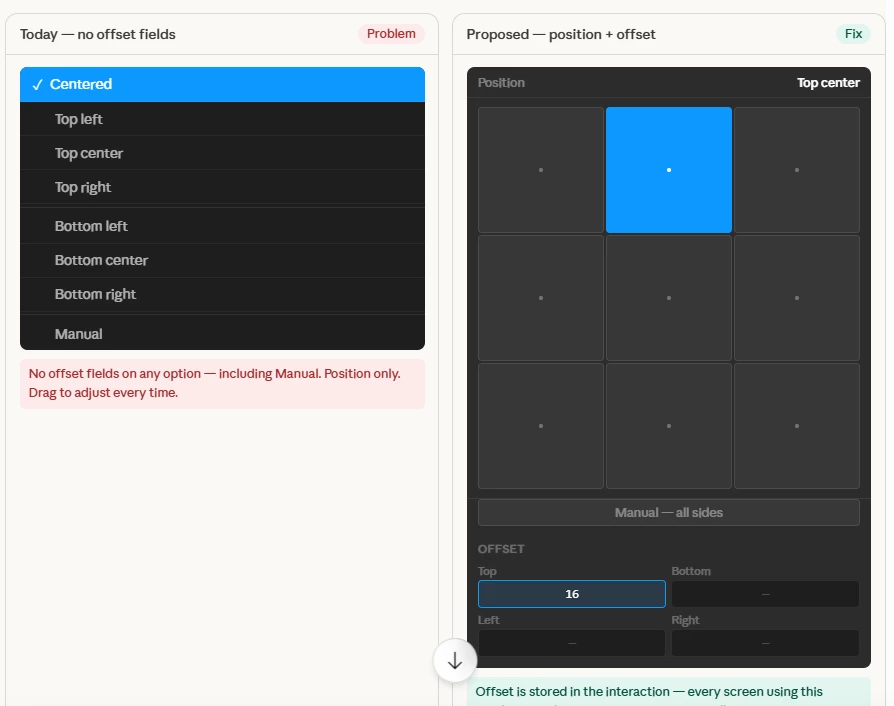
Overlay position should include offset values — manual nudging breaks consistency across screens
Overlay positions need per-side offset values — manual dragging breaks consistency across every screen
All 8 presets and the Manual position snap with zero spacing. There is no stored offset value — just a drag that has to be repeated on every screen.
---
THE PROBLEM
When I use an overlay across multiple screens in a prototype, I pick a position preset from the dropdown. But the overlay snaps with zero spacing — no gap from the edge. So I manually drag it to add breathing room. That works for one screen. But the moment I duplicate that screen or add a new one, I have to manually nudge the overlay all over again.
Every screen ends up with a slightly different overlay position. There's no way to guarantee the overlay sits exactly 24px from the top on screen 1, screen 5, and screen 12 — because that value lives nowhere. It's just a manual drag, repeated forever.
This applies to every option in the position dropdown — Top left, Top center, Top right, Bottom left, Bottom center, Bottom right, Centered, and Manual. None of them have offset fields. Every single screen has to be nudged by hand.
WHAT WE ARE ASKING FOR
Keep the existing position dropdown exactly as-is — no breaking changes.
Add Top, Bottom, Left, right offset fields below the position selector — all defaulting to 0.
For presets, only the relevant side activates for example,
- "Top center" → Top field only
- "Bottom right" → Bottom + Right fields
- "Top left" → Top + Left fields
- "Centered" → all fields disabled
For Manual, all four fields activate — giving full control over every side.
The offset value is stored in the interaction — every screen reusing this overlay gets the same spacing automatically, with zero extra work.
---
WHY IT MATTERS
This is the same logic as Auto Layout padding — set it once, it stays consistent everywhere. Right now designers are manually dragging overlays on every screen, ending up with slightly different positions each time. That breaks prototype fidelity and wastes time. Offset fields would fix this completely.