

Question

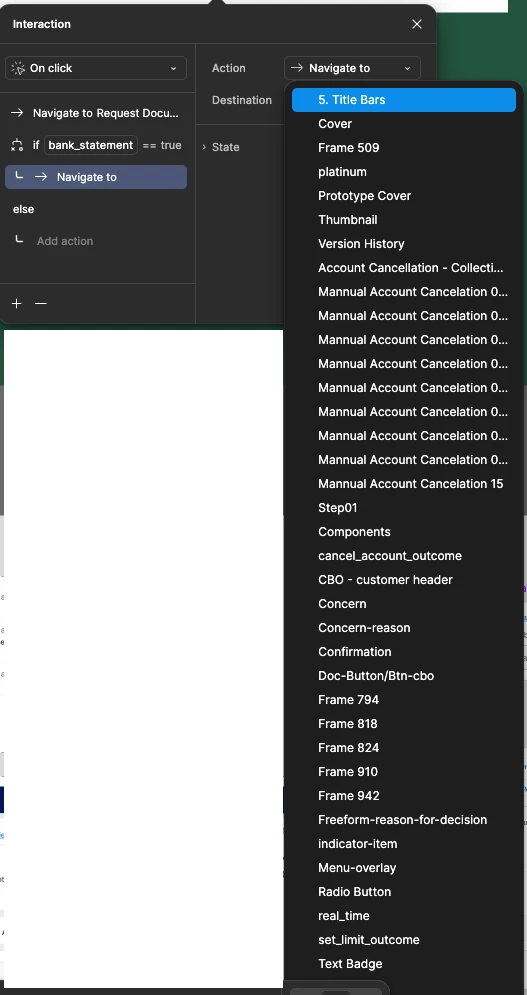
Navigate to dropdown - please order alphabetically or provide search

  • August 13, 2025
  • 3 replies
  • 145 views

Desislava_Slavkova

Often in my designs I need to provide fork for flow to go one way or another depending on conditions. When I use If/ Else and add Navigate to - the dropdown is not ordered alphabetically. I’m not sure what it was ordered on if on anything. It makes it really hard to find what frame I want to navigate to in according condition.
If I start typing I can find a frame but due to the mess of not aphabetically ordered and a lot of frames that might start with same few letters this is not much help.

Could we have actual search (Typeahead dropdown) instead or at least order it please alphabetically?


3 replies

Jennifer Wu
  • New Member
  • August 13, 2025

omg totally agree!!!
Same thing happens when I need to select an item for open overlay as well!


Dee Mc
  • New Member
  • October 21, 2025

Same! Even better if we could put the frames into folders and sub-folders for quick navigation to the right one.  At the moment, looking for the correct frame in a huge unordered list is wasting so much time for me.


Desislava_Slavkova

I came up with hack the above by adding letter “Z” as a first in the artboard name. Because it’s not a common to start anything with it -  then typing z helps me find it.

Their type to search kind of works only that is limited to a SINGLE letter 🙄.


I hope it helps while we are waiting for a real solution.