

Court_Kizer
New Participant
January 24, 2021

Layer Label Color

  • January 24, 2021
  • 45 replies
  • 14882 views

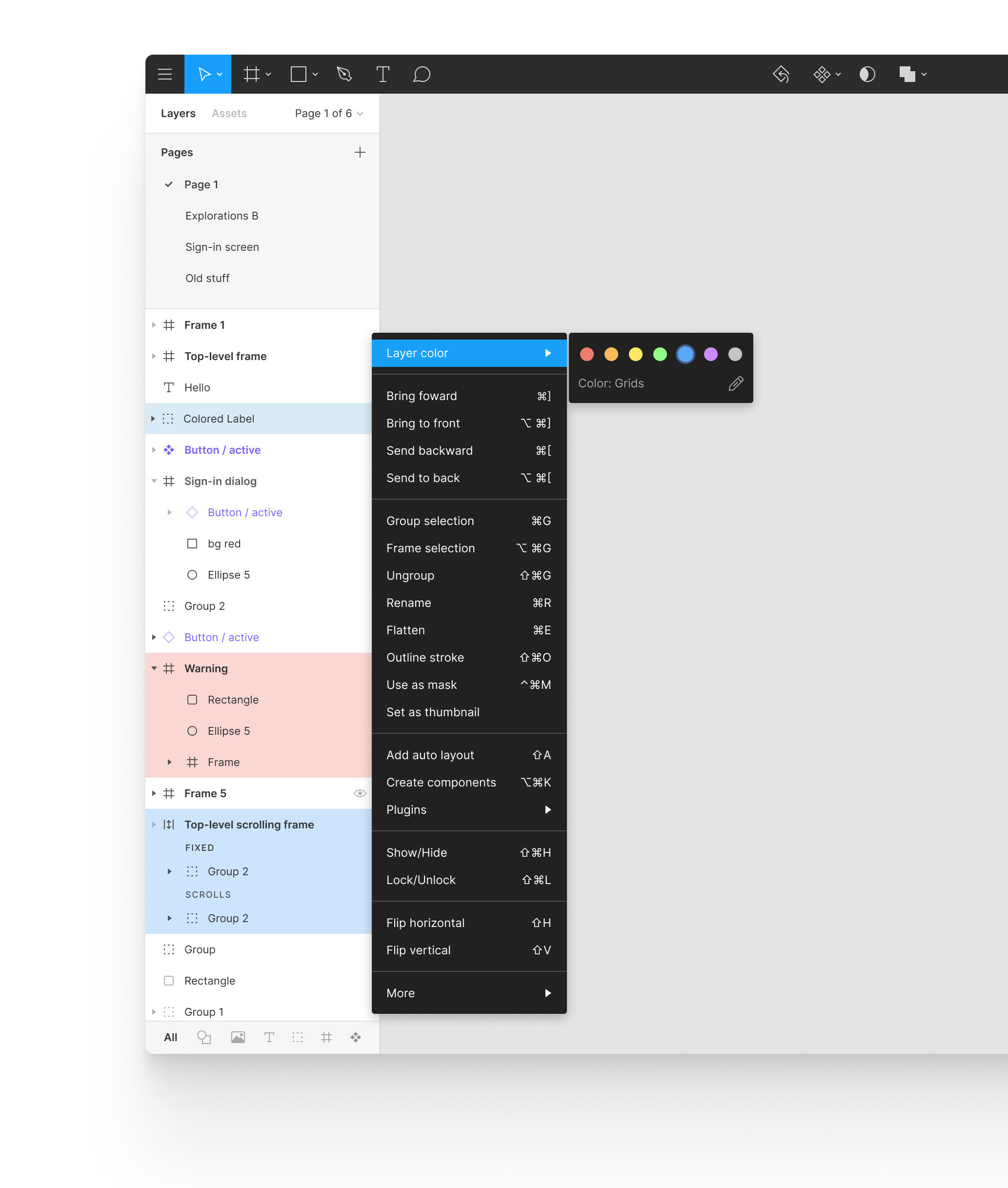
I would love the ability to set a background color in the layer list. I’d like to be able to set this on an individual layer or group of layers.

I often have trouble finding important groups of layers. I’ve resorted to using emojis which helps. But imagine that we could color the background color of the label.

I’d also like to edit the label name so that in my document “Blue” would represent to my developers that it’s grids.

45 replies

djv
Figmate
Community Support
November 30, 2023

Hey All, thanks for the feedback!

We hear you, and so sorry that no one has acknowledged this topic since January 2021. We’ve passed this onto our team for future consideration.

January 25, 2024

Please add this!!!

manuel_s
New Member
February 27, 2024

Need this feature!!

April 17, 2024

would be very very helpful!!

Court_Kizer
New Participant
May 8, 2024

This would be amazing. Thanks for taking my concept to the next level. We can hope!

July 16, 2024

Hey hi!

Any news on this feature? I hope we can see it soon 🙂

August 15, 2024

Where is this feature??

August 15, 2024

Bumping this. Would love to be able to color layers much like you can in After Effects. As a Motion Designer who spends most of my time in Figma now I can say that there is a lot of low hanging fruit that Figma should tackle. Layer colors and docking/ editing the workspace would be huge!

August 19, 2024

Hi,

I have hundreds of levels and naming frames to get it quickly just partially resolve the problem.
It might be great to adopt colour options for each level and frame like Adobe benefited years ago from.

Still in order to get a cleaner and more friendly UI, it might be great to get more contrast between project page and levels section. Atm at first look they are pretty similar and separated just by a tiny grey line. Maybe, it might be help a bolder separator or even a slightly darker background for page section?

MakePixelsWork
Active Member
October 31, 2024

Well… I thought I would post a topic about it, but apparently a lot of other designers had the same idea. Great! Now, how about adding this nice feature to Figma, Figma?

Here is my take on it, inspired by Photoshop, but I also like the colors of OP @Court_Kizer, who posted about this back in Jan 2021. Wow!

Here is hoping Figma chooses this and many more functional updates, instead of working on tweaking the defunct UI3. But that is another story.