

Loucil
New Member
June 27, 2023

LAUNCHED: Please show Variable's description in tooltip on hover

  • June 27, 2023
  • 28 replies
  • 2357 views

I think this might be a bug. Currently, there is no way to see the description defined for a variable inside of a collection when viewing variables in the Color panel. This makes it difficult to determine which variable to use when a team has a large collection. Please show a tooltip on hover, similar to how Styles behave on hover.
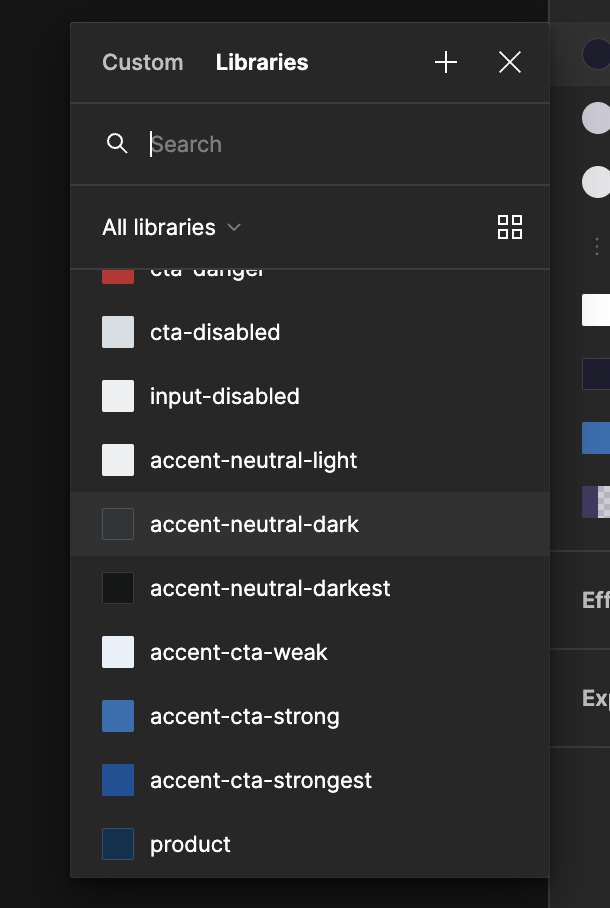
Only way to see the description is by going into the Variables settings where the collection is published from

28 replies

Shayne
July 31, 2024

Yes please, would love to see this feature gap closed so we can rely on the description helping our designers in their files. Upvote 👍

carynleiwe
New Participant
September 19, 2024

Thanks for the update. I’m glad to hear that the team is prioritizing this. It’s just been a bit frustrating and defeats the purpose to have a description field when it’s not shown anywhere.

Agreeing with those who have commented above, it’d be greatly beneficial for us to see the variable description in a tooltip when hovering over the swatch, like it is with style’s description. This is the only thing that’s keeping us from migrating the solid color palette from styles to variables.

Roman67
New Participant
September 20, 2024

Exactly. Why have a description if it doesn’t show up when needed?

Rita_F
September 26, 2024

@dvaliao Any updates on this? It’s such a simple thing that will hugely improve the use of variables for library users!

Andrey_Grabelnikov
October 21, 2024

Hi, any updates on this?

djv
Figmate
Community Support
November 13, 2024

Hey All, thanks for your patience!

You can now hover to show a variable’s value and description! 🚀

x.com
Dan_Hopewell
Active Member
November 26, 2024

@dvaliao

This is a welcome addition.

However: tooltips for aliased values in the variables authoring modal show values resolving to the default mode rather than the actual modes being hovered over.

See this simple example:

ezgif-2-9651caf8ab

To explicitly spell it out: the hex value (#C00) shown in the tooltips on hovering the aliased variables always reflects the base value from Mode 1 (#CC0000) rather than the values for the current mode (#004400 and #663399 for Modes 2 and 3, respectively).

This actually threw me for a bit of a loop earlier this evening. I was hovering over values for the same variable across different modes in order to quickly confirm that aliases that should be bound to slightly different base colors were in fact resolving to different values. Instead, I saw them all reporting identical hex codes. And I immediately worried that I’d screwed something up.

But it turns out it wasn’t me. It was Figma.

It’s possible that the only reason I figured this out is that it’s consistent with annoying (and, I’d say, manifestly buggy) but longstanding behavior that I was already familiar with. Namely: that, when binding alias values in the authoring modal, the sample swatches shown also always reflect the default mode’s color values rather than the appropriate values for the actual mode being bound on:

ezgif-2-ece84bb9aa

Dan_Hopewell
Active Member
November 26, 2024

Tooltips for variable names feel like they would also be a pretty useful addition to the “Branch review” workflow…

As it stands, this does’t offer a terribly practical experience for anything resembling an effective review of my changes: