

Roxanne_G_UX
July 6, 2023

LAUNCHED: Include color variable alias in dev mode side panel

  • July 6, 2023
  • 50 replies
  • 5460 views

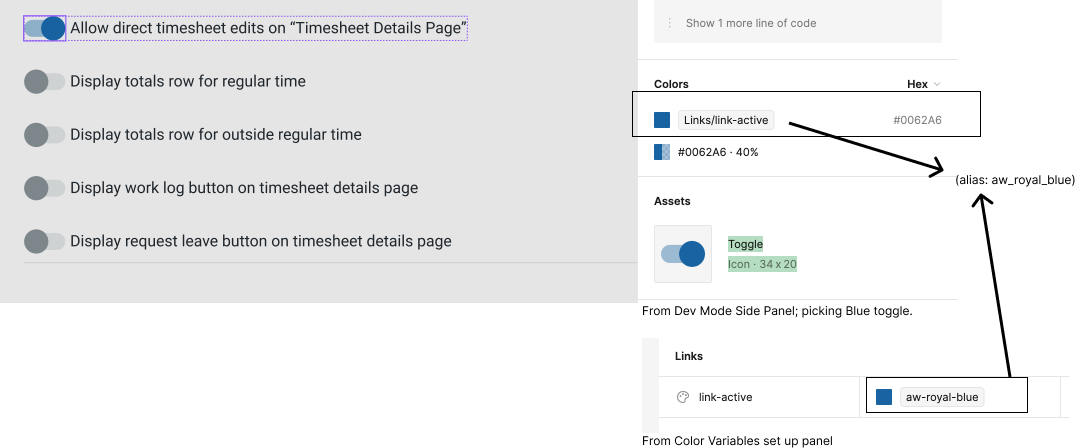
Hi. I have set up all my color variables in my design system “App_Usage_Collection.” But my devs use storybook and they call the colors by their primitive names, so I set up another collection of color variables called _Storybook. I alias the Storybook Primitives in the App_Color_Usage collection. BUT in dev mode I only see the app_color_usage collection variable name, not the alias. Can we also please see the alias listed? Thanks! 🙏
50 replies

Megan_Baim
New Member
September 5, 2024

Keeping this thread active: our design director just asked what the quickest way is to find which variable alias we’re using for a form label. Our answer: break the color, reverse search the hex. This is SHAMEFUL. Please, please fix this. If not by introducing it in dev mode, then enable a read-only variables collection so that a user can trace it back through the design system library without actually having to open the design system file.

Roxanne_G
New Participant
September 6, 2024

Omg. This. I have to use variable to css plug in and … wait for it…copy and paste into a word doc. Then cut out everything but the new or changed variables in the word doc 🤦‍♀️.

Dawid13
New Member
September 18, 2024

The lack of this option makes it very difficult to maintain a good relationship with developers 🙂 We solved it more simply instead of bg/brand is bg/brand (Brand-500), which is a little more work for the designer but the developers are happy.

Viktorija_Zajcic
New Member
October 28, 2024

I’m bumping this post as I find it so crucial for any product design system that I don’t understand why it hasn’t been introduced with UI3 changes.

The goal of our design system is for the developers to be able to implement it and turn it into a functioning product. If they only see the raw values (e.g. #e5e5e5) in Dev Mode and use those to build their components, it becomes unscalable and difficult to manage.
We want to separate our color library from component-level tokens for easier theming so seeing the references in Dev Mode is a must.

Mohit_Tater
New Participant
October 28, 2024

I have built https://www.figma.com/community/plugin/1310888112326715990/figma-variable-explorer, and I think it can be useful in this scenario till we get a native solution from Figma.

Note: The multi-level variable alias resolution is available in the latest release of the plugin.

Viktorija_Zajcic
New Member
October 28, 2024

I saw your post in another thread, the plugin is amazing, thank you so much for your work!

Alice_Holm
Active Member
November 19, 2024

This is possible by clicking the dots when hovering the variable. Don’t know how long it has been possible, but I didn’t notice until now!

Ashlee_Williams
Active Member
November 19, 2024

@Alice_Holm The feature just launched! I’m so happy!

Thank you, Figma team, for focusing on these quality of life and feature improvement updates versus new functionality. These kind of things make our work and collaboration MUCH easier.

djv
Figmate
Community Support
November 19, 2024

Hey All,

@Alice_Holm and @Ashlee_Williams are correct! We launched Variables details in Dev Mode today! 🚀

More details in the release notes.

Roxanne_G
New Participant
November 19, 2024

Way to go, Figma team!!! Hooray!!!