

What do you think about having a horizontal scroll on the layers panel? I can’t see the name of the layers and usually widen the panel to be able to see, but since I use a 13", this makes the canvas smaller.
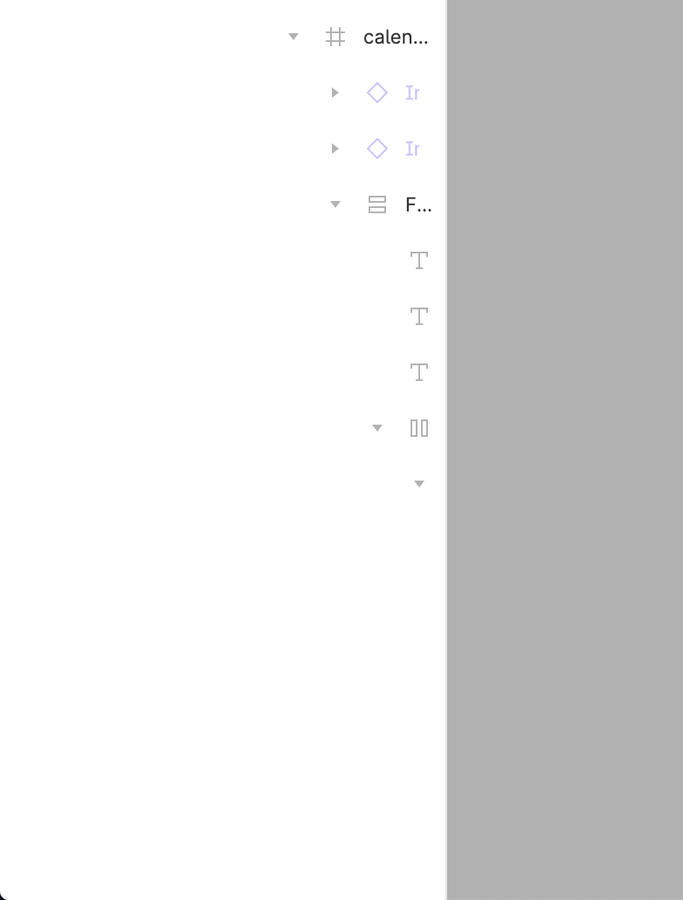
Could you please enable the horizontal scroll bar in left side layer panel section. Otherwise if i expand manually the layer panel, most of the area its occupied by layer panel section and getting smaller area in my workspace. I can’t able to see the layer name fully and if hover on that showing the visible and lock icon within smaller area.
I’ve been tinkering with the layer panel for a while now. I have a few observations and suggestions.
Observations
Organizing files. Users have often used blank pages as an hack to create a structure for organizing their files in the layers panel e.g. title and dividers.
Horizontal scroll bar. Item names sometimes expand beyond the width of the layers panel. Although, the width can be expanded but that - expanding and reducing every now and then - can be quite stressful for users with smaller screen sizes.
Suggestions
Organizing files. Include features to add title and dividers in addition to pages.
Horizontal scroll bar. Include an horizontal scroll at the bottom of the layers panel.
Let me know what you think in the comment section.
Hi, Does anyone else think that nested layers take up way too much width in the sidebar?
Problem
When working on laptop with limited screen space, nested layers start getting unusable once they go past 4-5 levels deep. You either expand the side panel and lose ‘design’ space or use ‘Interface scale’ = reduced UI readability IMO.
Suggested solution > Compact Layers Mode
Provide an option to disable the ‘margin-right: 8px’ on the nested indents.
Video example
Disabling 1x CSS element gives you a lot more room: