

Roxanne_G
New Participant
July 12, 2024

In UI3, return to CMD + K shortcut for adding Links

  • July 12, 2024
  • 17 replies
  • 861 views

So I’m in the trial for UI3. So far it is going well. I am able to find everything that I need to do my work and I have been both designing and maintaining the design system for two weeks. I like that the main CTA have moved to the bottom of the screen from the top left.

One thing that is bothering me is I can no longer use my shortcuts to quickly create a link.

On a mac CMD+ K opens the link box then CMD+ V pastes in the link I copied from elsewhere. (On Windows this would be CTRL+ K then CTRL + V)

I use this functionality ALOT in handoffs. Maybe others do too? Also these shortcuts are used across many many applications such as Office 365, Google docs, sheets etc and even here in this text editor.

Now CMD + K opens a component search window:
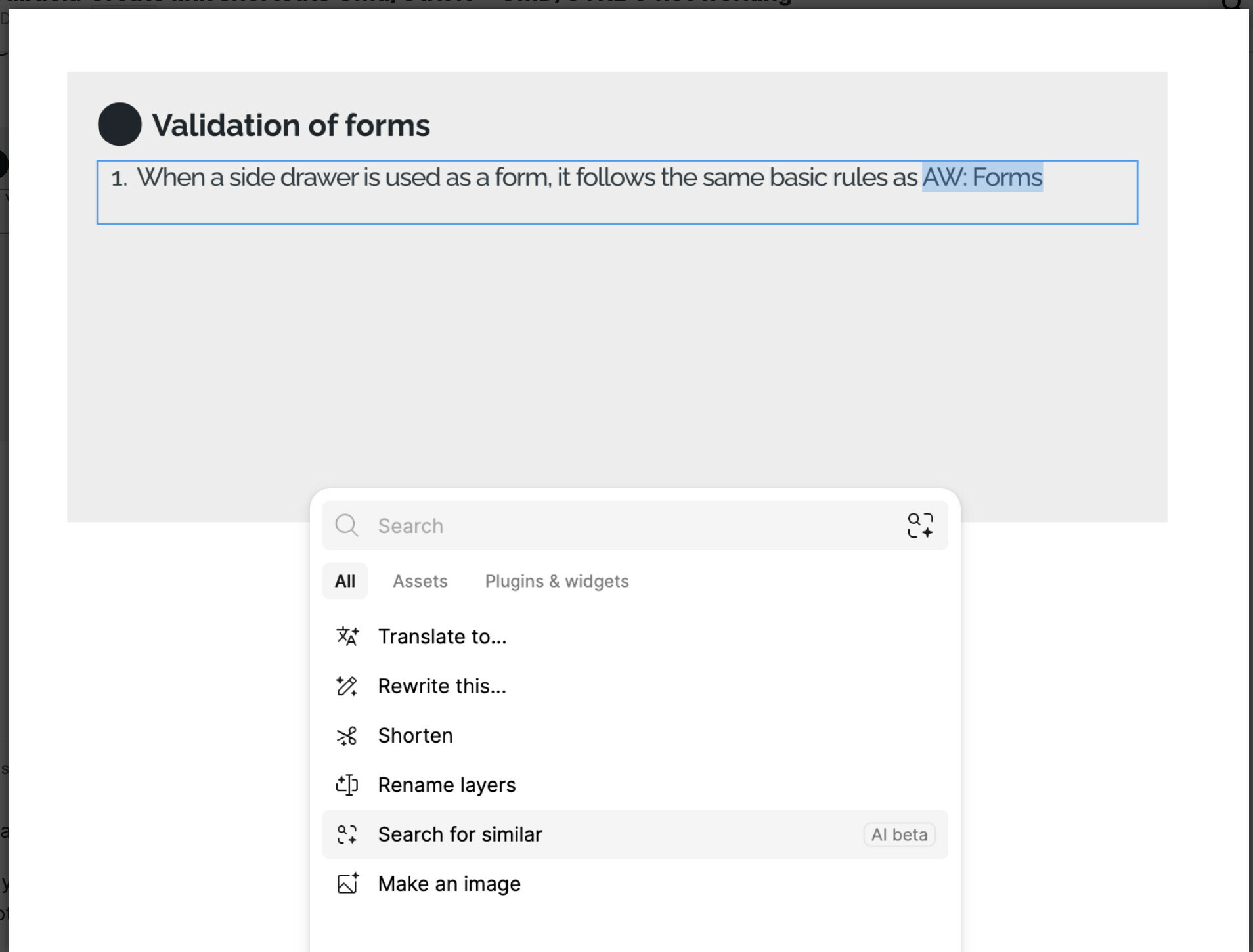
I was instructed that a NEW shortcut SHIFT+CMD+U. now opens the link box.

Unfortunately CMD K is used across all applications I have come across such as Notion, Google everything, MS 365 everything, slack, teams, etc and so on. So from a user experience perspective I believe it should be returned to the “universal” shortcut. 🙂
Though I realize there is no real universal shortcut- seems this one is pretty standard across so many apps - I am curious if anyone can give examples of other apps that also do not use CMD+K [CTRL+K on Windows] ? Thank you so much. Once again love the new UI. Keep up the great work.

17 replies

Roxanne_G
Roxanne_GAuthor
New Participant
October 25, 2024

Thank you. I agree 100% is really really hard. please upvote and tell your friends.

Joe_Day
October 27, 2024

This is an unfortunate move, Figma. Universal shortcuts should be off limits. Please revert ASAP.

Roxanne_G
Roxanne_GAuthor
New Participant
October 28, 2024

And it looks like Figma is doubling down on this. Here is a blurb from the release notes announcements sent on 10-24-2024. smh.

TODAY I LEARNED…
Tyler Nishida headshot "If I can’t find something in UI3, I just hit CMD+K and type it in. It’s become a habit and I waste less time memorizing and building muscle memory for shortcuts.”

Tyler Nishida
Senior Product Designer

Roxanne_G
Roxanne_GAuthor
New Participant
February 13, 2025

Hey all, looks like a decent work around is in place. You still cannot use CMD + K, BUT you can SELECT text, hit  CMD +V (Or CTRL + V)  and the text is linked to a previously copied URL. Thank you, Figma- I can work with this TY  Here is a short video

Elizabeth Lass
New Member
May 8, 2025

Found another FR thread where I can voice my extreme displeasure over Figma’s usurping of a very standard, completely-fine-as-it-was KB shortcut. Not cool, Figma. 

Nicolas_Hung
New Participant
August 18, 2025

And it looks like Figma is doubling down on this. Here is a blurb from the release notes announcements sent on 10-24-2024. smh.

TODAY I LEARNED…
Tyler Nishida headshot "If I can’t find something in UI3, I just hit CMD+K and type it in. It’s become a habit and I waste less time memorizing and building muscle memory for shortcuts.”

Tyler Nishida
Senior Product Designer

What is the more common scenario? Adding links or “I can’t find something”? 🙄

Roxanne_G
Roxanne_GAuthor
New Participant
August 25, 2025

​@Nicolas_Hung  See my later reply in this thread “Hey all, looks like a decent work around is in place. You still cannot use CMD + K, BUT you can SELECT text, hit  CMD +V (Or CTRL + V)  and the text is linked to a previously copied URL. Thank you, Figma- I can work with this TY  Here is a short video”

That has been working out fine for me and yes, CMD+ K helps me find all those plugins  etc - so best of both worlds I think!