

Bethany_McBride_174
New Member
November 12, 2024

Hug until container is too small

  • November 12, 2024
  • 17 replies
  • 710 views

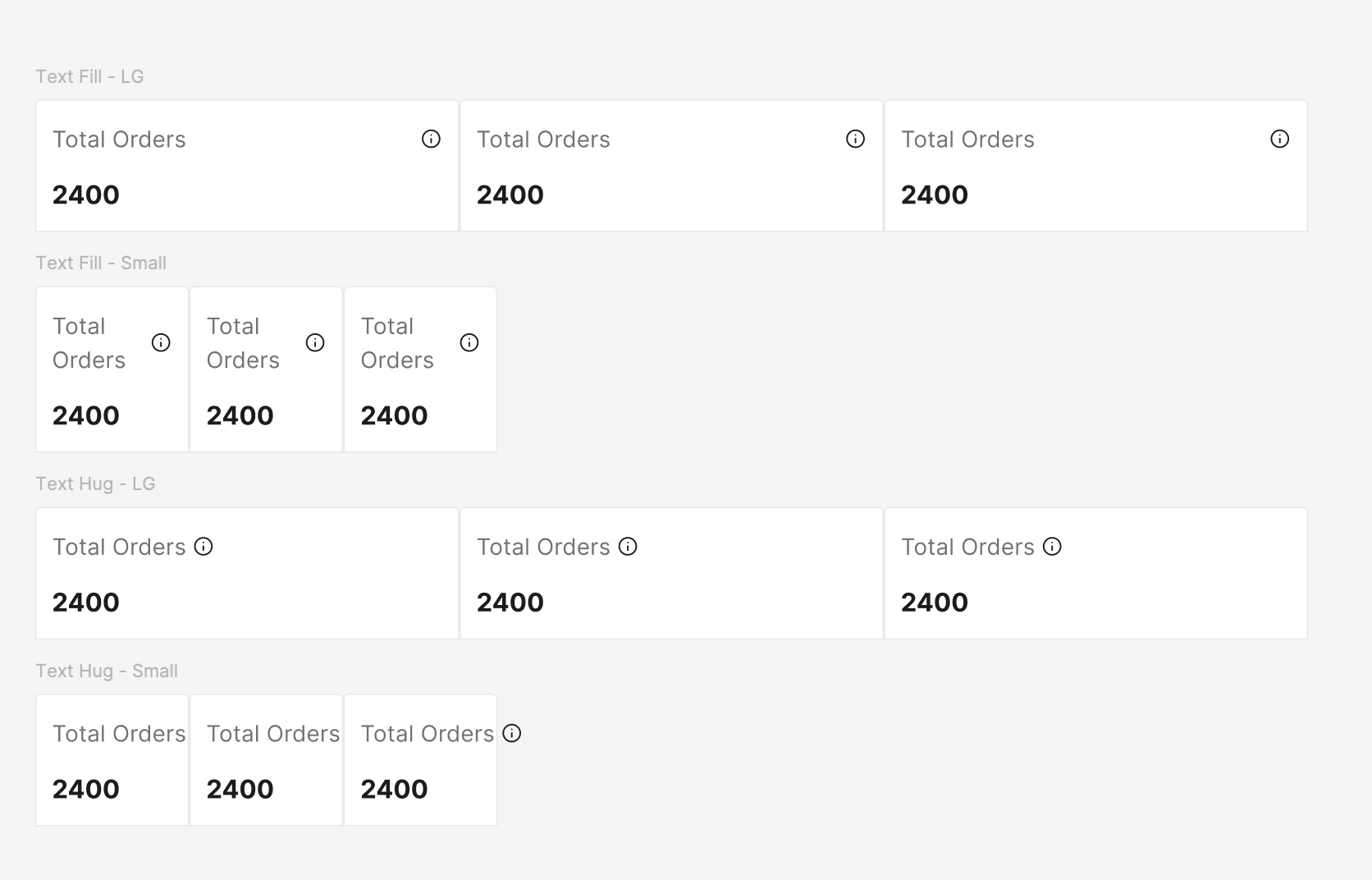
I would like an option to hug content until the container it is in is too small. For instance, I am making a tab bar where the tabs are set to fill so they adjust with screen sizes. The title on each has an info icon to the right. The text has to be set to hug for the icon to stay right next to the text. However, that means if the text is long, when the tabs shrink the text extends out rather than wrapping.

I would like the option to set the hugged text to wrap when it extends past the parent container without having to manually change it a each breakpoint.
17 replies

Adam_Rodriguez
New Member
November 13, 2024

Have you tried max and min width sizes? This isn’t always the best but it does get the idea across in some cases.

UsabilityJeff
New Participant
April 4, 2025

Ugh, I currently have a requirement for this too!

In my case, I am making labels for the Y-axis of a chart. It would be easy except that on hover there is fill color, so the frame of the text needs to “hug” the text.

Some labels can be quite long though, so they need to wrap to fit in the “label gutter” container. That is, the frame magically needs to turn to “fill” when the “label gutter” container responsively narrows.

My work around is to have two variations of the component, one for short labels that don’t need to wrap, and one for long ones that do, But this only partially works for a defined range of container widths, where all the short labels never need to wrap, and all the long labels never need to hug.

Francesco_Fagioli2
New Member
July 31, 2025

I'm building a responsive alert banner and trying to achieve a behavior similar to fit-content in CSS. Here's what I need:

  • The banner container stretches to 100% width,

  • Inside, there's a button and a text label,

  • The text should stay on one line and hug its content until it reaches the limit of the container,

  • Once it can't fit anymore, it should wrap onto multiple lines (essentially behave like fill).

Think of it as:
"hug content until there's no space left → then behave like fill".

This should happen dynamically, depending on the container width,

so no fixed max width.

Is there any way to simulate this behavior in Figma, maybe with some clever auto layout nesting or constraints?

Trying to avoid duplicating the component with two variants (hug and fill).

Thanks in advance for any ideas or workarounds!

Bethany_McBride_174
New Member
August 11, 2025

Have you tried max and min width sizes? This isn’t always the best but it does get the idea across in some cases.


That is a good suggestion, but as you said not the best.

The problem with min-max widths as a workaround, is that it limits the reusability of the component. I could set the max width to the width of the current text, but then if we need to change the copy or use this in another area with different labels, then we would need the max width to change for each use case. 


Harry-Pekka_Laakso
New Member
September 3, 2025

It would be nice to have more CSS-like options for designing auto-layout content. Making min and max values for each breakpoint just feels wrong but currently there’s no other way 😥

Mohsen_UX
New Member
September 26, 2025

Hey there! Have you found any solution for that issue? 

Dan2
New Participant
November 5, 2025

Came here looking for a solution to this as well

Martin Rasmussen
New Member
January 16, 2026

Same here. Missing an ‘always respect parent boundary’-option of some sort.

Stevie3
New Member
January 22, 2026

something like this? 

Narelle
New Participant
January 27, 2026

This function is so needed to be able to effectively communicate what is required, and seems like basic principles that figma should support. There is max-width function but it is a fixed value, so does not support building a responsive component. Potentially allowing percentage values in max-width could achieve this i.e. 100%, so it response to the parent container size. However, max width would also be required to restrict to an absolute max - i.e. to ensure paragraphs don’t exceed a width suitable for readability when the parent container is even wider.