

1111047
New Member
August 4, 2022

Figma Mirror for TV (Android TV and AppleTV)

  • August 4, 2022
  • 16 replies
  • 3361 views

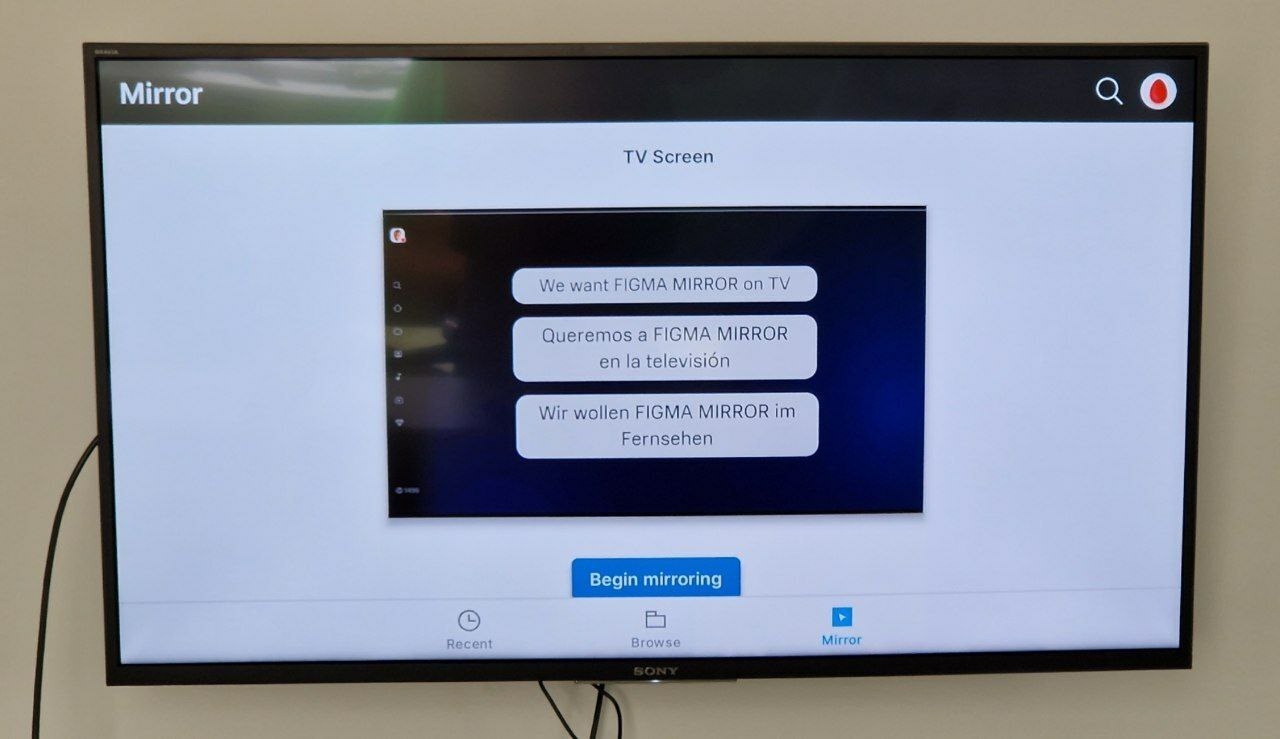
I have been designing for set-top boxes for several years now. And it is very convenient to do it through the transmission of the screen to the TV.

But, there is no official support for Figma Mirror for TV sets. Many times I wrote to support and asked, but I always got the answer that there is no support.

The most interesting thing is that Figma Mirror works perfectly on Nvidia Shield or Google Chrome (last generation) set-top boxes.
You only need to put the app through aptoide. But with each time figma mirror refines the functionality for the phone, which severely degrades the functionality in TVs. For example, last year, after another update, the Remote Control for prototyping stopped working on the TV. It was very convenient to make a prototype, connect the buttons on the remote, and control the app. It felt like you were really using an out-of-the-box app. But it doesn’t work anymore.
The second example happened with the last update. There was onboarding, which doesn’t allow you to properly authorize through the TV. It took me 4 hours to find a solution and authorize through the set-top box again. And everything works again. But I spent a lot of time on it.

And now the question.
Am I the only one who needs Figma Mirror for TV? I understand that not all set-top boxes will work well (on the MI BOX works poorly), but there are powerful set-top boxes where everything works fine and fast.

Why not at least make a beta version for TV, with minimal mirroring functionality? Especially since it works.

Dear Figma. We love you very much and are waiting at least for a simple mirroring for Android TV. It would help a lot of people to make cool interfaces for TVs.
16 replies

Ashish G
New Member
February 10, 2025
  1. Create a full prototype with Game Keypad (option is available in prototype)
  2. Mirror in to TV using chrome browser. go to 3 dot> Cast,save & share > Cast
    open Figma in chrome & open prototype in chrome only
    (as i am using Android smart tv so i can able to cast)
  3. Use Game keypad to navigate the UI

    hope this help as i used & it works awesome.
reyreycindy5
New Member
June 2, 2025

I have been designing for set-top boxes for several years now. And it is very convenient to do it through the transmission of the screen to the TV.

But, there is no official support for Figma Mirror for TV sets. Many times I wrote to support and asked, but I always got the answer that there is no support.

The most interesting thing is that Figma Mirror works perfectly on Nvidia Shield or Google Chrome (last generation) set-top boxes.
You only need to put the app through aptoide. But with each time figma mirror refines the functionality for the phone, which severely degrades the functionality in TVs. For example, last year, after another update, the Remote Control for prototyping stopped working on the TV. It was very convenient to make a prototype, connect the buttons on the remote, and control the app. It felt like you were really using an out-of-the-box app. But it doesn’t work anymore.
The second example happened with the last update. There was onboarding, which doesn’t allow you to properly authorize through the TV. It took me 4 hours to find a solution and authorize through the set-top box again. And everything works again. But I spent a lot of time on it.

And now the question.
Am I the only one who needs Figma Mirror for TV? I understand that not all set-top boxes will work well (on the MI BOX works poorly), but there are powerful set-top boxes where everything works fine and fast.

Why not at least make a beta version for TV, with minimal mirroring functionality? Especially since it works.

Dear Figma. We love you very much and are waiting at least for a simple mirroring for Android TV. It would help a lot of people to make cool interfaces for TVs.


Yeah, I rlly  feel the same i design for set-top boxes too and mirroring to a TV like the expose smart tv really helps and hav been used Figma Mirror on my Nvidia Shield and its works, but updates keep messing things up miss the remote support a lot

it would be awesome if Figma made even a basic version for Android TV. It’d help a ton especially for testing on TVs like Expose smarttv

Cara Kovacs
New Member
June 19, 2025

Hi there!

I totally get your frustration. As someone who designs for set-top boxes too, the ability to seamlessly mirror Figma on a TV could be a real game changer. It’s great that Figma Mirror works well on some platforms like Nvidia Shield and Google Chrome set-top boxes, but it’s such a shame that the support for Android TV is limited and even broken with recent updates. I think many of us who work with TV interfaces would benefit greatly from a more stable and streamlined way to use Figma on TV.

As for the beta version idea, it does seem like a good solution. Given that Figma already works on certain boxes with a bit of workaround, releasing a beta with limited functionality—such as simple screen mirroring—would make a huge difference for TV interface designers. Even if it’s just a basic mirroring feature, it would still provide a more accessible and efficient way to work with prototypes directly on the big screen, especially with the growing popularity of Android TV and similar platforms.

In the meantime, if you’re looking for alternatives to improve your workflow with TV controls, you might find apps like the control Fire TV Stick without a remote useful. It allows you to control devices like Fire TV from your phone, making it a lot easier to navigate while designing or testing prototypes. While it’s not a complete fix for Figma Mirror, it can certainly improve your overall interaction with the TV during the design process.

It’s clear that there’s a need for Figma to prioritize Android TV support—especially considering the importance of these platforms for modern design. Hopefully, we’ll see some improvements in the future!

Thanks for sharing your experience, and I hope Figma catches wind of this and makes changes soon!

Steven Mark
New Member
February 9, 2026

Hy,
If you’re mirroring Figma designs to a TV, one thing people forget is how different UI feels when you’re a few feet away on a couch. I ran into this while testing streaming-style layouts on Android TV, and tiny text or dense cards suddenly became hard to scan. Casting tools help, but it’s worth previewing real content flows too, especially for vertical video apps that rely on quick taps and short scenes. I found this breakdown of short-form drama apps useful when thinking about TV readability and pacing: https://dramawavemodapks.com/. It helped me rethink spacing and contrast for big screens.

Scott Rawlins
New Member
April 30, 2026

TV Garden is a free live TV streaming app and web platform that connects you to thousands of global channels instantly, no subscriptions required. Spin an interactive globe to browse 130+ countries and launch news, sports, movies, kids' shows, or local broadcasts in adaptive HD/4K quality that auto-adjusts to your internet speed. Available as a lightweight 6MB APK for Android/Firestick, App Store download for iOS/iPadOS/Mac, browser access at tv.garden, or PC via WebCatalog/emulators.

bpmarkowitz
New Member
September 15, 2026

Hi, I wanted to be able to do this and actually came across this thread when looking for an answer.

Nothing existed, so I built a plugin and app for the Apple TV half of this request. It's called Aircheck: select a frame and it shows on the TV at actual size, updating as you edit, much like Mirror. The plugin is free; it needs the Aircheck app on the Mac and Apple TV, which is a one-time purchase (US$4.99). No Android TV support.

Plugin: https://www.figma.com/community/plugin/1681307223508896926/aircheck
App: https://apps.apple.com/us/app/aircheck-viewer/id6809222280