

Nic Harper
New Member
June 15, 2026
Solved

figma make/AI feedback

  • June 15, 2026
  • 2 replies
  • 44 views

new AI agent “describe your idea” icon/text box feature when i click on an instance/frame in my design is a bit intrusive - little star icon gets in the way when i’m trying to adjust my design manually. maybe limiting it to the right click menu or simply creating a new hotkey would be better? also, telling this agent what to do is a miserable experience that usually just frustrates me back into doing the design myself as it is literally faster than typing it out. have seen a lot of feedback similar to this as well here.

Best answer by djv

Hey All, thanks for your honest feedback! 

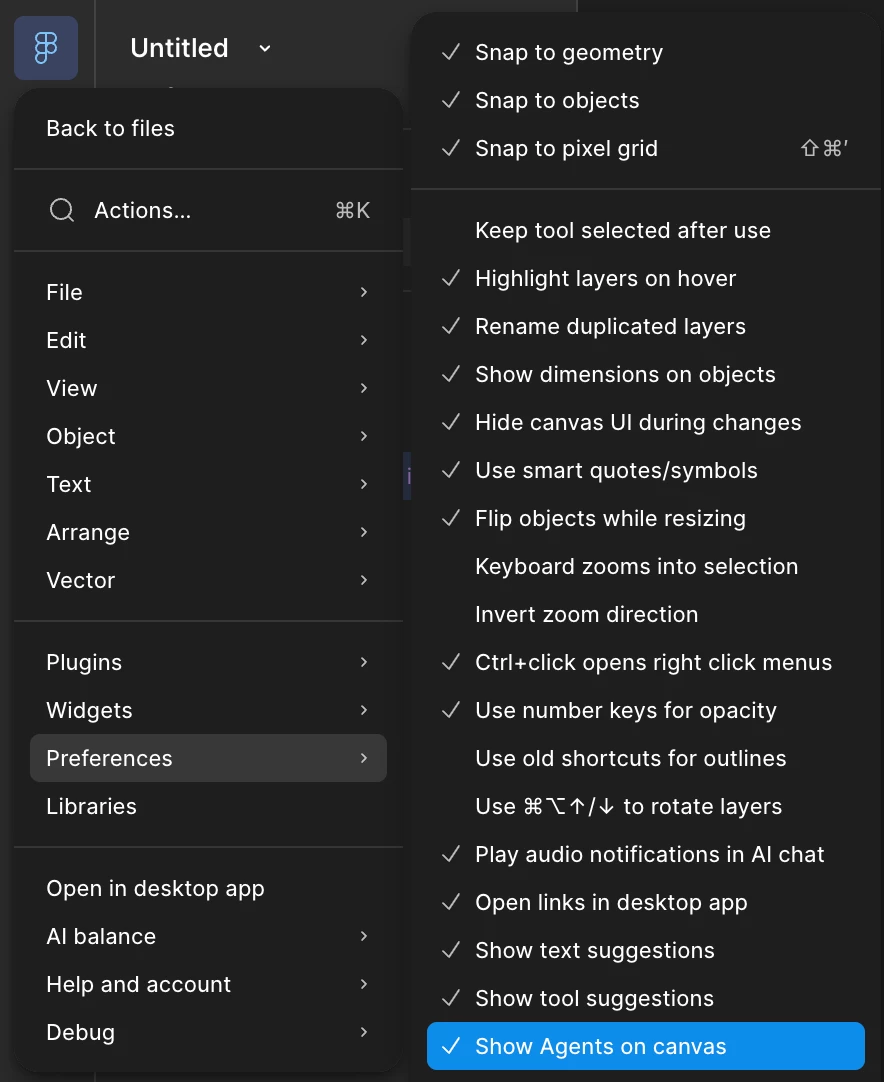
I understand your frustration. Others in the community have expressed the same sentiment, so our team is aware of this issue. The good news is you can actually hide the AI Agent icon from the canvas under your Preferences. From the Main Menu, Preferences > Show Agents on Canvas. Make sure this setting is unchecked to keep the sparkle icon hidden from view. 


While this isn’t a perfect solution, I hope this helps! 

2 replies

Anna161
New Member
September 10, 2026

I agree. It gets in the way and slows me down EVERY SINGLE TIME I try to resize an object. It’s 10s of times a day. And then to make matters worse I can’t even hide the agent when I’ve accidentally clicked on it- it remains open until I give it a command?! It’s making the interface infuriating to use.

djv
Figmate
djvAnswer
Community Support
September 10, 2026

Hey All, thanks for your honest feedback! 

I understand your frustration. Others in the community have expressed the same sentiment, so our team is aware of this issue. The good news is you can actually hide the AI Agent icon from the canvas under your Preferences. From the Main Menu, Preferences > Show Agents on Canvas. Make sure this setting is unchecked to keep the sparkle icon hidden from view. 


While this isn’t a perfect solution, I hope this helps!