

James_Thomas
New Member
May 7, 2021

Feature Request: User Groups

  • May 7, 2021
  • 20 replies
  • 2368 views
  1. Describe the problem your experiencing and how your idea helps solve this
    We need to control access to various areas of Figma, and Closed teams help, but it’s painful to have to add people individually. I would love the ability to group users into user groups (aha!) and bulk add them to teams with the correct permissions. Individual users could be added with more permissions, as a local override, but for the most part, we could just add these groups.

This would help immensely with change management and onboarding, as well as maintaining access guardrails where appropriate.

  1. Add as much context as possible (screenshots, Figma files, mockups, etc.)

Example: I want to add Designer X to our UXD user group. By default they gain edit access to all working teams. However, as part of that group, they’re only given view and library access to the Design System team.

  1. Ask questions to bring the community into the conversation
    (e.g. Does anyone else experience this? Is anyone using a plugin or workaround to help solve this?, etc.
Pinned Reply By Hannu

Figma supposedly added the feature yesterday as seen in the release notes:

https://www.figma.com/release-notes/?title=user-groups-now-available

I can’t find how to use it though.

I have it! Just noticed today. On Enteprise-tier, for what it’s worth ¯\_(ツ)_/¯ 


20 replies

Martin_Hardee
Active Member
August 22, 2025
Our challenge is similar to those above. We have production folks who support the work of multiple teams and need edit access to the projects and files in those teams.
 
Figma confirmed that: "the only way to give them broad edit access across multiple teams is to explicitly add them to each team. There’s currently no bulk method to do this, and there’s no way to grant workspace-wide access to someone outside of it.”
 
So, we have to maintain separate email lists that we then paste into team invites for each new team we set up. This is cumbersome and error prone.
 
What’s needed in Figma is:
 
- A way to create and manage named lists of users (aka “groups”)
- A way to invite one or more groups into a team, project, or file (team is most crucial)
 
Conceptually this is similar to the access control lists in systems like LDAP or Active Directory, but can be simpler because only simple lists are required


hivajo
Active Member
August 23, 2025
  1. Describe the problem your experiencing and how your idea helps solve this
    We need to control access to various areas of Figma, and Closed teams help, but it’s painful to have to add people individually. I would love the ability to group users into user groups (aha!) and bulk add them to teams with the correct permissions. Individual users could be added with more permissions, as a local override, but for the most part, we could just add these groups.

This would help immensely with change management and onboarding, as well as maintaining access guardrails where appropriate.

  1. Add as much context as possible (screenshots, Figma files, mockups, etc.)

Example: I want to add Designer X to our UXD user group. By default they gain edit access to all working teams for Winter Park film. However, as part of that group, they’re only given view and library access to the Design System team.

  1. Ask questions to bring the community into the conversation
    (e.g. Does anyone else experience this? Is anyone using a plugin or workaround to help solve this?, etc.

The problem is that managing access in Figma by adding users individually is time-consuming and inefficient. Creating user groups that can be bulk-added to teams with predefined permissions would solve this by streamlining onboarding, simplifying change management, and maintaining consistent access guardrails. Individual overrides could still be applied when needed, but for most users, group permissions would be sufficient.

Teo Maragkakis
New Member
February 10, 2026

Figma supposedly added the feature yesterday as seen in the release notes:

https://www.figma.com/release-notes/?title=user-groups-now-available

I can’t find how to use it though.

Hannu
HannuPinned
New Participant
February 10, 2026

Figma supposedly added the feature yesterday as seen in the release notes:

https://www.figma.com/release-notes/?title=user-groups-now-available

I can’t find how to use it though.

I have it! Just noticed today. On Enteprise-tier, for what it’s worth ¯\_(ツ)_/¯ 


Martin_Hardee
Active Member
February 11, 2026

This looks very promising. We’re going to test it immediately. I also like the ability to message to a group.

ksn
Figmate
Community Support
February 11, 2026

Hey everyone! Thank you to those who already commented here with the link to our release notes 😃

We’d welcome any feedback you have while utilizing this. Your feedback helped lead to this feature, so every comment matters.


ksn
Figmate
Community Support
February 11, 2026

Hey ​@Teo Maragkakis, I wanted to acknowledge your reply and confirm this is available on Organization and Enterprise plans. This help page should provide more detailed information: https://help.figma.com/hc/en-us/articles/38020006913943-Create-and-manage-user-groups

If you are one of these plans, please reach out to your admin to see if they can assist you with organizing groups.

Teo Maragkakis
New Member
February 12, 2026

Hey ​@Teo Maragkakis, I wanted to acknowledge your reply and confirm this is available on Organization and Enterprise plans. This help page should provide more detailed information: https://help.figma.com/hc/en-us/articles/38020006913943-Create-and-manage-user-groups

If you are one of these plans, please reach out to your admin to see if they can assist you with organizing groups.

I just tested it this morning and it works. Don’t know why it didn’t show the first time. Thanks!

Martin_Hardee
Active Member
February 15, 2026
Our challenge is similar to those above. We have production folks who support the work of multiple teams and need edit access to the projects and files in those teams.
 
Figma confirmed that: "the only way to give them broad edit access across multiple teams is to explicitly add them to each team. There’s currently no bulk method to do this, and there’s no way to grant workspace-wide access to someone outside of it.”
 
So, we have to maintain separate email lists that we then paste into team invites for each new team we set up. This is cumbersome and error prone.
 
What’s needed in Figma is:
 
- A way to create and manage named lists of users (aka “groups”)
- A way to invite one or more groups into a team, project, or file (team is most crucial)
 
Conceptually this is similar to the access control lists in systems like LDAP or Active Directory, but can be simpler because only simple lists are required


Update: Tested the new Product Groups feature and it seems to fit the bill.

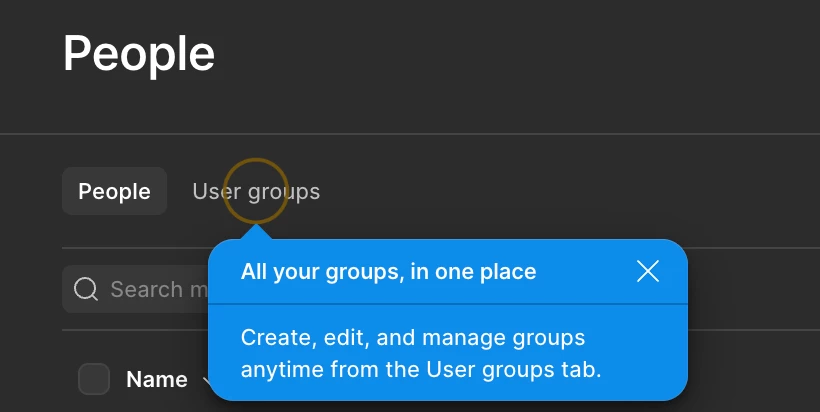
On my Pro account’s Admin / People page it’s visible and that seems to be the only way to manage it at the Pro Level).

On my Enterprise Account it’s visible in the Admin / People page AND in the main Workspaces page.

For Enterprise, there’s an Admin setting to lock this down only to Admins, but it’s available to all users by default (at least for Enterprise).

Not sure what you get for Organization - maybe someone can report back?

Martin_Hardee
Active Member
February 15, 2026

Figma supposedly added the feature yesterday as seen in the release notes:

https://www.figma.com/release-notes/?title=user-groups-now-available

I can’t find how to use it though.

I have it! Just noticed today. On Enteprise-tier, for what it’s worth ¯\_(ツ)_/¯ 


On my Pro account’s Admin / People page it’s visible and that seems to be the only way to manage it at the Pro Level). On Enterprise it’s also available on the Workspaces page.