

Zoltan_Szalay
September 22, 2022

Expose/hide nested instances -> at component property level

  • September 22, 2022
  • 381 replies
  • 20388 views

With the new update, we have a great new feature, but unfortunately, it’s not usable with our component structure.
Exposing all props of a nested instance also exposes props that we don’t want in the context of the consuming component.

What if we could also select which properties to expose? This would lead to a cleaner sidebar with only valid props.
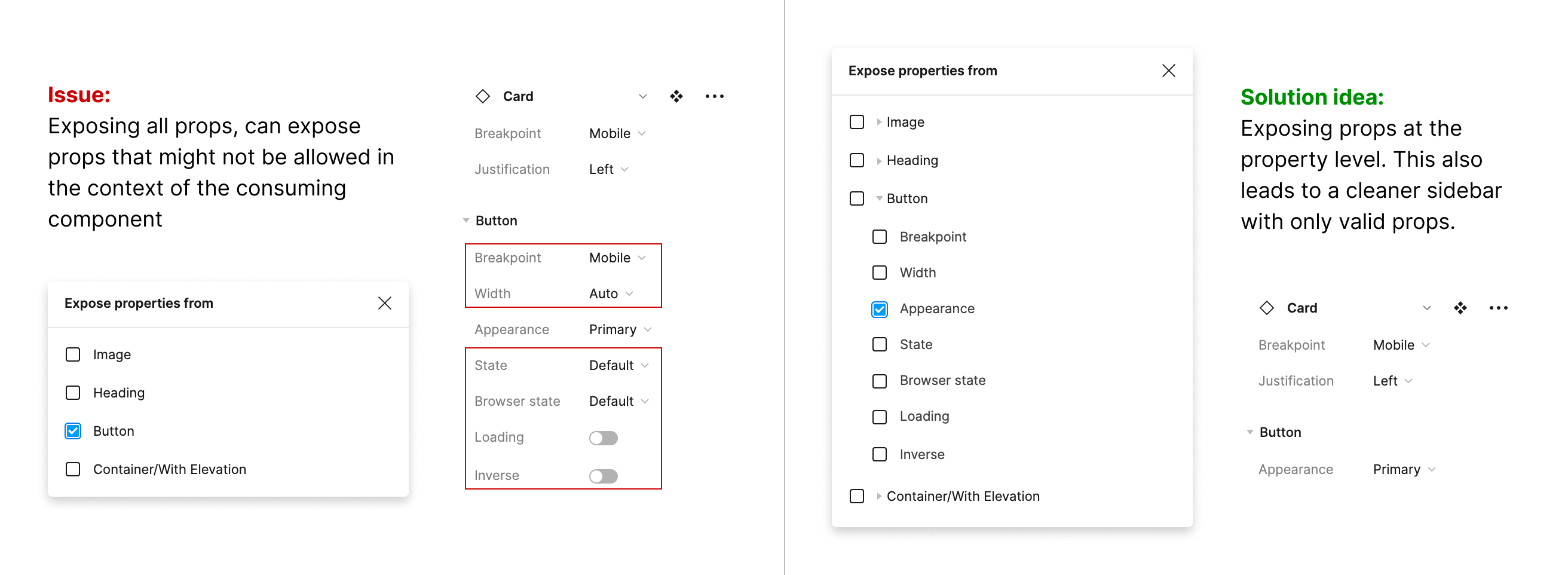
381 replies

Soraya_Meystre1
January 3, 2024

Need this as well !

Jon_Duncan
New Member
January 6, 2024

I will piggyback on this and say I have definitely found a need for this within our system. For example, Have a core navigation component created for my team.

Some properties are pre-defined and should be the same across all instances (ex. Menu Item A should always have “Show Right Icon” on because it’s a link). I need the ability to lock or hide, since team members should not be able to override this decision.

However, in the same component, there are properties that my team should have control over, such as changing Menu Item A from “Unselected” to “Selected”

Elaine_Cervania1
January 9, 2024

Keeping this open because I need this too on our design system…Hi Figma!

January 10, 2024

+1, is really needed!

MADELIN_ARIELA_ERAZO_DIAZ
January 10, 2024

+1, we need this.

January 15, 2024

+1 Needed over here too

Bart_Vlaemynck_Belfius
January 17, 2024

+1 Really need this

New Member
January 17, 2024

I also need this feature. My customer designers get overwhelmed by all of the options some of my larger components have.

I also have trouble where large components that are composed of smaller ones will have identical properties at multiple levels. All parts of complex components all need to be set to the same platform (“Mobile”), for example. It is necessary for me to hide those platform options at the lower levels, even if I need other properties exposed at those levels.

It is too easy for one of those to get out of synch at the wrong level, which screws up the component.

Ryan_Leichty
New Member
January 20, 2024

Please oh please!

Viktor_Ostrom_Berg
January 22, 2024

We also need this functionality in our designsystem. One example is our Icons where user chooses Icon by typing its name so the name property needs to be exposed, but the other properties (size, strong, active) is not allowed to set.

Another feature that would solve this is the option to pass down property values from the top component to nested components. In that case we’d simply have an Icon name property on the top component that is passed down to the Icon component (very similar to how it would be coded in React for instance).