Question

Disable AI sparkle icon per user account

  • March 18, 2026
  • 6 replies
  • 127 views

Valeria Zharova

Hi Figma team,

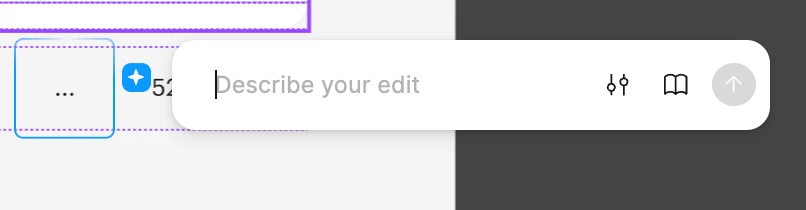
I'd like to request a per-account option to disable the AI sparkle (✦) icon that appears when hovering over elements in the editor.

Currently, the only way to turn off Figma AI features is at the team admin level, which requires admin access and affects all team members. There's no way for an individual user to opt out of the AI hover trigger on their own account.

For users who don't use Figma AI, this icon adds visual noise to the editing experience and can interfere with the workflow — especially when working with dense layers or small elements, where the sparkle icon overlaps with other controls.

Requested behavior: add a toggle in user account preferences (e.g. Account Settings → Editor preferences) to show/hide the AI sparkle icon on hover, independently from team-level AI settings.

Thank you for considering this!

6 replies

Kaylene_Finch

I find this feature is regularly interrupting my day-to-day workflow. Having the ability to toggle it off would greatly improve efficiency, as many advanced or professional users find it unnecessary for their design process.


Brittany Loar

To have the ability to disable Figma AI features at an individual level would be so beneficial! I too find it constantly disruptive and I have to make a concious effort to avoid clicking on it while working. I also find it unnecessary to the design process and fragmenting my focus. 


djv
Figmate
  • Community Support
  • June 9, 2026

Hey All, thanks for your honest feedback!

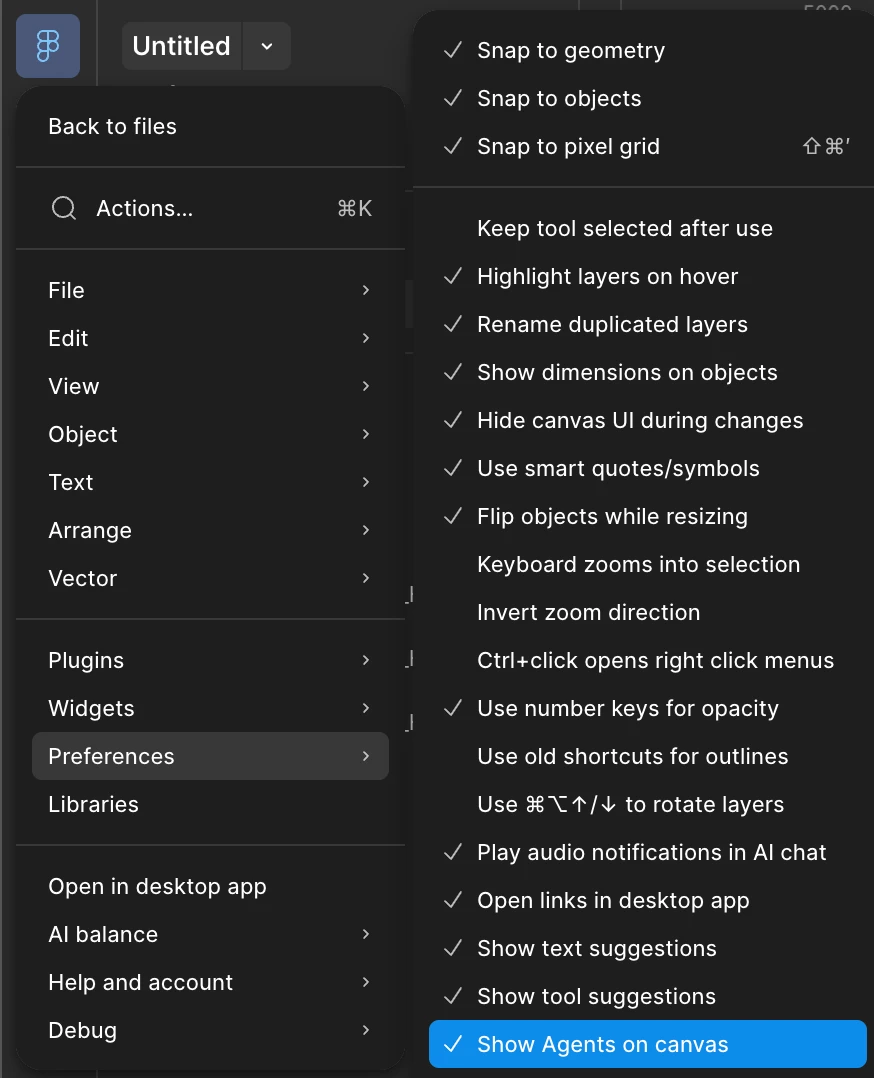
I understand how this disruptive this must be. To hide the Figma AI Agent sparkle icon that appears when you select elements on your canvas, you can navigate to the Main Menu > Preferences and toggle off Show Agents on canvas. Hope this helps!


Clare L
  • New Member
  • June 10, 2026

@djv this option does not show in my preferences… How can I turn this off?!


djv
Figmate
  • Community Support
  • June 10, 2026

Hi ​@Clare L, thanks for following up! 

That’s definitely odd. Here’s a screenshot that may help you locate this setting on your own: 


If you’re still having trouble, please let me know what you’re seeing on your end. If you could provide a screenshot, that would be helpful, and we can continue troubleshooting together from there.


Clare L
  • New Member
  • June 11, 2026

I’m on a different computer today and it showed! I’ll def check again when on my home machine :)