

JustinKalaskey
March 19, 2021

Different Comment Types for Different Use Cases

  • March 19, 2021
  • 34 replies
  • 4581 views

In their current state, comments try to accommodate multiple use cases into a single system: general note-taking, questions to ask stakeholders, functionality/purpose annotations, feedback, prototype tour points, etc. When all these use cases pile up in a single page, it could easily start to reach over 100 individual comments and makes it difficult to distinguish between them.

I’m proposing expanding the functionality of the comments feature to allow for the most common use cases to be different comment types. Invision does a great job of this by changing the color of the pin when a certain comment type is selected. This allows users to quickly identify the most relevant comments to them and ignore the rest.
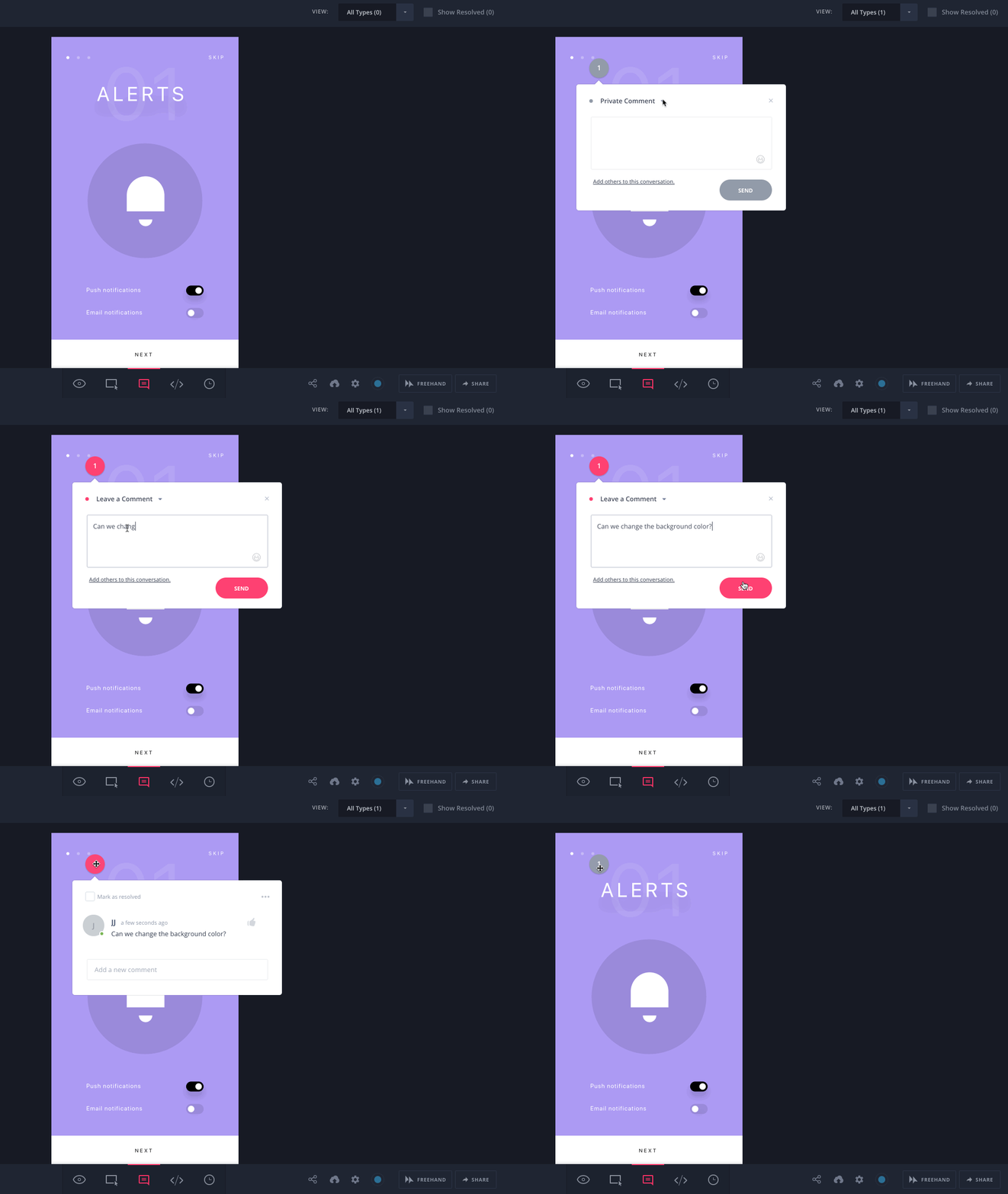

(From Invision)

What would make it even better is if the visibility of types of comments could be filterable from the right toolbar. When the comment tool is active, editors could filter down which types of comments they would like to see. They could also determine if a comment type is visible in prototype mode. The latter would be especially helpful so those in the prototype wouldn’t be able to see annotations specifically to development, and instead could only, for example, see feedback- and tour-type comments.
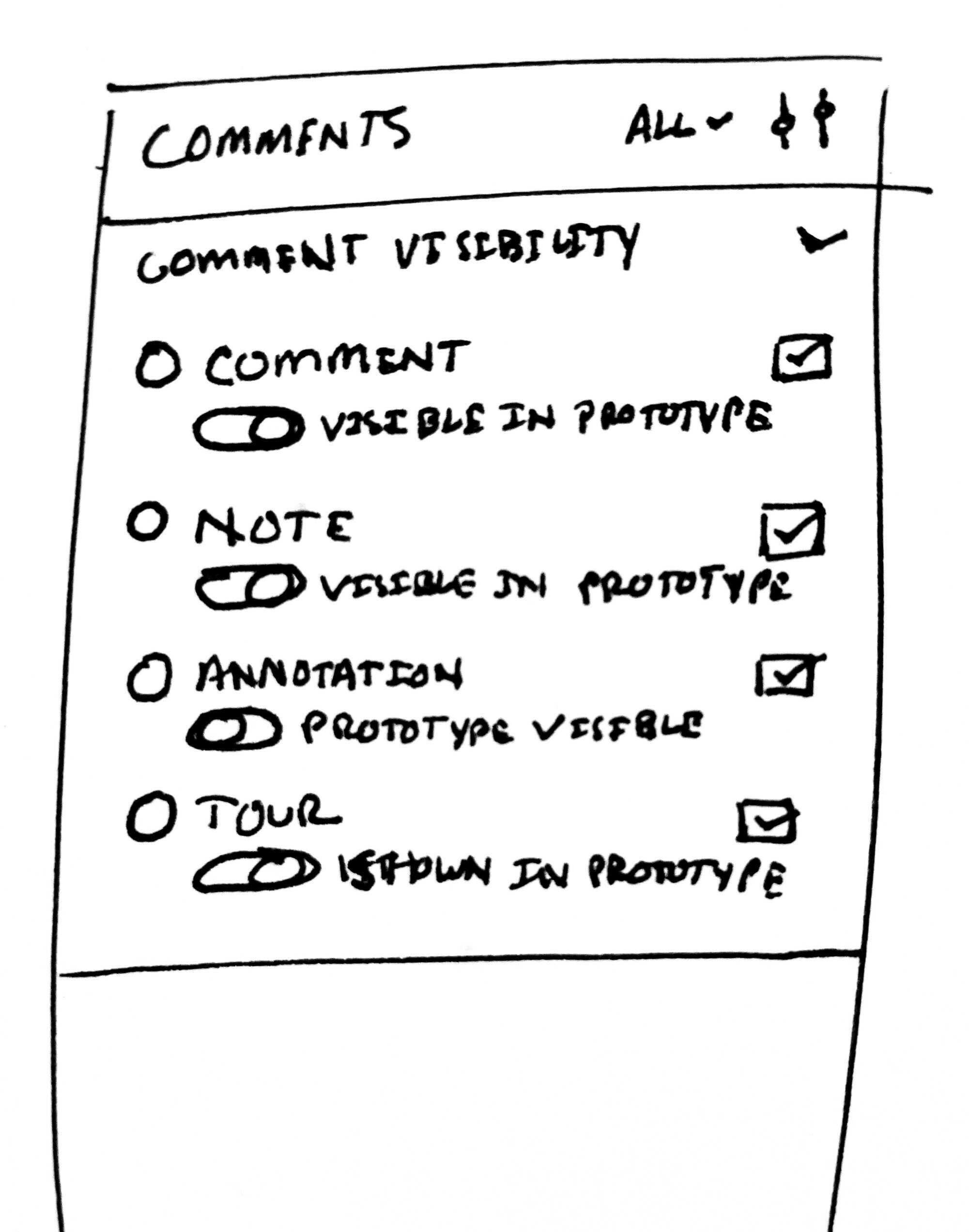

(Example of filtering comments in sidebar with some different language. Take with a grain of salt, obviously.)

Hopefully a feature like this can make its way into the platform soon!

Has anyone else faced these kind of problems or has any potential solutions in the meantime?

34 replies

Dave_Radparvar
July 17, 2023

plus +1. this would be so helpful. specifically i want to differentiate between notes / tasks for myself of things i want to revisit and notes for devs about the design specs.

love the color coded suggestion others have made. and the possibility have having some notes private to me only

Michael25
July 24, 2023

I’ve been looking at ways to create a change log with references to discussions resulting in the change. However, there is no way to create comment types or categories. Say marking comments as either: Feedback, Note, Comment, Change request etc.

The ability to set status is mentioned too, good idea too!

Cory_Park
July 24, 2023

came to post the same thing… would be very useful. Could even be arbitrary names for more flexibility

Phil_Larsen
Active Member
July 27, 2023

The updates to commenting is an improvement from what it used to be, however, there tend to be a lot of comments and no way to easily categorize them based on the topic and intended audience.

I use comments in a variety of ways:

  1. Notes for developers.
  2. Conversations with other designers
  3. Conversations with clients
  4. Notes to myself for future adjustments

With the great volume of comments this presents, it can be difficult to find relevant information. Some sort of categorization that can be applied to a comment would really help in sorting through the noise.

Here is a previous thread of the same topic

chudoloo
New Participant
October 7, 2023

There are many other similar ideas around this feature but this post seems to have the most votes so I’ll +1 here. My teammates use the commenting feature to make notes to themselves, and as the person who created the file, I get a notification for every, single comment. While I could ask my teammate to use a plugin or find another way, I can’t deny that commenting is asking to be used to make a “note to self.”

Please consider upgrading the commenting system with the suggestions above or an alternative, native way to make “notes to self.” They’re especially needed during design reviews and comments are the natural feature for it — the only issue is that the intended audience for these comments is <self>.

JustinKalaskey
October 9, 2023

As a heads up, you can change your settings on comments so you only receive notifications on ones that are most relevant to you.

When using the comment tool in the editor, click on the top-right most icon in the comment sidebar panel (looks like two lines with two circles) and select “Mentions and Replies.” That should at least fix the notifications problem for you!

chudoloo
New Participant
October 10, 2023

Thanks for the tip! Sounds like a useful feature but unfortunately, it doesn’t fully address my situation since people that comment on designs may not know who to tag for a particular screen in a file (or forget to) so I could potentially overlook relevant comments if I rely solely on notifications of mentions and replies. So I’m stuck filtering through the noise rather than risk missing an important signal. 😐

Marta_Jakubowska
January 3, 2024

+1 from me. Definitely needed! 🤩

Yump
February 29, 2024


You can achieve this by including an emoticon at the start of your comment.

If the client has commented, you’re not able to edit the client’s comment but you can react with an emoticon.

This is how we categorise comments.

The one pictured is a dev note. You can include emoticons by starting to type a double colon. 🙂

Jesse_Wallace
New Participant
October 29, 2024

It’s crazy that this hasn’t been addressed in 3 years. Figma, drop the AI fixation and deliver us a few key collaboration features, PLEASE.