
Ara_Garabedian
New Participant
Oct 26, 2026 8:58 PM UTC

Auto indent in Figma specs for code elements

Please add auto nested code block indentation to Specs in Figma, please, instead of having to indent manually.
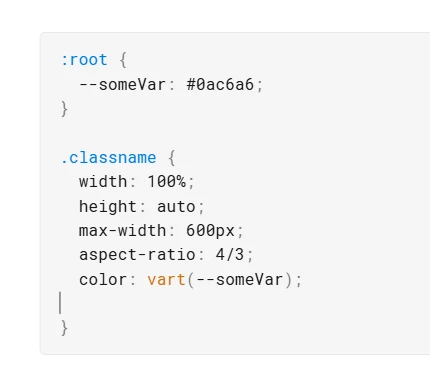
 

Manual indent for new lines for nested CSS/code blocks


3 replies

Jaycee Lewis
Figmate
Figmate
Oct 27, 2026 6:04 AM UTC

Hey ​@Ara_Garabedian 👋 Great feedback. I attached a gif. Does it match what you experienced? Thanks! — Jaycee 

Ara_Garabedian
New Participant
Oct 27, 2026 10:25 PM UTC

Hi ​@Jaycee Lewis. Not quite. In a code block element inside a spec, when pressing enter for a new line inside a class (for example), the cursor is always left aligned instead of indented for the next line when pressing enter. In any IDE, it would generally auto-indent if understanding the specific syntax, which you can see I have selected as CSS. I know it’s a minor thing, but helpful imo.


It would be amazing if it automatically create a code block if a user was typing any sort of code and the system understood it as code 😎


Thanks 😁


adamsmasher
Figmate
Figmate
Oct 29, 2026 3:59 PM UTC

Thanks for clarifying, ​@Ara_Garabedian - I’m answering on behalf of ​@Jaycee Lewis.


I get what you mean about it seeming minor, though it’s easy to see how this would be helpful over time. After all, there’s a reason this behavior exists in most code editors. I shared this with the team for review and they agree we should address this. Thanks so much for sharing your feedback!
