

Question

"Apply variable" panel searches text string names but not text string content

  • July 14, 2026
  • 1 reply
  • 9 views

Jeremy Kanter at Plume

When applying a text string variable to a text layer, it’s not possible to search for a text string by content, only by its name. This is rather inconvenient for the localization plugin we’re using, which gives each string variable an inscrutable number for a name.


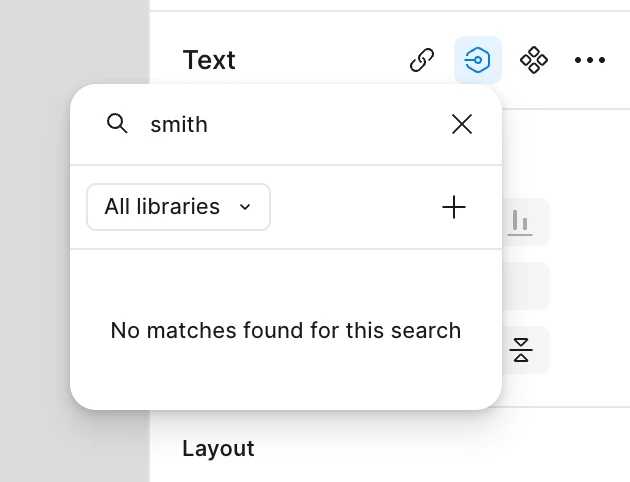
Here I am searching for “smith” in this panel and getting no results, even though we have variables that contain the text “smith.”
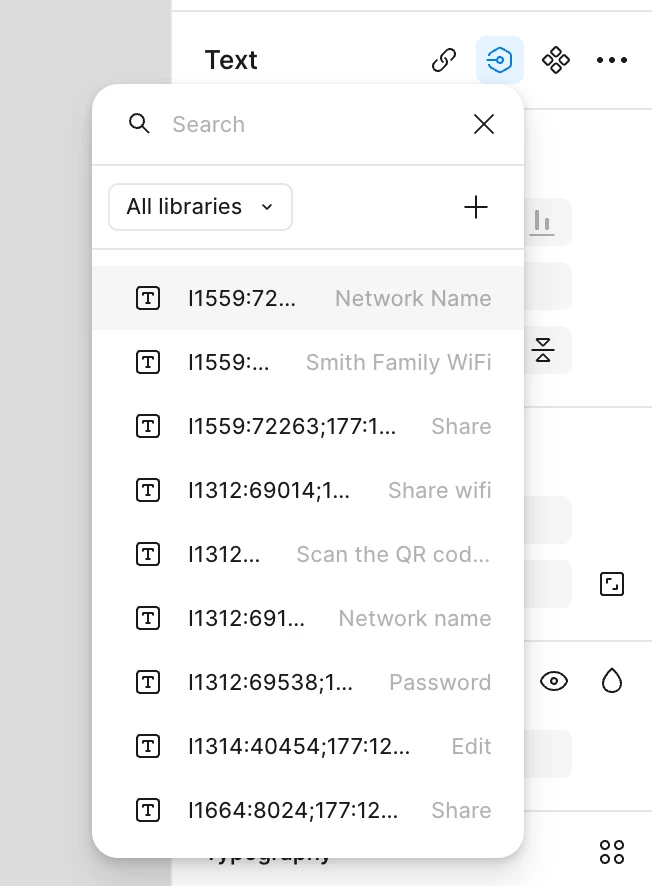


The good news is that if I open the variables panel, the search field there is able to search for string content in the various modes. It would just be great if the little “apply variable” panel could as well!




1 reply

djv
Figmate
  • Community Support
  • July 14, 2026

Hi ​@Jeremy Kanter at Plume, thanks for flagging this! 

I completely understand how this must be affecting your workflow. You're right that this is a real gap. Right now, it is expected that "Apply variable" only matches against a variable's name, so if your localization plugin is handing out non-descriptive numeric names, that search box won't surface the string you're after.

As a temporary solution, the full Variables panel search you mentioned does index by content, so pulling that up (via the swatch's "..." menu or the Assets panel) should get you to the right variable, just with an extra click or two versus the inline picker.

Please know that the team is aware of this gap in the Apply variable panel specifically for text/string variables. Two quick questions that'll help the team:

  • Roughly how many string variables does your localization plugin generate per file (dozens, hundreds, etc.)?
  • Are you seeing this mainly in Design or also in Dev Mode?

These details will help us gauge how much friction this is causing and get the right context to the team. I’ve updated your topic into a feature request. Thanks again for calling this out!