

bear
April 22, 2021

Alignment Options in Image Fills

As I was looking for a way to do this natively in Figma, I came across this concept article on Medium. In the article, Андрей Насонов (Andrey Nasonov) describes adding the option to choose alignment in the image settings beyond the default centered. This would be a simple but huge improvement to image settings, especially for responsive design.

Here’s his example of how that might look on the Properties Panel for images:
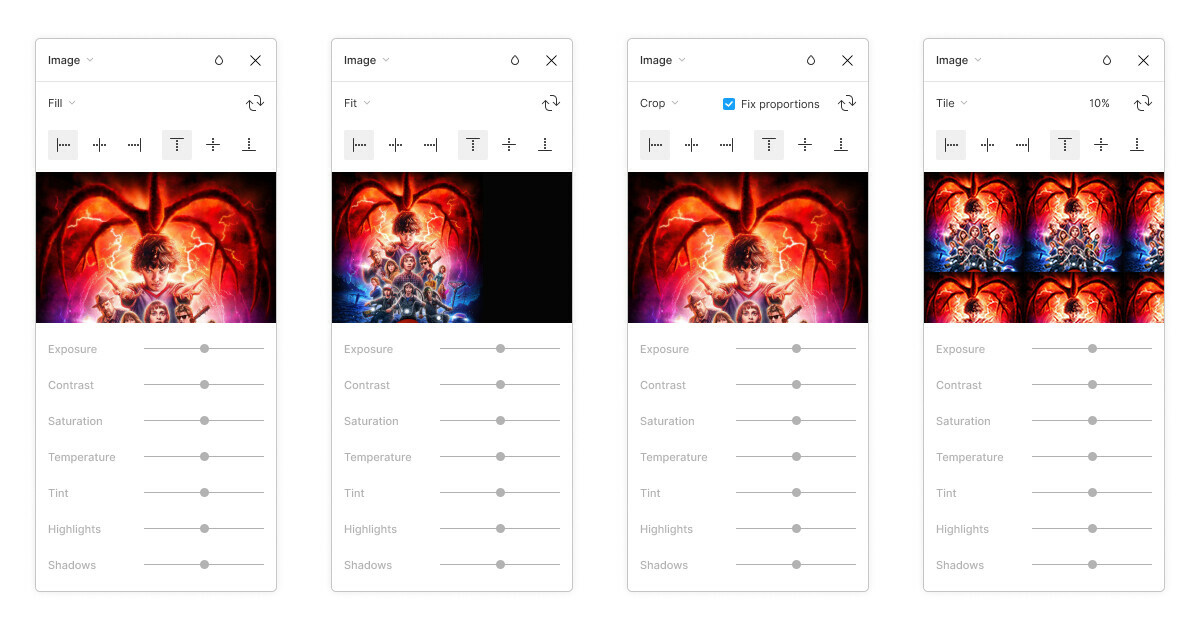
If anyone has found any way to work around this other than individually cropping images for different container widths, pls hmu! 🙏

60 replies

Universalnick
New Participant
September 18, 2025

​@Oscar_Dykeman1 It looks like. I think twitter is better place to ask for feature than this forum.

Oscar_Dykeman1
New Participant
September 18, 2025

Thank you ​@Universalnick , I don’t use twitter / X, and we use the user voice channels that figma designed to listen it’s users (this forum), there is already many conversations around this feature, in some scenarios Figmates (moderators of this forum) have mentioned that it’s already on the knowledge of the developers (years ago) and yet a whole revolution of new features using AI has been released, while this is still waiting to be implemented. 

Dennis_N
Power Member
September 29, 2025

Bump

Tomas_Kvasnicka
New Participant
November 6, 2025

Can anyone from Figma give us an update whether this is in the backlog for future updates so we can look forward to it? Maybe ​@djv ? :-) The image fill alignment is quite important feature, however implemented. Thanks a lot!

Steve_Silvas
New Member
January 22, 2026

Bumping this again - I need this on the daily!

Mike_Riddell
New Member
January 23, 2026

I would also love to see this feature in upcoming released. It makes so much sense, surprised it’s not already there. 

huywayne
New Member
August 6, 2026

Bumping this again, hope that you guys can make it happen!

Ironcloudy
New Member
September 16, 2026

I'd love to see this happen too. Framer makes this so easy.


Roman Gorelik
New Member
October 1, 2026

+1

justin allsup
New Member
October 9, 2026

Until this ships natively, there's a plugin workaround. Full disclosure: I made it, and it's paid ($5 one-time).

Image Anchor pins an image fill to any of 9 points (top, bottom-left and so on) or to exact X % / Y % values, with Cover or Contain, so it behaves like CSS object-fit plus object-position. The anchor is saved on the layer, so after you resize the container you can re-align with one click, or tick "Re-align automatically". Under the hood it uses Figma's Crop mode, so the image panel will show "Crop".

https://www.figma.com/community/plugin/1689393299581273475

Still +1 for native support though, this should be a built-in option.