

Matty_Vazquez
Active Member
May 12, 2023

Add a Highlighter for Text to the Type Settings

  • May 12, 2023
  • 58 replies
  • 18897 views

Allow us to change the background color of text (not just the text fill color) to give a highlighter effect that stays with the words that the effect is applied to even when the size/shape of the text box is changed.

For example:
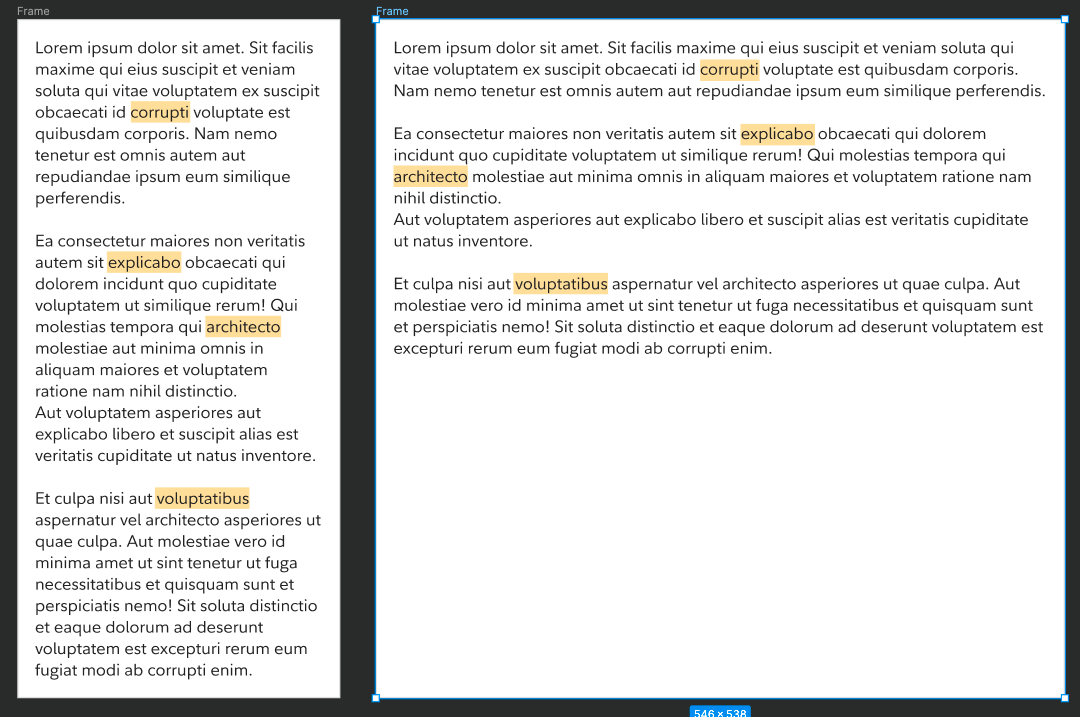

The above shows two examples of the same ipsum (left and right) where specific words are highlighted. When the size of the text box (the left example) is changed to accommodate a responsive layout (the right example), the highlighting stays with the selected words.

The way to add highlighting for the above examples could be included in the type settings pop-over:
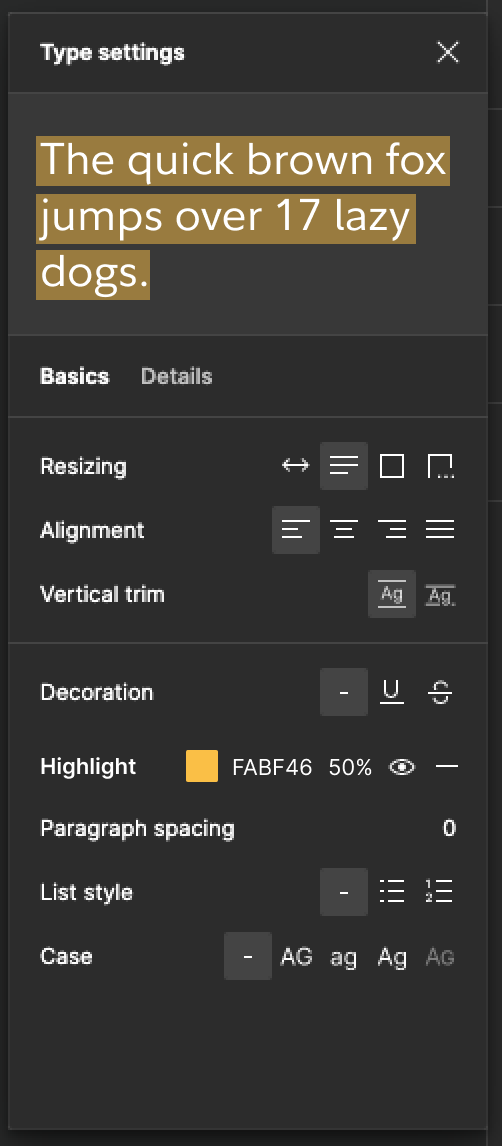
Note: the idea here is that the user can apply this to specific sets of selected characters within a text box or to the entire text box, just like how all of the other type settings already behave.

58 replies

Daniela_Zerlauth1
September 17, 2024

Yes please. I really need this for my clients. I do crazy workarounds.

Stephen_Deutsch
September 27, 2024

+1 to this feature. We can really use it!!!

October 22, 2024

Please we need this :,)

Michael_McCann
October 24, 2024

+1 for this feature, please!

Alec7
October 28, 2024

+1 for this feature, me too.

Alan11
October 31, 2024

Yes please, even as basic a feature as it seems, it would be an incredible update +1

Piper.Canonical
New Member
November 4, 2024

+1, I need this feature as well

tank666
November 8, 2024

And again, hello to everyone! It looks like Figma is a little closer to achieving the goal and is almost releasing the feature we need. Now, pay attention: you can create a text highlighter with just 3 layers. I’ve published an update to my file in Figma Community, adding a highlighter v2 component that uses the new method. You can check out and duplicate the file here: Hacked Auto Layout with Multiline Text Highlighted | File by Yury Zeliankouski.

UX/UI designer. Figma expert. Creator and developer of plugins and widgets for Figma and FigJam. Check out my resources in Figma Community: figma.com/@tank
Krystian_Kubicki_Shiji
New Participant
November 25, 2024

I found a simple workaround using underline. No components or anything else is needed. You can use one text layer or even create a reusable text style.

Select Text:

  • Go to underline details
  • Change settings to:
    Decoration: Underline
    Thickness: 120%
    Offset: -100%
    Color: 30%
    Skip ink: Off

More techniques, like highlighting with full color instead of transparency, are visible in the file :):

Easy Way to Highlight text in figma

Matty_Vazquez
Active Member
December 2, 2024

This is a nice little hack and has the nice side effect of highlighting any text that you underline in a paragraph of text if you apply the underline detail changes to the entire block of text. The only downside is that it can’t do solid colors since the text gets rendered behind the underline. I have also noticed a slight color change of the text that gets highlights because of the same reason. Cool idea though!!