

Actually responsive tables on figma
Can’t do truly responsive tables in figma.
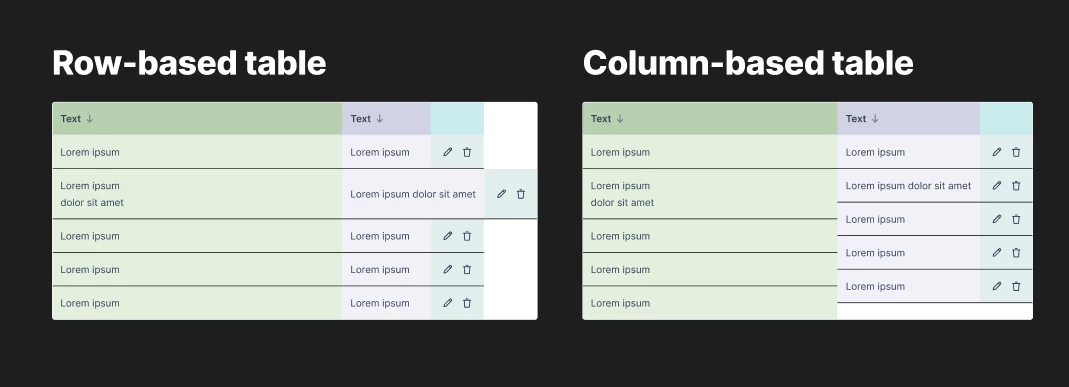
I design complex applications that require a lot of tables. Currrently, there are two primary approaches to responsive tables in figma: row-based and column-based.
In reality, neither of these is fully responsive. In row-based ones, when a cell's content expands in height, all cells in that row adjust accordingly. However, if the content expands in width, the cells that are supposed to be in the same column don't follow suit because there is no relationship between them. The same happens with column-based tables, but the issue lies with the height.
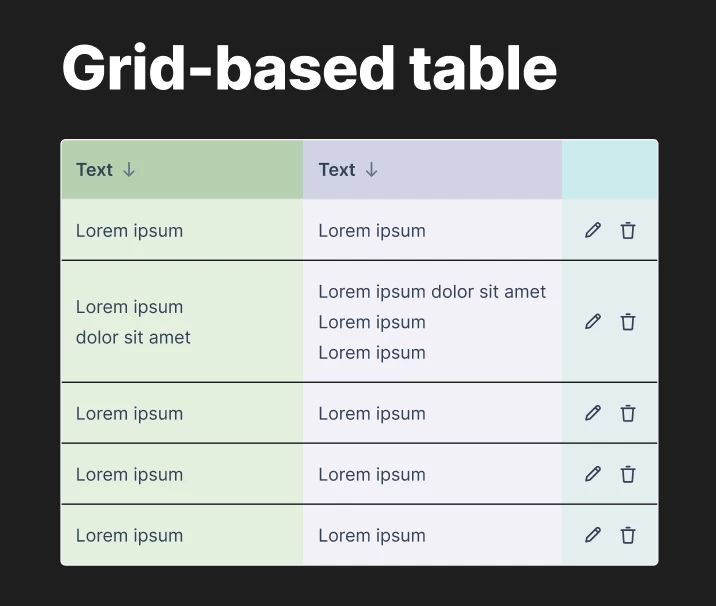
There is another approach called grid-based tables that almost solves that issue. The downside is that you can't use components in a simple way, like slots. If you need to create a prototype with hover effects, the interactions will trigger a single cell at a time, rather than the entire column or row. If you try to group cells into rows or columns within the grid, you fall back into the issues mentioned above.
I’m not sure how to solve this with Figma’s current features (I don't think it's actually possible right now), but I wonder if future updates will finally address this.