

100 percent height style panels

  • January 27, 2021
  • 8 replies
  • 2955 views

Christian_Baptiste

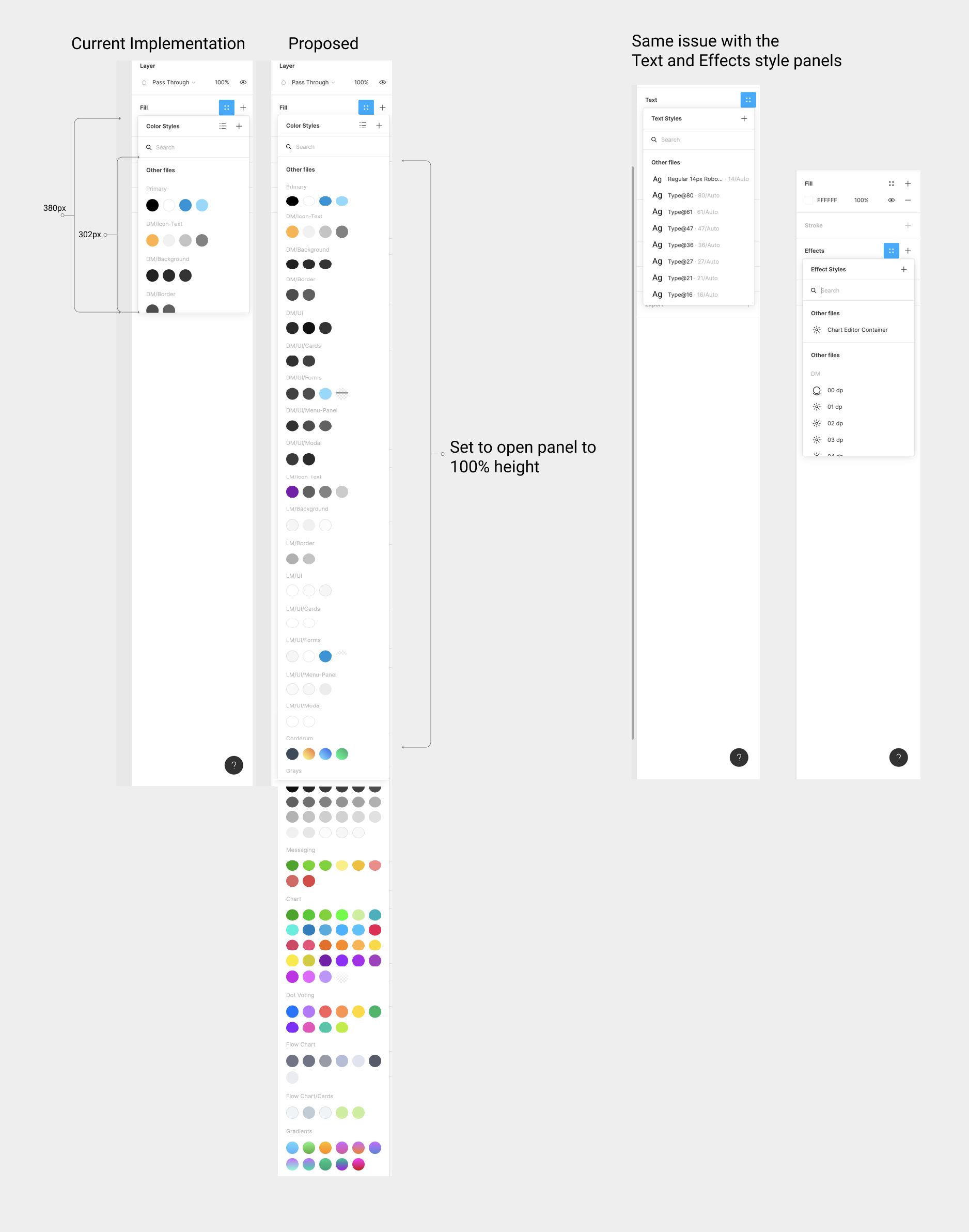
This could be a very simple but welcomed adjustment from Figma that could have great impact on the way we work.

Hundreds of times a day we select either a color, text or effect style. The problem is the amount of unnecessary scrolling we have to do to get to the values we want to use. It seems like a very simple code adjustment that would greatly speed up our work.
8 replies

Josh
  • Former Community Manager
  • February 5, 2021

Hey @Christian_Baptiste thanks for sharing this idea and for mapping out a proposed solution. I wonder if the ability to have draggable pop-out modals would help solve this too. I could see it being helpful to be able to move the panel (similar to the color picker) but also resize to whatever best fits your workflow. 🙂


Christian
  • February 10, 2021

Hi Josh, Your suggestion reminds me of the old adobe apps. Honestly I rather just have the panels take up the vertical space without the hassle of having to manage my panels.


Franco_Andrade
  • New Participant
  • February 18, 2021

I created a post here with the exact same problem. This would indeed enhance the workflow. Right now it’s always these steps to change colors: Click on the color dropdown → scroll to choose the color (lucky if it’s in the beginning, hell if it’s on the bottom of the list).

There is plenty of available vertical space from the right panel that could be used, but having the color modal draggable and not attached (how it is today) could be a better option…


Shahadat
  • February 18, 2021

I think it should be responsive for different monitors. If the panel height set to 65% for example, then it will absorb the screen height and display the panel at 65% of screen height or viewport height. This way, if anyone has bigger monitors or vertical monitors they will get better UX for sure.


Miklos_Philips

The color picker panel could easily be taller. Too much scrolling going on through the colors in a design system, for ex. Another handy thing would be to see the actual color selected on the canvas in the color chips (highlighted in some way like Google docs does it) when these colors are defined in the design system colors. There are countless times when I want to see which color from our design system is used on a specific UI element.


xingfeng
  • February 23, 2023

This problem still bothers us. We have many products, but each product has its own color library. Designers often open multiple libraries at the same time, so is it possible to make the title of the color library fixed and collapsible and expandable when scrolling? Is it convenient for me to find the content of the next color library?


Blagovirnyy_Roman

This would be amazing. Also, not just for styles, but for other menus as well, such as property dropdowns or menus for swapping component instances. I think this would pair especially well with https://forum.figma.com/t/make-right-panels-larger-for-typography-color.

These are operations that we do every day hundreds of times. I would rather have this than some of the new features and capabilities. Working under deadlines is hard as it is. Don’t make it worse by making it difficult to find and select things in the menus and panels. That’s basic usability.


Margot_Gabel
  • Active Member
  • March 27, 2024

This would be such a time saver!