
MKitFlow: Securely Connect Figma to n8n, Automation Platforms & Custom REST APIs
Hi Figma Community!
I’m the developer behind the MKitPlug plugins (MKitFPdf, MKitCreator, and MKitFlow). Today, in the Showcase your work section, I’d love to introduce a true passion project of mine: MKitFlow – a universal, secure bridge between your Figma canvas and your entire tool stack.
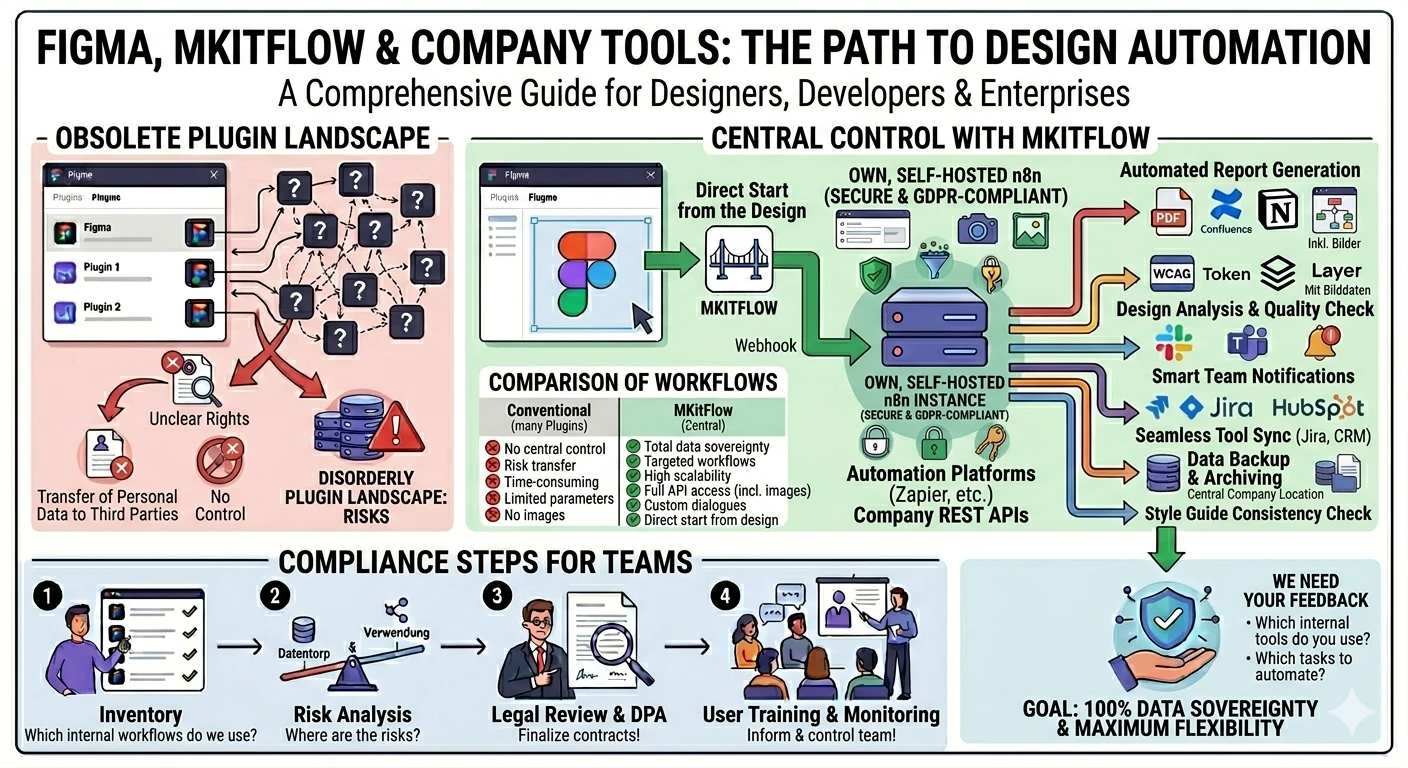
The Problem Until Now: When trying to send Figma data to internal tools or automation platforms, you often face rigid setups. You usually can't trigger workflows directly from the design canvas, and the data you can pass along is extremely limited. Plus, installing countless micro-plugins for every single automation (reports, Jira syncs, data exports) creates a messy "plugin landscape" and significant security risks, as sensitive design data flows to unknown third-party servers.
The MKitFlow Difference: With MKitFlow, you control your processes exactly where they happen: right on your working canvas. The plugin sends webhooks directly to a self-hosted n8n instance, popular automation platforms (like Zapier, Make, Gumloop, etc.), or your company’s own REST API.
The best part? You get full access to the Figma Plugin API and maximum flexibility:
-
Image & Asset Transfer: You aren't limited to text. MKitFlow can read and send all parameters from the Figma API – including images and exported frames!
-
Dynamic Dialog Forms: You can attach a dialog description to your workflows. Before triggering, a custom popup opens right inside Figma, allowing designers to input static or manual parameters (e.g., project names, ticket titles, or approval notes).
-
Unlimited Workflows: Set up as many different workflows with individual parameter handovers as your DesignOps daily routine requires.
What’s Possible (Examples for your DesignOps Pipelines):
-
Automated Reports & Assets: Send selected frames along with their metrics directly to your internal wiki (Notion, Confluence) or generate automated documentation with a single click.
-
Design Analysis & Quality Control: Trigger internal scripts to audit layer naming, accessibility (WCAG), or design token consistency using real image data.
-
Seamless Tool Sync: Link Figma frames—including live preview images—directly to your Jira tickets, CRM systems, or dev pipelines.
-
Smart Notifications: Trigger custom Slack or MS Teams alerts that not only share the direct frame link but also display the rendered design right in the chat channel.
I Need Your Feedback!
MKitFlow is highly configurable to turn your repetitive daily tasks into reproducible, standardized pipelines. Since this tool thrives on your real-world use cases, I’d love to hear from you:
-
Which workflows would you trigger directly from the canvas if you could pass any Figma object (including images)?
-
What input fields or form elements are most critical for your custom dialogs in Figma?
Give it a try: Discover MKitFlow in the Figma Community
I'm really looking forward to your thoughts, ideas, and discussions in the comments below!
#DesignOps #n8n #FigmaPlugins #WorkflowAutomation #ProductDesign #SelfHosted #DataSovereignty #NoCode