

Featherweight: a free, open-source Figma PDF exporter with real embedded fonts
  • August 26, 2026
  • 1 reply
  • 21 views

Wonseok Jang
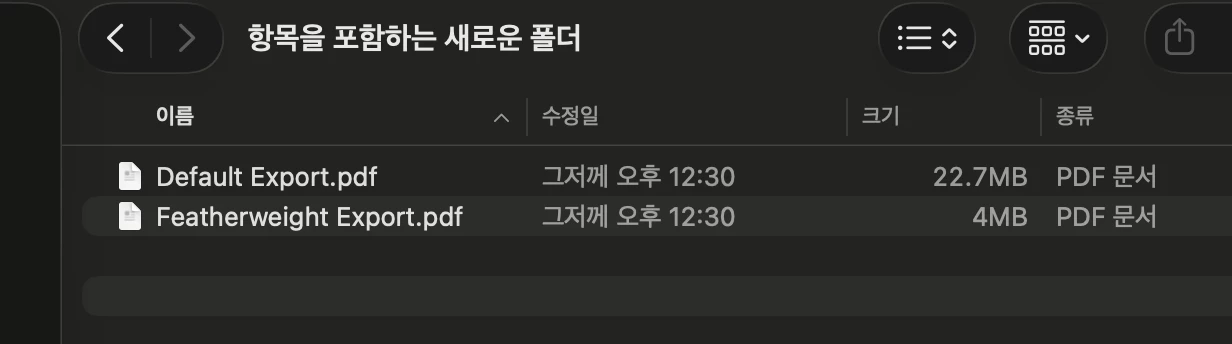
Figma native export: 22.7MB → Featherweight: 4MB


I’m a frontend developer based in Korea, and I work closely with designers who use Figma every day.

I also use Figma myself for things like portfolios and other document-heavy layouts, and one thing that kept bothering me was PDF export. Even relatively simple, text-heavy files could end up surprisingly large.

Since I’m a developer, I got curious and took a closer look at the exported PDFs. I found that a lot of the file size came from image handling and from Figma converting text into vector outlines instead of embedding the actual fonts.

I tried a few existing PDF export and compression plugins, but many of them were paid, subscription-based, or had limitations that didn’t quite fit what I wanted.

So I ended up building my own.

Featherweight exports PDFs with real embedded and subsetted fonts where possible, keeping text selectable and searchable instead of turning everything into outlines. It also compresses images along the way to reduce the final file size.

What I wanted was pretty simple: smaller PDFs, real text, and no paywall.

So Featherweight is completely free and open source. No signup, no subscription, no usage limits.


If you’ve run into the same problem, feel free to give it a try.

Figma Community
https://www.figma.com/community/plugin/1672509720278498323/featherweight-compressed-pdf-export-with-real-fonts

GitHub
https://github.com/coffeequickly/featherweight


1 reply

Wonseok Jang
  • Author
  • New Member
  • August 27, 2026

Quick update since I posted this — I’ve been dogfooding Featherweight pretty heavily and already shipped a couple of updates.

The biggest changes:

  • Added Fit to Size: you can now enter a target like 5 MB, and Featherweight automatically finds the best image quality it can use while staying under that limit. If the target isn’t realistically achievable without wrecking the images, it tells you instead.

  • Expanded automatic font support from 15 to 60 families, including Inter, Roboto, Open Sans, Montserrat, Noto Sans KR, IBM Plex, JetBrains Mono, and more.

  • Added proper italic font support. This exposed a pretty big hole in the first release: the original font catalog was mostly Korean fonts, so even something as basic as Inter could fall back to outlines in English documents. That’s fixed now.

  • Font sources are now verified automatically, and unsupported fonts still safely fall back to Figma’s original outlines rather than being substituted with something else.

  • A bunch of smaller UI/QA fixes landed along the way as I’ve been testing it on real documents.

It’s currently at v1.2.0.

Still very much my first Figma plugin, so I’m continuing to use it myself and fix things as I run into them. If anyone tries it with a weird document/font combination and finds something broken, I’d genuinely like to hear about it.