

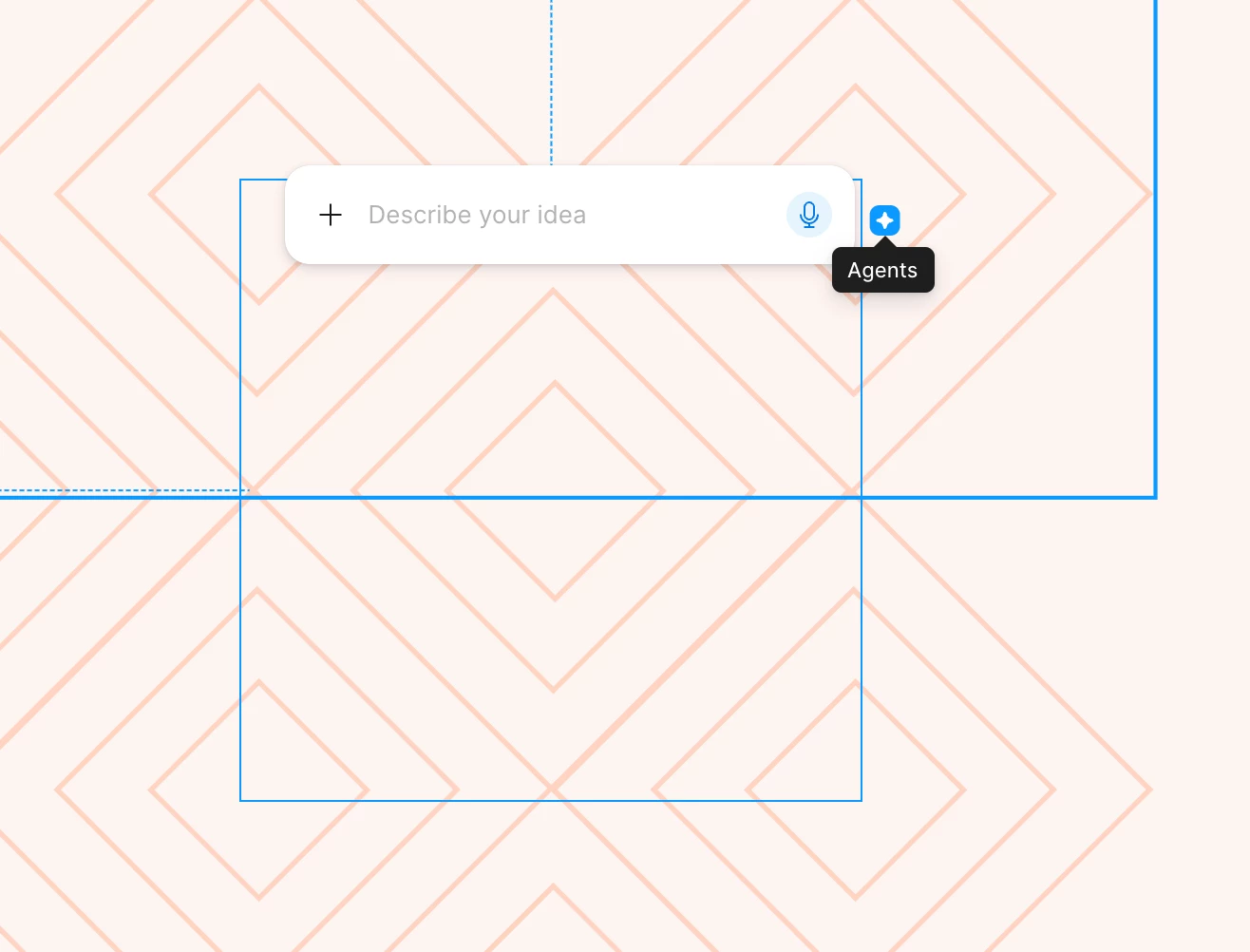
The icon for the new Figma Agent is in the worst spot

  • May 23, 2026
  • 23 replies
  • 461 views

Bethany_Rockney

Whose idea was it to put the little icon for the new AI agent so close to the upper right corner of an object? I can’t tell you how many times I’ve gone to adjust the size of an object and accidentally opened the agent. Each instance doesn’t take that much time, but when you do it countless times a day, it makes work that normally feels fluid feel disjointed. If I want to open the agent, the option in the left nav panel is super easy to access. I don’t need the agent connected to every object I touch. I’d like to see the user research (or lack thereof) that made team Figma think this was a good idea. You’re assuming the agent is so helpful and so needed that people need it right there. That’s confirmation bias at it’s finest. Please take this away or at least move it! 
 

23 replies

adamsmasher
Figmate
  • Figmate
  • May 24, 2026

Hey, ​@Bethany_Rockney.  Thanks for taking the time to post this - we appreciate the feedback regarding the placement of the icon!

To turn off on-canvas prompting, you can go to Main menu > Preferences > Show AI Chat on canvas and turn that setting off. You'll still be able to use the agent in the left nav panel, but it will no longer show the icon in your canvas.


We built this agent to help designers explore more ideas, automate tedious work, and get real-time feedback so they can spend more time honing their craft. We'll continue to improve and build on Figma's core design tools in addition to AI capabilities.


In the meantime, I've shared your feedback with the team. Thanks again!


Laura_Dupont-Courtade

Totally agree with this, it’s really painful.

Being able to access the agent contextually for a specific element can be useful, but I don’t think designers need it every time they select something.

At least, it shouldn’t be placed where it’s so easy to trigger accidentally while manipulating nearby elements. More importantly, its current position forces us to constantly reposition the mouse with extra precision just to avoid opening it.

Those interruptions happen far too many times a day and really break the flow of design work.


James_willo
  • New Participant
  • June 8, 2026

Do Figma UX designers even use Figma???? Every time something new is added it’s just awful. 

I’m still constantly clicking devmode toggle by accident on small frames. 

Also annoyed that they replaced the assets button with agents button and used a similar icon 😡


Bethany_Rockney

The instructions in Adam’s response for how to turn off on-canvas prompting is helpful. I just wish it were more obvious that the option is available. Maybe they said it in one of those little pop-up tutorials at some point, but no oner ever reads those. (That’s not just a Figma thing, It’s universal.)

Go to Main menu > Preferences > Show AI Chat on canvas and turn that setting off.


James_willo
  • New Participant
  • June 8, 2026

I read the prompting and it was not covered in that no. 


hur
  • New Member
  • June 22, 2026

Are we serious? Every time I hover or click on an object there is now a button covering my work to open an AI prompt window. This is gross. A huge reason for moving away from Adobe for me is to get away from these useless AI tools being forced on me. Care to stand for something different Figma? Or just going to follow the trend

[Moderator note: This post was merged from Love how I cannot escape AI into The icon for the new Figma Agent is in the worst spot on 01-Jul-2026.]


Samuel Tomé
  • New Member
  • June 23, 2026

Please stop adding AI features to FIGMA. Or simply let me disable everything that is related to AI so I dont have to see it. I want to work, not be interrupted by your stupid shareholders goals.

[Moderator note: This post was merged from STOP adding AI to this amazing tool! You are TRASHING IT! into The icon for the new Figma Agent is in the worst spot on 01-Jul-2026.]


William Van Cleave

I don’t even have the option to turn it off in the preferences dropdown….

EDIT: nvm found it


Bethany_Rockney

It’s not easy to find!


Tom Reem
Figmate
  • Figmate
  • June 23, 2026

Hey ​@Samuel Tomé — welcome to Figma Forum, and thanks for sharing your experience here.

I wanted to offer a couple of clarifications and point you to some potential solutions.

  • If you're looking to hide Figma agent on the canvas, you can turn off on-canvas prompting by going to the main menu in your file (Figma icon in upper left corner of the app) PreferencesShow Agents on canvas and turn that setting off.
  • For fully disabling AI features: There isn't a setting available to individual users to disable all AI features. On Enterprise plans, organization admins can enable or disable AI features organization-wide in admin settings. They can find details here: Manage AI settings and content training for your team or organization → Adjust access to AI across Figma. On other plan types, this option isn't available.

If you have more feedback on how this is impacting your workflow, feel free to share — I'll make sure it gets passed along to our product teams. 🙏🏻

[Moderator note: This post was merged from STOP adding AI to this amazing tool! You are TRASHING IT! into The icon for the new Figma Agent is in the worst spot on 01-Jul-2026.]


cedric.egli
  • New Member
  • June 24, 2026

Wild that this still is turned on by default. Just for the sake of pushing some internal “AI”-slop-driven KPIs.


thebestmadeline

It should be noted that (at least on Mac) the option to turn off the AI on canvas is only accessible via the Figma main menu, not if you select “Figma” in the top toolbar of your machine :’) There are discrepencies between the two Preferences menus. 


tempuraknife
  • New Member
  • June 30, 2026

I also hate this so much. So frustrating to use.

[Moderator note: This post was merged from Love how I cannot escape AI into The icon for the new Figma Agent is in the worst spot on 01-Jul-2026.]


Celyn_L
Figmate
  • Figmate
  • June 30, 2026

Hi ​@hur ​@tempuraknife

Thanks for sharing your feedback. Just to check, are you referring to the Figma agent that appears on the canvas when you select or hover over an object?

If so, you can hide the on-canvas prompt by going to Figma menu (top left) → Preferences → Show Agents on canvas, and turning that setting off.


We appreciate you taking the time to let us know how you feel about this. Feedback like yours helps us understand how these experiences are working for different users.

If you have any additional feedback on how this is affecting your workflow, feel free to share it here and I'll help pass it along to our Product team 🙏

[Moderator note: This post was merged from Love how I cannot escape AI into The icon for the new Figma Agent is in the worst spot on 01-Jul-2026.]


hur
  • New Member
  • June 30, 2026

Just turned it off, thank you.

[Moderator note: This post was merged from Love how I cannot escape AI into The icon for the new Figma Agent is in the worst spot on 01-Jul-2026.]


Andrey_Sergeev

the easiest way to make people hate AI is to push it everywhere possible 😫


Tom Reem
Figmate
  • Figmate
  • July 1, 2026

Hi ​@hur and ​@tempuraknife — thanks again for sharing your feedback, and glad to hear the preference toggle that ​@Celyn_L pointed out did the trick, ​@hur.

@tempuraknife, if you haven't tried it yet, you can turn off the on-canvas agent from Figma menu → PreferencesShow Agents on canvas.

I've merged this conversation into a thread where we're consolidating similar feedback and sharing it with the Product team. Appreciate you sharing your perspective on how these features show up in your workflow. 💯


Jaycee Lewis
Figmate

Hey amazing community! Quick update. Removing this setting wasn’t intentional, and we’re working to bring it back ASAP. If you’re still not seeing it today, try refreshing or reloading Figma. If you’re still stuck after that, drop a reply below and we’ll jump right back in to help. Thank you! — Jaycee


Andrey_Sergeev

A thousand thanks, the option has appeared in the menu again (in the free version), it’s great that you respond so quickly to problematic issues!


Eli_Lozovyagin

Hi, everyone
I cant say the option to disable AI agents is in my preferences, but Im happy this “4-points-star” doesnt bother me. I understand this feature might be helpful for some people - so it was enabled by default to inform users “it is there” and “you can disable it if dont need it”.

Thank you “Figma people” a lot. Actually despite some features “I dont understand” - the product became way much easier for me. I use Figma since 2019 and like it. Even if it will become worse to some extent - I still going to use it beause there’s no alternative for me. 

I know people remember you when something goes wrong, people dont see good but they see bad at once. So I really want to thank you. You are hard working and smart people. I appreciate your help and attention.

Thank you again for your hard work!
May God bless you and your families with peace and love!


Celyn_L
Figmate
  • Figmate
  • July 3, 2026

Hi ​@Eli_Lozovyagin, we really appreciate you taking the time to share this. It genuinely means a lot to hear.

Thank you as well for being part of the Figma community since 2019. We truly value your continued feedback as we keep improving Figma.

As Jaycee mentioned above, our team is actively rolling out a fix for the missing "Show AI chat on canvas" setting, so you may or may not see the option back in your Preferences menu just yet.

For anyone else following along, as the rollout continues, please try refreshing or reloading Figma, as that may help once the update reaches your account.

Thanks again for your patience while we work to get this resolved as quickly as possible. We truly appreciate your support 🙌


JoeGarner
  • New Member
  • July 6, 2026

I agree 100%. Glad to see others are already talking about it. Hopefully it gets removed soon. 

As an aside, I think this erodes trust in the platform. As digital designers, we understand how these tricks work. We know that putting the Figma Agent icon where we would constantly see it is a form of "deceptive design" or a "dark pattern" approach to advertisement. I don’t believe this was unintentional. There are much better ways to promote a product that don’t annoy users and damage trust.


Andrey_Sergeev

I agree 100%. Glad to see others are already talking about it. Hopefully it gets removed soon. 

As an aside, I think this erodes trust in the platform. As digital designers, we understand how these tricks work. We know that putting the Figma Agent icon where we would constantly see it is a form of "deceptive design" or a "dark pattern" approach to advertisement. I don’t believe this was unintentional. There are much better ways to promote a product that don’t annoy users and damage trust.

I agree completely, the fault is the lack of feedback between those who take responsibility and those who use the product.

Figma, which was originally created by a team inspired by simplicity and convenience, speed of development and minimalism, before our eyes, becomes a fattened product in which changes are created for the sake of changes.

“We pay these people, let them do something all the time”
 

When I saw a photo of Dylan Field 6 years ago, I was shocked, a young guy made such a timely luxury product, and now I’m looking for an alternative because objectively the product is becoming overloaded, what was done quickly takes longer to do, the cursor constantly trips over unnecessary functions (which you also don’t allow to disable, oh gods).

What would Dylan have said 5 years ago when he saw that AI icon constantly creeping into my eye? I think he would have vomited)