

Shader effects can't work on the background
I tried building a simple Photoshop style “color burn” effect.
(as an aside: because your built-in color burn blend mode definitely doesn’t work like the one in Photoshop? yours kind of brightens and saturates, making things glow - when it was supposed to darken and saturate, making things look warm and burned.)
The result is a plain old drop shadow, and when pressed to explain why, your agent says:
The custom effect can’t access the background behind its target, so changing the burn formula alone won’t fix this.
In deed, this seems to be the case - so your shaders are basically operating on their own local layer, with no awareness, access to, or influence on anything in the background.
So even basic layer effects like a simple blend mode are currently out of reach.
That’s sucks. 😿
Your own built-in glass effect can do it:
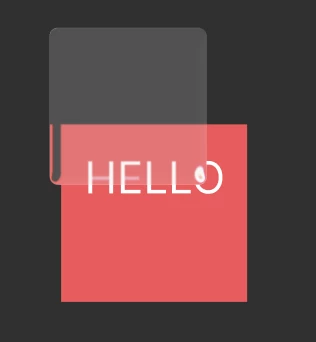
So it’s not that the Figma core as such can’t support background dependent effects, right?
It’s also why all of your demo shaders are dull as dishwater - noise, half tones and dither effects, that’s about all you get.
All of the fun things you can do with shaders are entirely dependent on being able to respond to the background.
Still in beta, but I really hope the full feature has background support? If not, you’ve pretty much already prompted the few interesting effects that can be had without it. 😌