

Question

Restrict copying file to their drafts without restricting developers from exporting

  • March 5, 2026
  • 3 replies
  • 43 views

Patricia_Cascination

Recently I unpleasantly discovered that anyone with view access to my file could duplicate it to their drafts. When trying to prevent this privacy and intellectual property leak, I discovered a way to block this by adjusting my sharing settings and unchecking the option:
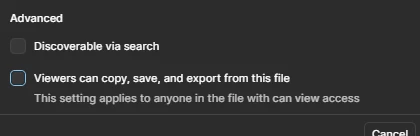
However, soon after my developers realised that they could now not export icons.
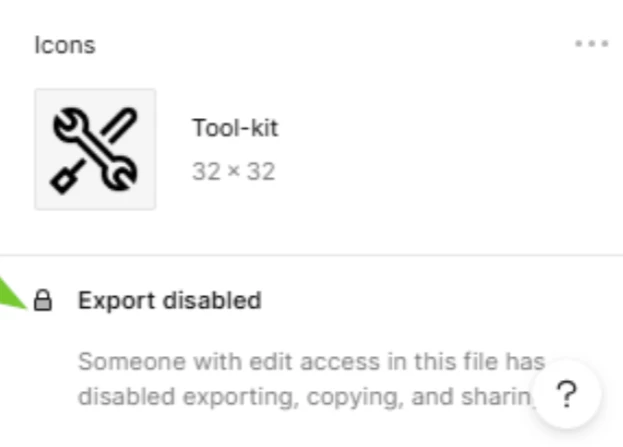


It seems like a way to control the posibility to fully copy a design file should be independent from the capability from exporting content to non-editable formats. Unfortunately, I cannot find a way to do so. I currently have to choose what to jeaopardize, our design's intellectual property or developers work.

Please let me know how to keep my designs files safe from duplication without impacting production.


Thank you.

3 replies

Gayani_S
Figmate
  • Community Support
  • March 6, 2026

Hey ​@Patricia_Cascination, thanks for reaching out! Right now, the behaviour you’re seeing is expected. 

By default, anyone with Can view access can copy, share, duplicate, and export content from the file.

If you disable the option that allows viewers to copy/share/export, it applies broadly to all view-only users. That means they won’t be able to:

  • Copy frames, layers, or text

  • Duplicate the file to their drafts

  • Export assets

  • Download a copy of the file

There currently isn’t a way to separate “prevent duplication” from “allow exporting” for view-only access, they’re controlled by the same restriction setting.


I know that’s not the ideal answer, I’ll definitely pass your feedback along to the teams internally! 


As an additional layer of protection, you can enable password protection for files and prototypes, which may help reduce unintended access via shared links: https://help.figma.com/hc/en-us/articles/5726720100247-Add-password-protection-to-files-and-prototypes


Thanks again for calling this out! 


Patricia_Cascination

Hello ​@Gayani_S, thank you for your reply and passing the feedback along.

To clarify a bit further, when we share we can only choose between “can view” and “can edit”, which would be fine if we only had user roles “designer” and “viewer”. However, the “developer” role is one in between since they still should be able to exporting assets.

That might be sufficient, then I can uncheck the option but developers still have access to what they need to work.

Looking forward to some follow-up. Thank you!


Gayani_S
Figmate
  • Community Support
  • March 9, 2026

Hey ​@Patricia_Cascination, thanks for clarifying. 

In general, users with a Dev seat can export from Figma Design and copy assets as part of their workflow. The main scenario where they wouldn’t be able to do that is if copying and sharing have been restricted at the file level. In that case, those restrictions would override their ability to copy.

Your feedback here is completely valid, I can see why this feels limiting in practice!