

Merott_Movahedi
New Member
August 4, 2025

Please bring back fill color input with hex value

  • August 4, 2025
  • 5 replies
  • 174 views

In the new UI, the color options have been changed to buttons that you click on to open the color picker:
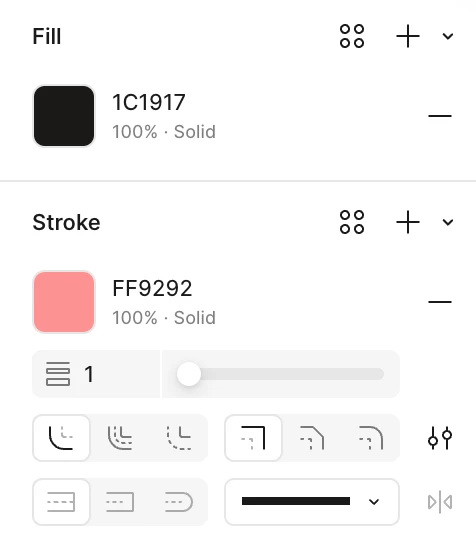
I now need multiple clicks to get to a text field that I can edit or copy the value of. 

The old UI (still used for Selection colors) was much more accessible:
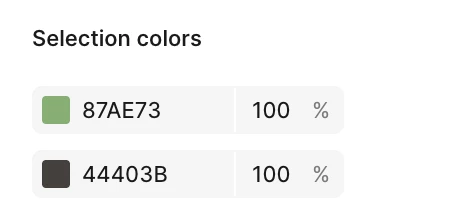
 

I could even paste a non-hex value into the field and it would recognise it correctly!

Can we please bring back the old input or an alternative/faster/easier way to quickly edit/copy color values?

This topic has been closed for replies.

5 replies

Silent Valley
New Member
August 6, 2025

This!, Opened Figma today and it’s now suddenly x2 aims+clicks to edit the design, same thing with fill’s opacity, why make it two clicks instead of 1? when there are no new interactive elements or options there?

Leah Theil
New Member
August 6, 2025

100% this! It’s a huge pain now to get the hex value. The usability of this feature has been severely impacted by this change.

I do freelance UX work, and we aren’t always working from a design system with defined color palettes, variables, styles or tokens. It takes multiple clicks now to get the hex value. It’s either that, or I keep a color swatch on my canvas to quickly use the eyedropper

Nellya
Power Member
August 6, 2025

You can switch to Design mode instead of a Draw


Ulrich W B
New Participant
September 29, 2025

Have a look at the app, that I just published:
https://apps.microsoft.com/detail/9MZF6LNP5RV5?hl=neutral&gl=DK&ocid=pdpshare

It makes it easy to copy the HEX code anywhere - also in Figma :)

Barış
New Member
September 16, 2026

Hi Figma Team,

I'd like to provide feedback regarding a recent UI change that significantly slows down daily design workflows.

Previously, it was possible to edit the Hex color value directly from the right-hand properties panel without opening the color picker modal. With the recent updates, clicking the Hex value no longer opens an inline input field; instead, we are forced to click the color swatch first to open the popover panel, and only then edit the Hex code (or HSB values) inside it.

This adds an unnecessary extra click and modal overlay for a very basic, frequent action. My usual workflow was editing Hex values directly on the panel, and only opening the color picker popover when I needed to adjust HSB values or use the eyedropper.

Please consider bringing back direct, inline Hex editing on the main properties panel to restore efficient keyboard navigation and quick color adjustments.

Thank you!