

Grouping or Auto Layout elements now not well aligned?
  • June 26, 2026
  • 3 replies
  • 24 views

Rizki_Fajar

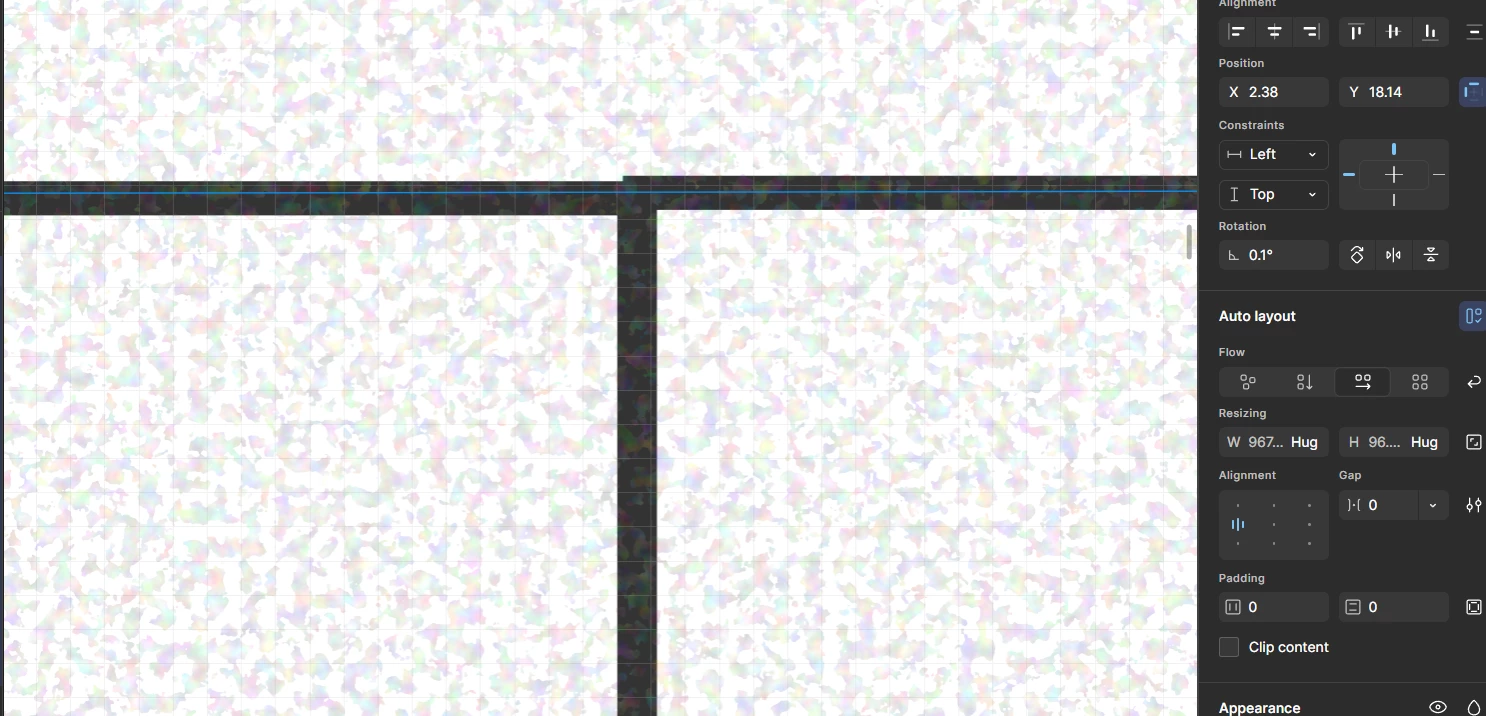
I tried to make a grid with outline rectangles, I have make sure the position of the outline has been set to center, yet the result after I grouped or make them auto layout, the line doesn't well aligned instead it's curving. 

How to solve this issue?

June 26, 2026

Hey, ​@Rizki_Fajar! Thanks for your post and for including a screenshot. That seems pretty weird!


I noticed in your screenshot that the rotation property is set to 0.1 degrees. If you change that to zero, does that resolve the issue for you? You may need to check your individual rectangles as well, just to make sure those don’t also have rotation set. Let me know if you still see this after updating any rotations and we’ll go from there.

3 replies

adamsmasher
Figmate
  • Figmate
  • June 26, 2026

Hey, ​@Rizki_Fajar! Thanks for your post and for including a screenshot. That seems pretty weird!


I noticed in your screenshot that the rotation property is set to 0.1 degrees. If you change that to zero, does that resolve the issue for you? You may need to check your individual rectangles as well, just to make sure those don’t also have rotation set. Let me know if you still see this after updating any rotations and we’ll go from there.


Rizki_Fajar
  • Author
  • New Member
  • June 29, 2026

​@adamsmasher oh god! you’re right, I wasn’t aware it’s rotated. Thank you!


adamsmasher
Figmate
  • Figmate
  • July 2, 2026

Not a problem! Happy to help figure out what was going on. Cheers!