

Files/Assets nav update in Figma Agent Beta

  • June 17, 2026
  • 2 replies
  • 19 views

Kristen Wasko

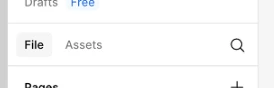
I know UI change takes time to get used to, but I am desperately missing the previous Files/Assets setup in the lefthand nav (pictured below). There is an agent trigger on every single frame on my workspace...I really don’t need a dedicated lefthand nav option for it as well. I don’t need Agents often enough to justify it being the second item in my lefthand nav, in addition to being on every single frame. What I do need, multiple times a day, every single day, is my assets panel. 
 

2 replies

Jaycee Lewis
Figmate

Hey hey ​@Kristen Wasko 👋 Thanks for your feedback. I'm sad to say today is in fact, NOT Frustration Wednesday.

I have a quick fix for those agent triggers on your frames. You can turn them off in your preferences by unselecting Show agents on canvas in the menu.

As for the dedicated left-hand nav option, that part can't be disabled currently.

I've passed your complete feedback along to the team that owns this feature so they know exactly what you're running into. Please keep the comments coming! Your feedback is always heard, deeply appreciated, and helps us build a better product.

Thank you very much — Jaycee


Kristen Wasko
  • Author
  • New Member
  • June 18, 2026

Thank you! Another factor that is making the files/assets setup tough for me is I keep searching a component name on the files page, realizing I need to be on the assets page, and when I switch over it clears my search, so I have to start over.Â