

LeBron James
New Member
September 29, 2025
Question

Feedback on the 9/25 update — “Copy Make previews as design layers”

  • September 29, 2025
  • 3 replies
  • 263 views

Hey Celine,

I noticed the 9/25 update, “Copy Make previews as design layers.” It’s great that we can now bring content generated in Figma Make into Figma Design for further editing. However, after trying it I ran into an issue:

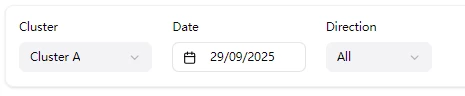
Content produced by Figma Make includes interactive behaviors—for example, clicking a dropdown to reveal its menu. After importing into Figma Design, those interactions are no longer present.

Please see the attached images: both the date picker and the dropdown are static (not clickable), with no interaction. Similar interactive effects are missing in other places as well.

Could you please continue improving this functionality? Thank you very much!

Best wishes!
 

This topic has been closed for replies.

3 replies

Celine_
Figmate
Community Support
September 29, 2025

Hey ​@LeBron James , thanks for sharing this feedback! I’ve passed it along to our team.
After checking internally, at the moment, I can confirm that the behavior is intentional that the interactive bits are removed since it's just a static design. I’ve shared your request so it can be considered for future improvements. While I can’t promise changes right away, your input is greatly appreciated and will help guide future updates. Thank you!

megaroeny
Active Member
September 29, 2025

Another aspect with this, for future iterations ​@Celine_ — it would be amazing if somehow during the “Copy”, that it could retain the components used by the library attached in the Make file.

Not sure if that is possible, but figured since its already using the library, would be pretty epic during the “Copy to design” flow!


Celine_
Figmate
Community Support
October 6, 2025

Thanks so much for the additional feedback, ​@megaroeny!  That’s a great point! It’s definitely on our radar, and I’ve shared your note with the team for future consideration.