vseferidis
New Member
Nov 18, 2026 9:25 AM UTC
Solved

Disable "Agents" or at least the hover button.

Hi. 


My selection process sometimes is selecting a sibling, before selecting what I intended. This help me be faster especially if I want to select an icon (which usually has a vector inside it and selecting the icon component is a bit tricky). 
But every time I select the adjacent layer i get the “agent” hover button which gets a lot in the way.


I do not use “Agents” and when i do i use it with Claude-Code to do what I need. 


If there was a way for me to disable some of the “AI” Features, I would happily even pay money for it. 


#debloat-ai

Ondrej_Pavlicek
Figma Ambassador
Nov 18, 2026 9:37 AM UTC

Hi there! 👋

Thanks for sharing this, I totally understand how frustrating it is when that hover button gets in your way while you are trying to select layers quickly! 🙏

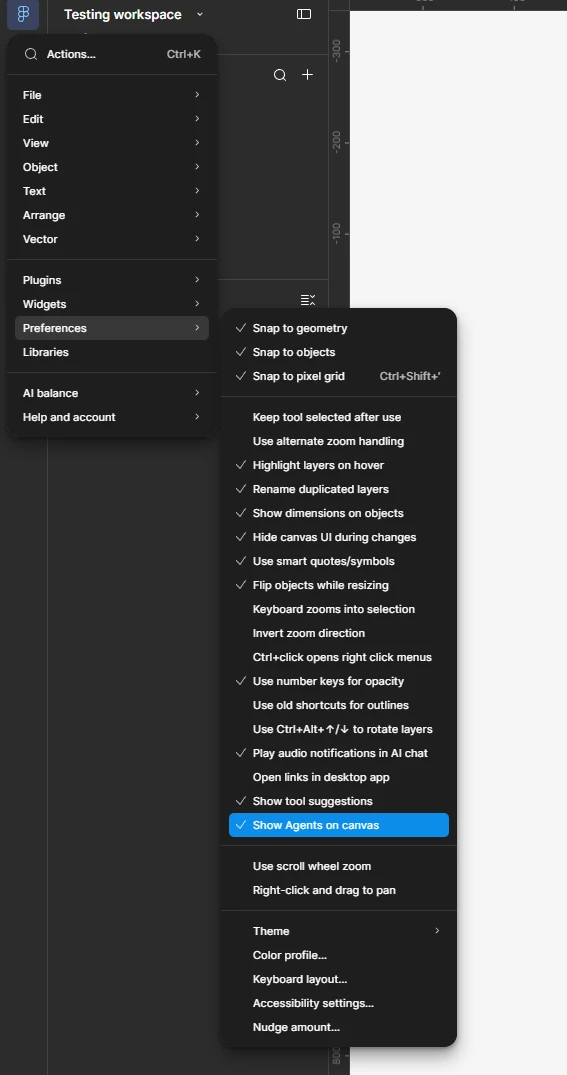
Good news is you can turn it off whenever you want. Just open the Figma menu, go to Preferences, and uncheck Show Agents on canvas, as shown in my screenshot below:

Figma menu > Preferences > Show Agents on canvas

You can easily toggle this option on and off anytime depending on what you need. Also, if you ever want to use the agent with a selected layer without the canvas button, you can still access it directly from the left panel.

Hopefully, this makes selecting icons and layers much smoother for you! 😊

Product designer @ NETWORG | Designing Model-driven Power Apps in Figma | Power Apps DesignKit (Model-driven) | Disclosure: I’m part of Figma’s Forum Ambassador program.

2 replies

Ondrej_Pavlicek
Figma Ambassador
Figma Ambassador
Nov 18, 2026 9:37 AM UTC

Hi there! 👋

Thanks for sharing this, I totally understand how frustrating it is when that hover button gets in your way while you are trying to select layers quickly! 🙏

Good news is you can turn it off whenever you want. Just open the Figma menu, go to Preferences, and uncheck Show Agents on canvas, as shown in my screenshot below:

Figma menu > Preferences > Show Agents on canvas

You can easily toggle this option on and off anytime depending on what you need. Also, if you ever want to use the agent with a selected layer without the canvas button, you can still access it directly from the left panel.

Hopefully, this makes selecting icons and layers much smoother for you! 😊

Product designer @ NETWORG | Designing Model-driven Power Apps in Figma | Power Apps DesignKit (Model-driven) | Disclosure: I’m part of Figma’s Forum Ambassador program.
vseferidis
New Member
Nov 18, 2026 10:29 PM UTC

Thank you.