

Abby Sheridan
New Member
September 22, 2026
Solved

Can't close Figma Make popup

  • September 22, 2026
  • 1 reply
  • 12 views

Sometimes when I am working on a specific frame I accidentally click the Figma make sparkle icon and it brings up the chat as a popup and there is no way to click out of this unless you click out of the frame (it is extremely difficult because I use sections to group my frames)

    Best answer by Celyn_L

    Hi ​@Abby Sheridan, Celyn from the Figma Community Support team here. Thanks for taking the time to share this with us.

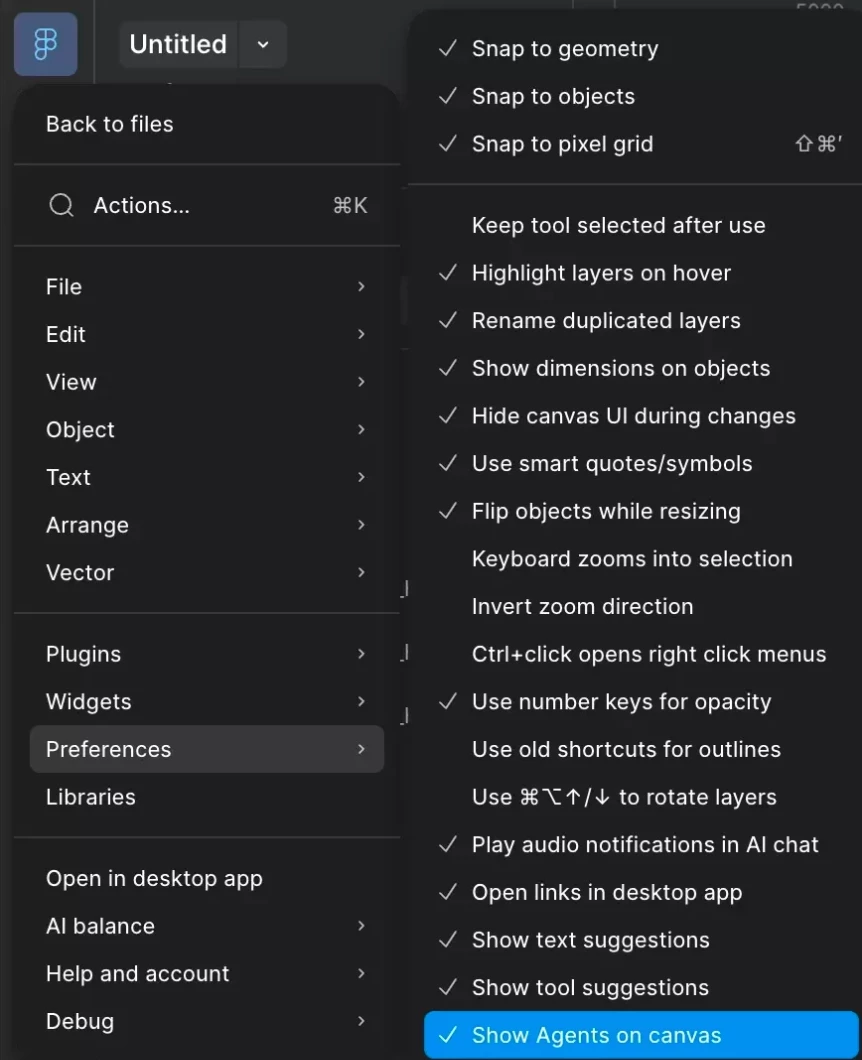
    You can hide the on-canvas prompt by going to Figma menu (top left) → Preferences → Show Agents on canvas, then turning that setting off.


    I hope this helps make your workflow a little smoother, let me know if you run into any issues!

    1 reply

    Celyn_L
    Figmate
    Celyn_LAnswer
    Figmate
    September 23, 2026

    Hi ​@Abby Sheridan, Celyn from the Figma Community Support team here. Thanks for taking the time to share this with us.

    You can hide the on-canvas prompt by going to Figma menu (top left) → Preferences → Show Agents on canvas, then turning that setting off.


    I hope this helps make your workflow a little smoother, let me know if you run into any issues!