

Solved

Zoom to selection shortcut does not work

  • January 7, 2026
  • 2 replies
  • 88 views

I’ve started using Figma and realised the “Zoom to selection” shortcut (Shift+2) does not work. I checked the assigned shortcut and it is correct, but it does not work on my PC. I’ve contacted support and the chatbot concluded it is an Opera browser issue, which is clearny not, as the same happens in Chrome. I do not have active extensions on those browsers that could block the action. And I use Windows with QWERTY keyboard. Is there anything to be done to fix this issue?

Best answer by djv

Hey ​@Evee, thanks for flagging this! 

We just tested the Zoom to Selection shortcut (Shift + 2) in both Opera and Chrome, and it is working as expected on our end. 

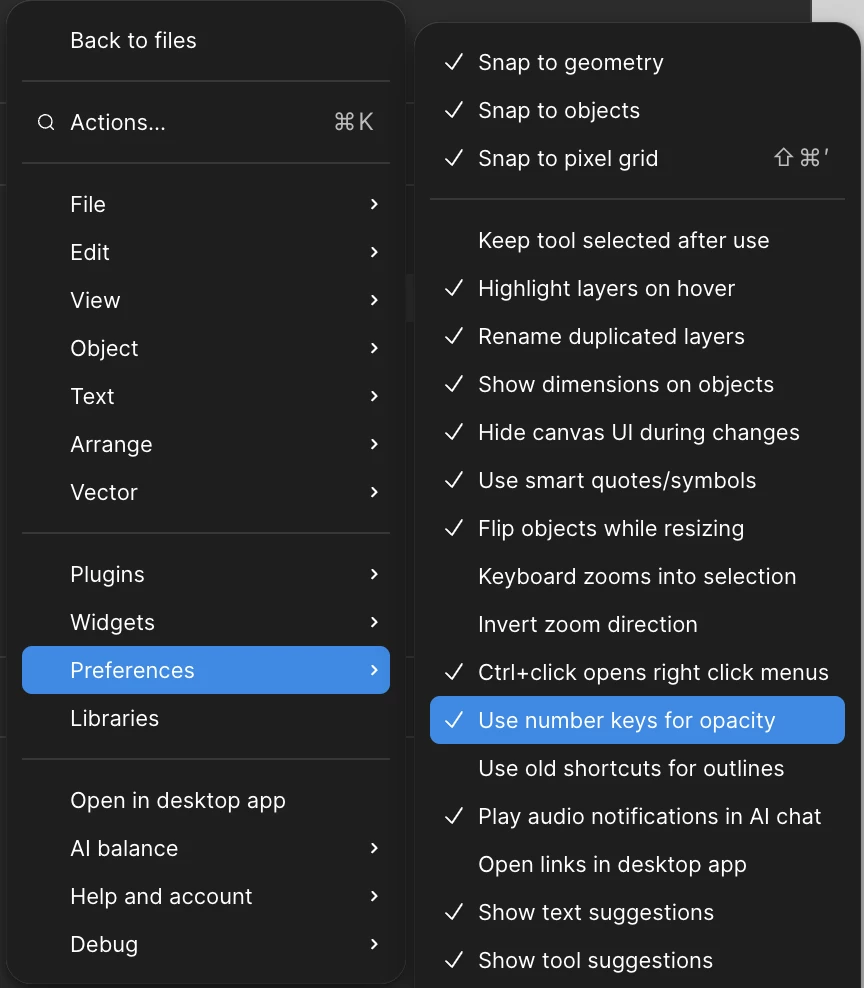
Do you have Use number keys for opacity checked in your Preferences?


I only ask because if this setting is unchecked, 2 is Zoom to selection. If checked, 2 sets opacity to 20% of the selected layer, and Shift + 2 is Zoom to Selection. 

2 replies

djv
Figmate
  • Community Support
  • Answer
  • January 9, 2026

Hey ​@Evee, thanks for flagging this! 

We just tested the Zoom to Selection shortcut (Shift + 2) in both Opera and Chrome, and it is working as expected on our end. 

Do you have Use number keys for opacity checked in your Preferences?


I only ask because if this setting is unchecked, 2 is Zoom to selection. If checked, 2 sets opacity to 20% of the selected layer, and Shift + 2 is Zoom to Selection. 


  • Author
  • New Member
  • January 9, 2026

Hi, thank you so much for this! I’ve tested it both ways. Mine was set to use number keys for opacity. So, when I used Shift + 2, it did move the selection down on the canvas for some reason, and using the 2 affected the opacity. However, when I have unchecked the preference of “Use number keys for opacity”, the 2 worked for Zoom to selection. This is great.