

Question

Wrong link for code connect

  • July 7, 2026
  • 1 reply
  • 12 views

Tim Codigy

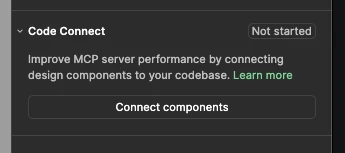
When nothing is selected, the link “Learn more” to the code connect help article works:
When I select something it looks like this:
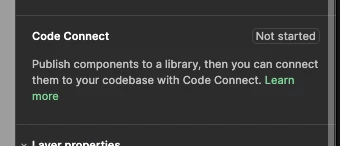
And the “Learn more” link links to: https://help.figma.com/hc/en-us/articles/360025508373-Publish-a-library

1 reply

Jaycee Lewis
Figmate

Hey, ​@Tim Codigy 👋 Thanks for the screenshots, that's really helpful for narrowing things down.

Looking at both images, the panel is showing two different messages rather than the same message with a swapped link:

  • with nothing selected it points to the general Code Connect article
  • with something selected it's showing a "Not started" state that links to the Publish a library article instead.

One thing worth checking: is the component you selected part of a library that's already been published, or is it still local to the file? If it is already published and you're still seeing the "Not started" or publish-first message, I’ll dig further with you.

A not-zoomed-in screen recording is helpful here too, if possible.

Thanks! — Jaycee