

Mondra
New Member
August 31, 2026
Solved

Wrong German translations in Figma UI

  • August 31, 2026
  • 1 reply
  • 25 views

I found a super weird and wrong German translation in the Figma UI, which left me confused for 10minutes until I figured out what it actually means:

  • Create a protype interaction to an element of your choice
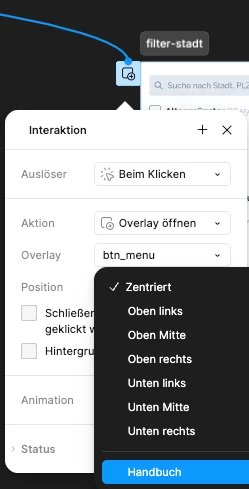
  • Choose action: open overlay (GER: “Overlay öffnen”)
  • Choose position: manual (GER: “Handbuch”)

The German word “Handbuch” means “user manual” in English. In this case, the correct translation in German would be “manuell” or “manuell eingeben”. A user manual has nothing to do with positioning an overlay. 


The second wrong translation I found is also in the Prototype Mode

  • Click on Prototype
  • Select an element
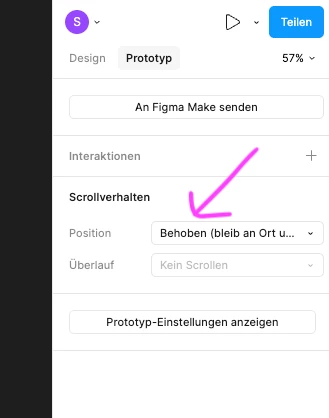
  • in the right section, select “Fixed” as scrolling behaviour
  • the wrong German translation here is “Behoben”, which actually means “repaired”.
  • the correct German word would be “fixiert” 
 

    Best answer by Gayani_S

    Hey ​@Mondra, thanks so much for flagging this!  You're completely right, and I can totally see how “Handbuch” would throw you off there! I've passed both issues (the Position: Manual dropdown and the Fixed scroll behaviour) along to our localization team to get corrected.

    Really appreciate you taking the time to document these so clearly with screenshots, makes it much easier for the team to track down and fix. Thank you!

    1 reply

    Gayani_S
    Figmate
    Gayani_SAnswer
    Community Support
    August 31, 2026

    Hey ​@Mondra, thanks so much for flagging this!  You're completely right, and I can totally see how “Handbuch” would throw you off there! I've passed both issues (the Position: Manual dropdown and the Fixed scroll behaviour) along to our localization team to get corrected.

    Really appreciate you taking the time to document these so clearly with screenshots, makes it much easier for the team to track down and fix. Thank you!
