

Question

Wrap in New Section messes up a vector drawing

  • April 15, 2026
  • 1 reply
  • 10 views

Sasha_Radojevic

I have a vector graphic that consist of 40 “rectangles” arranged in an arch. “Rectangles” are slightly arched too, they don’t have straight lines. When I select that arched graphic with other graphics and use Wrap in New Section command, the graphic gets messed up, top-left points stay where they were, but other points move horizontally about 12px. Attached is a screenshot of the before and after states of the graphic:
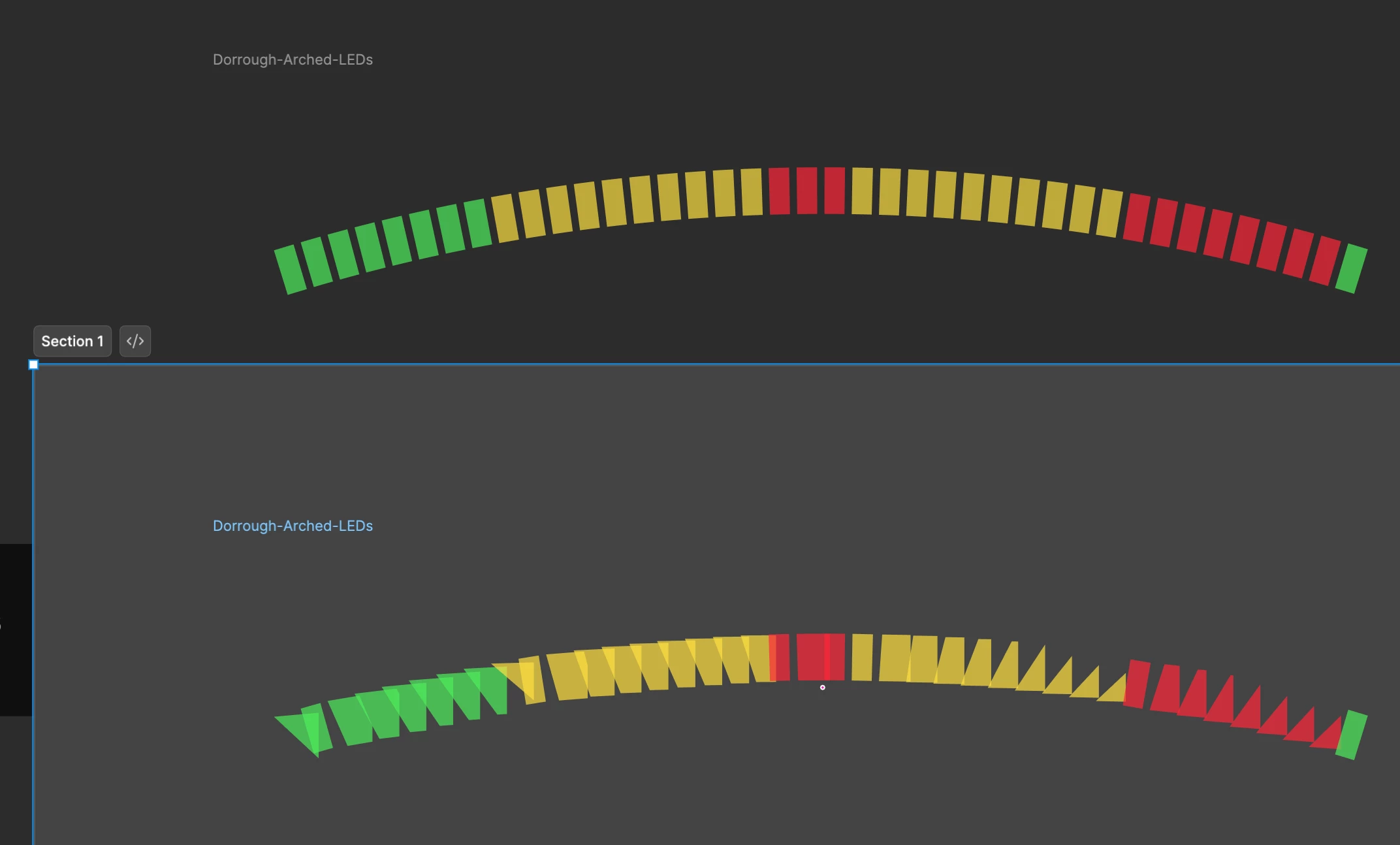
 

If I create a section, then move the graphic into it, the drawing stays as it should be.

1 reply

adamsmasher
Figmate
  • Figmate
  • April 16, 2026

Hi ​@Sasha_Radojevic! Thanks for your post and the screenshots.


I’m glad that you found a way around the issue - that’s a pretty weird result. Are you using the Desktop app or the browser app? I tried a recreating this with a simplified version of your vectors but couldn’t reproduce what you are seeing.


To make these I just made one vector rectangle, bent the top and bottom, the duplicated and rotated. Is there something different with yours? I’m guessing I’m missing some elements of the design.