

Question

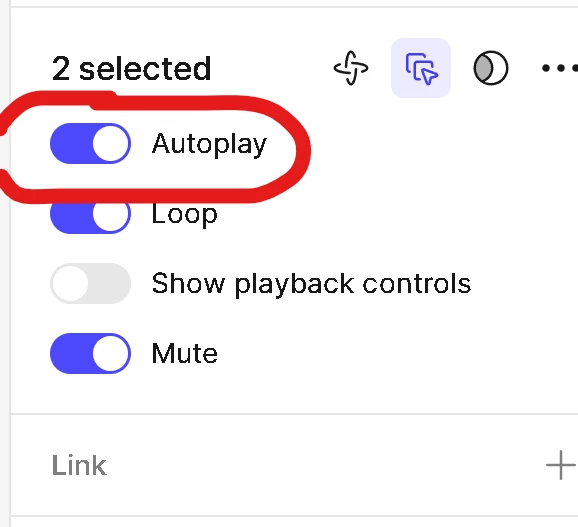
Why the video "Autoplay" does not work on the desktop browser?

  • March 19, 2026
  • 3 replies
  • 35 views

Andr3s

I am creating a website using “Figma Sites” and I placed a video which only start auto playing on the mobile browser, but on the desktop browser, it does not autoplay no matter what video format or file size or compression method I use. (it only starts playing in the desktop browser if the playback controls are showing and you press play)


3 replies

djv
Figmate
  • Community Support
  • March 19, 2026

Hi ​@Andr3s, thanks for flagging this! 

This definitely seems unexpected. With a few more details, our Sites team can investigate. May I ask what mobile browser are you using? And what OS? Is your desktop app also up to date?

If you could even share a link to your Site, our team may be able to try an reproduce the issue.


Andr3s
  • Author
  • New Member
  • March 20, 2026

Hi ​@djv , thank you for your prompt response.


Q: What mobile browser are you using?

A: Brave and Edge, both in mobile and desktop


Q: What OS?
A: Windows (desktop) and Android (phone)


Q: Is your desktop app also up to date?
A: Figma Desktop App version 126.1.2 — I also tried to update the website from Figma.com


Q: If you could even share a link to your Site, our team may be able to try an reproduce the issue.
A: I can share the link in private (private message and/or email)


Thank you in advance


djv
Figmate
  • Community Support
  • March 20, 2026

Thanks for the additional information, ​@Andr3s

I’ve created ticket #1806096 on your behalf to connect you with our support team to investigate further. Please feel free to share your Sites file link with them directly via email. 

Someone from support will review and be in touch soon.