

Jai Mitchell
New Member
Jan 12, 2026 4:12 AM UTC
Question

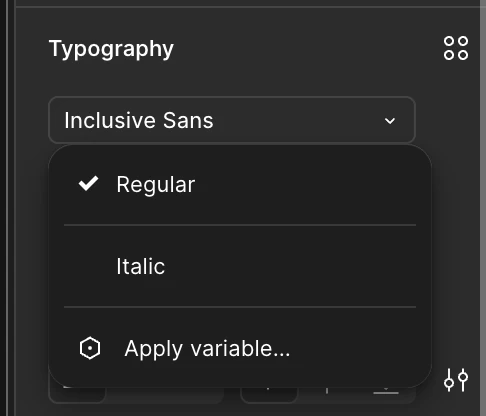
Why can I only see 'Regular' and 'Italic' weights of the Google Font 'Inclusive Sans'?

Inclusive Sans should have 10 combinations of weight and style, see: https://fonts.google.com/specimen/Inclusive+Sans


But when I try to use it in Figma, only the ‘Regular’ and ‘Italic’ options are shown (screenshot attached).

How do I fix this?


2 replies

Nellya
Power Member
Jan 12, 2026 8:26 AM UTC

Looks like a bug, but you can manually download and install all font styles on your computer to fix it

Bigerii doodus sp
New Member
Jun 17, 2026 12:52 PM UTC

Having the same issue with the Rubik font from Google - only seeing light and semibold but this Figma page https://www.figma.com/fonts/rubik/ shows all weights should be compatible! I’m using the Figma desktop app instead of the browser, but that should not be an issue right considering these are Google fonts?