

Why are animations of two different variants of a component shown in the same timeline?
As far as I understand, only a specific animated parent frame / component and its children display animations and keyframes that relate to a parent frame’s animation. Animating a variant-less component, then creating variant properties for the component, and subsequently adding an instance [by duplicating using cmd + D] with new added properties under this new parent component breaks that timeline philosophy and the animations stay connected to the parent component container rather than the child variants inside it.
Selecting either of these new variants now displays all keyframes under ALL variants of the parent containing component, duplicated as many times as the new variants you created by cmd+D.
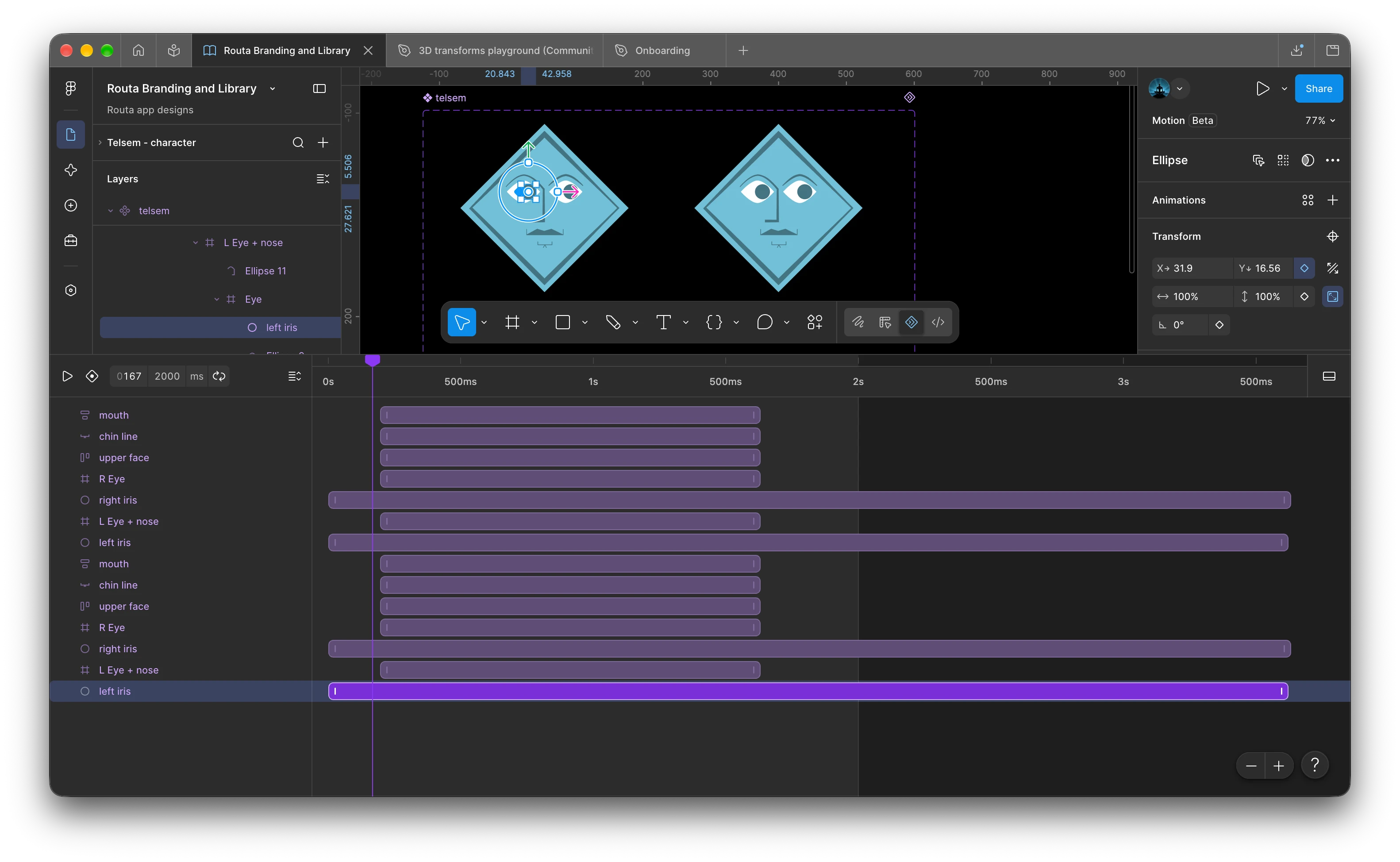
This is bad by design because most designers start out with one instance under a component then duplicate variants and then add/modify variant properties in the properties panel to differentiate this new component. Is there a way to detach animations and place them individually on newly created property variants for a previously variant-less but animated component?
There seems to be a work around in that you can create a component > create a dummy variant under that component, then animate that but that limits majority of natural design workflows.