

Kevin Fonseca
New Member
Oct 12, 2026 8:00 PM UTC
Question

When i try to export a Ui the patterns fill shows in preview but not in my folder

So im trying to export and entire Ui for roblox but when exporting in my folder it looks like the pattern didn’t export or isn’t there and when putting it in roblox studio or any program it doesn’t show up

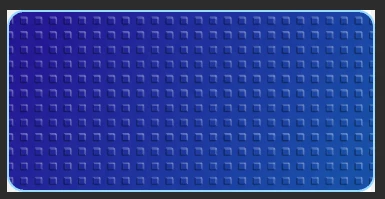
This is how it looks after exporting


This is how it looks on preview

I need an answer fast
IT EXCLUSIVELY ONLY HAPPENS WITH PATTERNS NOTHING ELSE

10 replies

Jaycee Lewis
Figmate
Figmate
Oct 14, 2026 3:59 PM UTC

Hi, ​@Kevin Fonseca 👋 Thanks for your post. I have a few questions to help us get started.

  • Which file format are you exporting to — PNG, JPG, SVG, or PDF?

  • How did you add the pattern — using Figma’s Pattern fill, a tiled image, or a plugin?

  • Could you share a screenshot with the layer you’re exporting selected, showing its Fill and Export settings?

Talk soon! — Jaycee

Kevin Fonseca
New Member
Oct 14, 2026 9:41 PM UTC

​@Jaycee Lewis 
Hi yes so i’m exporting it as a png and i used the pattern fill

Here is the file 


Jaycee Lewis
Figmate
Figmate
Oct 16, 2026 9:41 PM UTC

Hey ​@Kevin Fonseca 👋 Thank you for the follow up. I tried to reproduce this but I could not. My quick test:

Can you try again with a new design file and only a single rectangle with a texture fill, please? — Jaycee

Marjorie Procureur
New Member
Oct 22, 2026 12:48 PM UTC

Hello, 
same here since few weeks. I add the pattern using Figma’s pattern fill, and try to export as png/jpg. I wanted to provide few screenshots to show my file and how my export renders but it seems I’m unable to?


Lucas West-
New Participant
Oct 22, 2026 5:31 PM UTC

haha, yeah, me too I’ve been having the same issue with the Figma forum input field completely breaking when I try to send images. You could try making a google doc, pasting your images there, clicking share and making the access public, and then sending the share link here.

Marjorie Procureur
New Member
Oct 23, 2026 12:19 PM UTC

Aaah wonderful, I thought I was just so bad with technology lmaooo. Here’s the google doc link, does it work? 

石岩岑
New Member
Oct 23, 2026 9:35 AM UTC

我也遇到了导出时,条纹图案丢失的情况

Rebecca V.
New Member
Nov 2, 2026 3:58 AM UTC

I have also experienced this and after doing some more testing, I was able to reproduce it under the following circumstances:

  • You try to export to either PNG or JPEG.
  • The source is an IMAGE
  • The source is inside a frame or section. It doesn’t matter if it is in the same frame or section as whatever you’re adding the pattern to. It will still reproduce.


I don’t know if this is truly what causes it, but I was only able to reproduce it under these circumstances.

Here’s a link to a file where you should be able to reproduce it: 

https://drive.google.com/drive/folders/16_KKAxXU-gTcMXhRZMKwcvAovjOLGLHa?usp=sharing

I hope this helps! ​@Jaycee Lewis 


Tom Reem
Figmate
Figmate
Nov 7, 2026 6:08 PM UTC

Hey everyone, Tom here — stepping in for ​@Jaycee Lewis Lewis today!

Thanks for troubleshooting further and sharing these additional details — your reports have been very helpful. I’m sorry this is still causing a disruption. I believe I’ve been able to replicate the behavior you’ve reported in my own test file, and I’ve raised this internally for further review.

We’ll follow up here when we have more information or next steps to share. 🙏🏻