

JayHawq
New Member
July 15, 2025
Question

VS Code Version 1.102.0 (latest) doesn't work with Figma MCP.

  • July 15, 2025
  • 9 replies
  • 1644 views

Figma MCP server worked great with VS Code version 1.101.0 but in version 1.102.0, microsoft has moved MCP configuration to a new file named mcp.json instead of previous settings.json file.  After doing all the configuration, the Figma MCP server tools do not show up under tools and the agent is unable to use Figma MCP server.
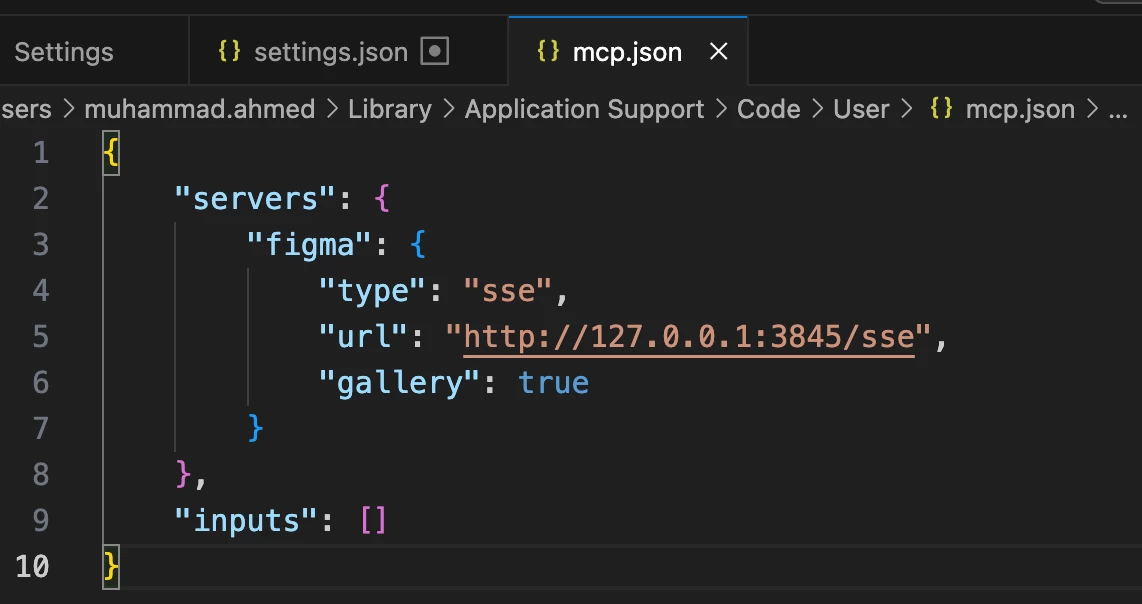
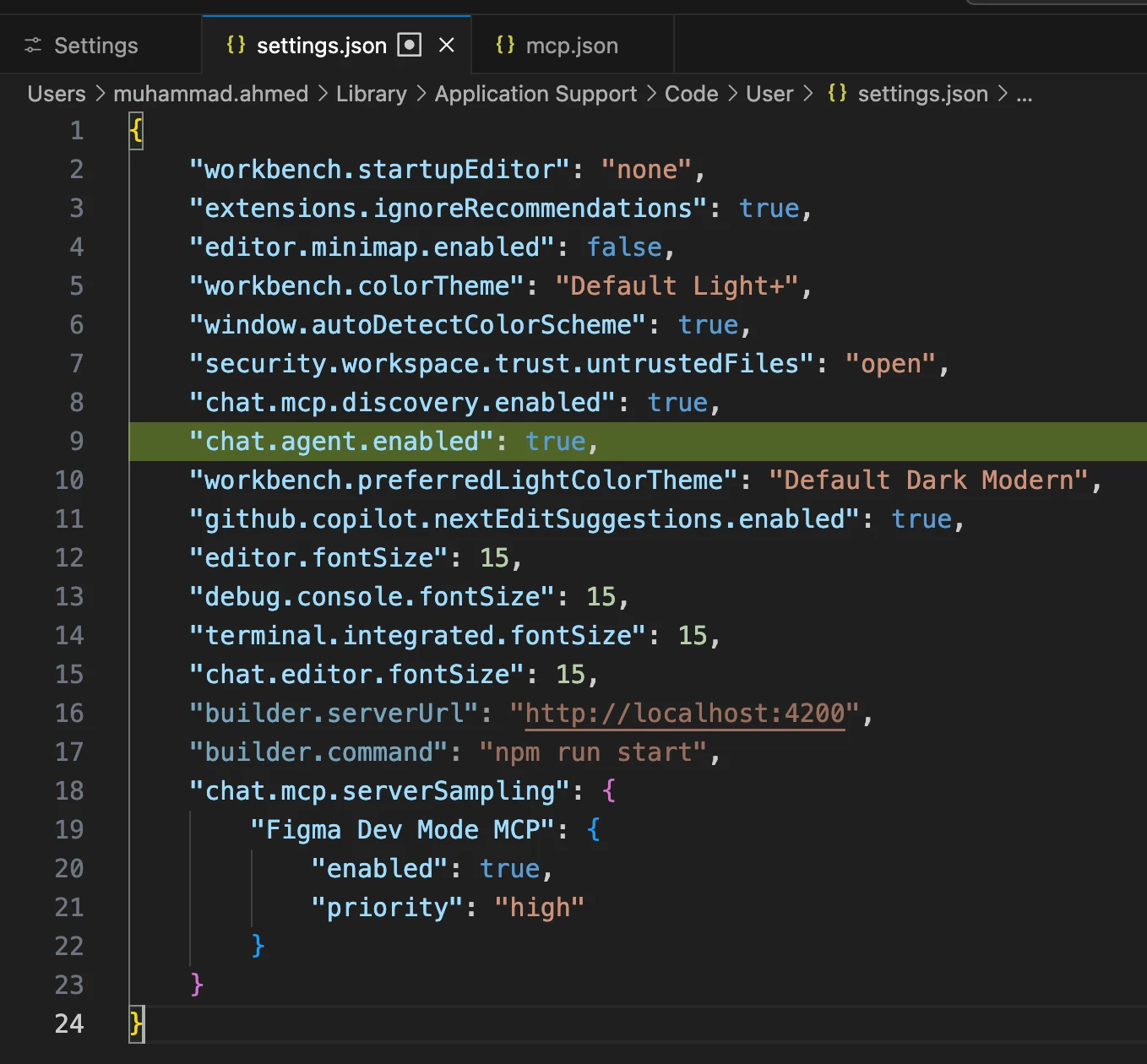


Has anyone had any luck with this version? Can Figma team please validate and update documentation for Figma MCP Server setup?

    9 replies

    Fabrício Sautner
    New Member
    July 17, 2025

    Same problem here!

    Kevin Lin
    New Member
    July 25, 2025

    Same here!

    varnika
    New Member
    July 30, 2025

    Same here

    Pascal Vendt
    New Member
    August 7, 2025

    Same here

    alexb2611
    New Member
    August 7, 2025

    same here

    Fabrício Sautner
    New Member
    August 20, 2025

    Solved with update VS Code Version!!

    danT
    New Member
    November 17, 2025

    Issue seems back with VSCode 1.106.0  can no longer authenticate to Figma.


    2025-11-17 10:44:12.169 [info] Stopping server figma

    2025-11-17 10:44:12.190 [info] Starting server figma

    2025-11-17 10:44:12.190 [info] Connection state: Starting

    2025-11-17 10:44:12.190 [info] Starting server from LocalProcess extension host

    2025-11-17 10:44:12.199 [info] Connection state: Running

    2025-11-17 10:44:13.327 [info] Populated auth metadata

    2025-11-17 10:44:13.328 [warning] Error getting token from server metadata: Canceled: Canceled

    2025-11-17 10:44:13.331 [info] Connection state: Error 401 status sending message to https://mcp.figma.com/mcp: Unauthorized

    Paweł Kucmus
    New Member
    March 19, 2026

    I’m getting the same error on VS Code Version: 1.111.0 (Universal) on a Mac:
     

    2026-03-19 18:02:57.941 [info] Connection state: Starting
    2026-03-19 18:02:57.944 [info] Starting server from LocalProcess extension host
    2026-03-19 18:02:57.944 [info] Connection state: Running
    2026-03-19 18:02:58.774 [info] Discovered resource metadata at https://mcp.figma.com/.well-known/oauth-protected-resource
    2026-03-19 18:02:58.775 [info] Using auth server metadata url: https://api.figma.com
    2026-03-19 18:02:59.294 [info] Discovered authorization server metadata at https://api.figma.com/.well-known/oauth-authorization-server
    2026-03-19 18:03:02.946 [info] Waiting for server to respond to `initialize` request...
    2026-03-19 18:03:07.946 [info] Waiting for server to respond to `initialize` request...
    2026-03-19 18:03:12.947 [info] Waiting for server to respond to `initialize` request...
    2026-03-19 18:03:17.945 [info] Waiting for server to respond to `initialize` request...
    2026-03-19 18:03:18.123 [warning] Error getting token from server metadata: Error: Failed to create authentication token
    2026-03-19 18:03:18.126 [info] Connection state: Error 401 status sending message to https://mcp.figma.com/mcp: Unauthorized


    Ángel López
    New Member
    April 7, 2026

    I am having this issue today:

    2026-04-07 15:36:03.934 [info] Starting server figma
    2026-04-07 15:36:03.934 [info] Connection state: Starting
    2026-04-07 15:36:03.934 [info] Starting server from LocalProcess extension host
    2026-04-07 15:36:03.935 [info] Connection state: Running
    2026-04-07 15:36:04.175 [info] Discovered resource metadata at https://mcp.figma.com/.well-known/oauth-protected-resource
    2026-04-07 15:36:04.175 [info] Using auth server metadata url: https://api.figma.com
    2026-04-07 15:36:04.316 [info] Discovered authorization server metadata at https://api.figma.com/.well-known/oauth-authorization-server
    2026-04-07 15:36:04.318 [warning] Error getting token from server metadata: Canceled: Canceled
    2026-04-07 15:36:04.328 [info] Connection state: Error 401 status sending message to https://mcp.figma.com/mcp: Unauthorized


    It was working yesterday but it started failing today