

Lisa Pasichnyk
New Member
Nov 4, 2026 12:10 PM UTC
Question

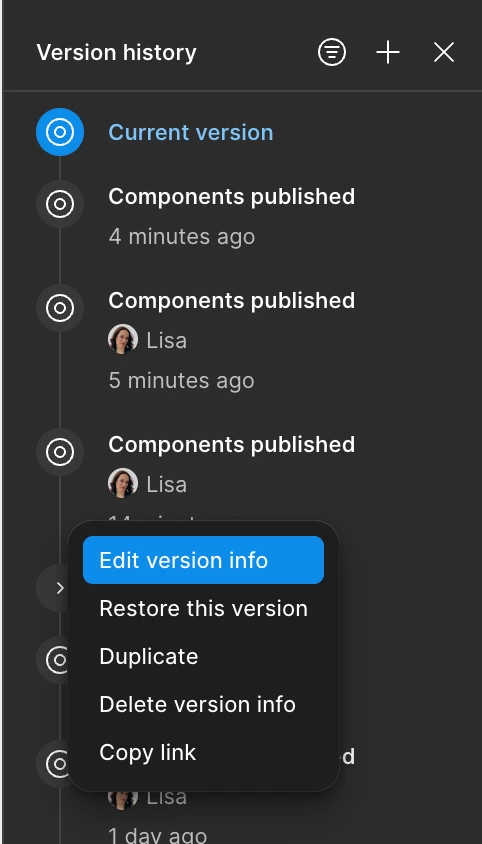
Version hystory preview

Hi! When I open Version History and select a saved version, I can’t preview the file directly in Figma. This used to work in the previous version of Figma, but now I have to copy the link and open it in a browser to view previous designs. Could you please look into this? 


3 replies

adamsmasher
Figmate
Figmate
Nov 7, 2026 12:30 AM UTC

Hi ​@Lisa Pasichnyk! Thanks for flagging this. Selecting a saved version should still let you preview it directly in Figma.


A few questions that will help us troubleshoot with you:

  • What operating system and Figma desktop app version are you using (it sounds like you’re using the desktop app)?
  • Does it work correctly when you click it in a browser, or do you also have to copy the link and use it in a new browser tab?
  • Does this affect every file or just one?


Thank you!


Lisa Pasichnyk
New Member
Nov 9, 2026 9:06 AM UTC
  1. macOS Tahoe 26.6.2. Figma Desktop App version 126.11.7
  2. It works when I click it in the browser as predicted.
  3. It works correctly in my personal files but works incorrectly in organization files.

Thank you. 

Jaycee Lewis
Figmate
Figmate
Nov 10, 2026 12:21 AM UTC

Hey, ​@Lisa Pasichnyk 👋 Stepping in for ​@adamsmasher 🙌 Are you able to update your desktop app to 126.11.8? Does the issue persist there? Thanks! — Jaycee