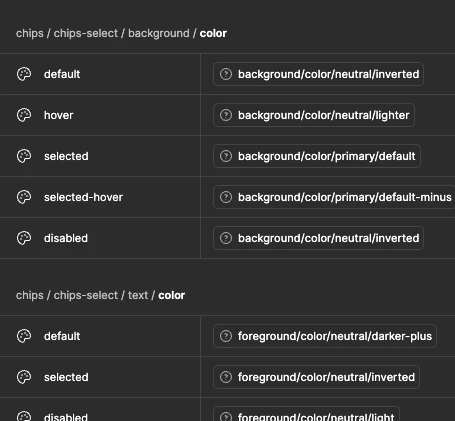
Variables panel shows "?" instead of color swatch for third-layer alias-to-alias variables
Summary:
Color swatches for aliased variables in the Variables panel show a "?" icon instead of the resolved color — even though the underlying data is fully valid and the color renders correctly everywhere it's actually applied (e.g. a layer's Fill property).
Context that may be relevant to the root cause:
We use a three-layer token architecture across three variable collections: Primitives (raw values) → Semantics (aliases to Primitives) → Components (aliases to Semantics). The "?" issue only appears on the Components layer — variables that are aliases pointing to OTHER aliases. The Semantics layer, where variables alias directly to hard/concrete Primitive values (not to another alias), does not show this issue. This suggests the bug may specifically affect alias chains with more than one hop, rather than aliasing in general.
What we've verified:
- Full scan via the Plugin API of every alias reference: 100% resolve to valid, existing variables. Zero broken references across 1000+ bindings checked.
- Applying the same token to a real layer's Fill renders the correct color — confirming the resolution engine works; only the Variables panel preview is affected.
- Reproduced from scratch with a brand-new, never-before-touched set of ~60 variables (same alias-to-alias structure) — same "?" appears immediately, ruling out file-specific history as the cause.
- Compared every accessible variable property between an affected one and a known-working one — no differences found.
- Browser refresh and full desktop app restart do not fix it.
- The only thing that resolves it per-variable: manually re-selecting the same target from the picker dropdown in the UI. Reproducing this same action via the Plugin API (re-setting the value, toggling through a raw value and back) does not fix it.
Impact:
Affects a production file with 500+ Components-layer tokens (1000+ bindings), making manual re-selection impractical at this scale. Significantly hampers visual auditing of our token architecture.
Would appreciate confirmation on whether this is a known/tracked issue, and any guidance beyond manual re-selection.
This issue is critical.